


Bitrix24 SMS Integration: Send SMS and Viber With Dexatel


Published: Aug 21, 2026
Customer information may live in Bitrix24, but sending messages often requires a separate communication platform. Teams may need to export contact lists, switch between systems, and then manually check whether their campaigns were successfully delivered.
The Dexatel Bitrix24 SMS integration brings these activities into one workflow. Businesses can prepare and launch SMS and Viber campaigns from Bitrix24, while message sending and delivery are handled through the Dexatel Messaging API.
The integration also provides a read-only performance dashboard inside Bitrix24. Users can review the number of messages sent, delivered, or failed, monitor messaging spend, filter results by sender or period, and check their available Dexatel balance.
In this guide, we explain how the integration works, what messaging channels and features it supports, and how to connect your Dexatel account and launch a campaign from Bitrix24.
Availability note: The Dexatel app is currently available to Bitrix24 accounts in the Russian Bitrix24 zone and is intended for customers in Armenia. Businesses using another Bitrix24 zone should confirm availability before installing the integration.
What Is a Bitrix24 SMS Integration?
A Bitrix24 SMS integration connects the customer data and campaign tools in Bitrix24 with an external messaging provider. Bitrix24 is used to manage contacts, create audience segments, prepare messages, and launch campaigns. The messaging provider is responsible for routing and delivering those messages to customers’ phones.
Bitrix24 supports connections with external messaging services because it does not deliver SMS directly. As explained in the official Bitrix24 SMS guide, businesses must first connect a supported provider before they can send messages from the CRM.
With Dexatel connected, teams can create outbound campaigns in Bitrix24 while Dexatel handles message delivery. Users can select SMS or WhatsApp for each campaign, giving them access to three messaging channels through a single provider.
What Can You Do With the Dexatel Bitrix24 Integration?
The Dexatel integration adds multi-channel campaign delivery and performance monitoring to Bitrix24. Once the app is connected, teams can:
Send messaging campaigns from Bitrix24. Create campaigns using customer data already stored in the CRM, without exporting contact lists to another platform.
Choose between two messaging channels. Send campaigns through SMS or Viber based on the message, audience, and intended use.
Track delivery results. View the total number of sent, delivered, and failed messages from the Dexatel dashboard inside Bitrix24.
Track campaign costs. See the total amount spent on sending messages during a selected period.
Filter campaign data. Review results by delivery status, sender, or date range to find the information you need more easily.
Check your Dexatel balance. View the available account balance before preparing or sending another campaign.
Together, these features give teams a convenient way to send customer communications and review essential campaign information without leaving their Bitrix24 workspace.
SMS or Viber: Which Channel Should You Use?
The right channel depends on where your customers are located, how quickly the message needs to reach them, and the type of campaign you are running. With the Dexatel Bitrix24 integration, businesses can choose between SMS and Viber through a single messaging provider.
Dexatel also makes the cost comparison easier by publishing transparent pricing for each channel. Businesses can review the applicable rates before selecting a channel or planning their campaign budget.
SMS for Broad and Immediate Reach
SMS messaging is a practical choice for urgent alerts, reminders, service updates, and campaigns that need to reach a broad audience. Customers do not need an internet connection or a specific messaging app to receive an SMS.
However, sender requirements, message length, and costs vary by country. Dexatel’s SMS pricing page shows rates by destination and allows businesses to estimate costs based on their expected messaging volume.
Viber for Branded Customer Campaigns
Viber Business Messaging is well suited to promotional campaigns, branded communications, and customer notifications in markets where Viber is widely used.
Businesses need an approved Viber sender, and the channel’s effectiveness depends heavily on adoption among the target audience. They should also account for message-type rates and the applicable monthly minimum commitment. Dexatel publishes these costs on its Viber Business pricing page, making them easier to evaluate before launching a campaign.
How to Connect Dexatel to Bitrix24
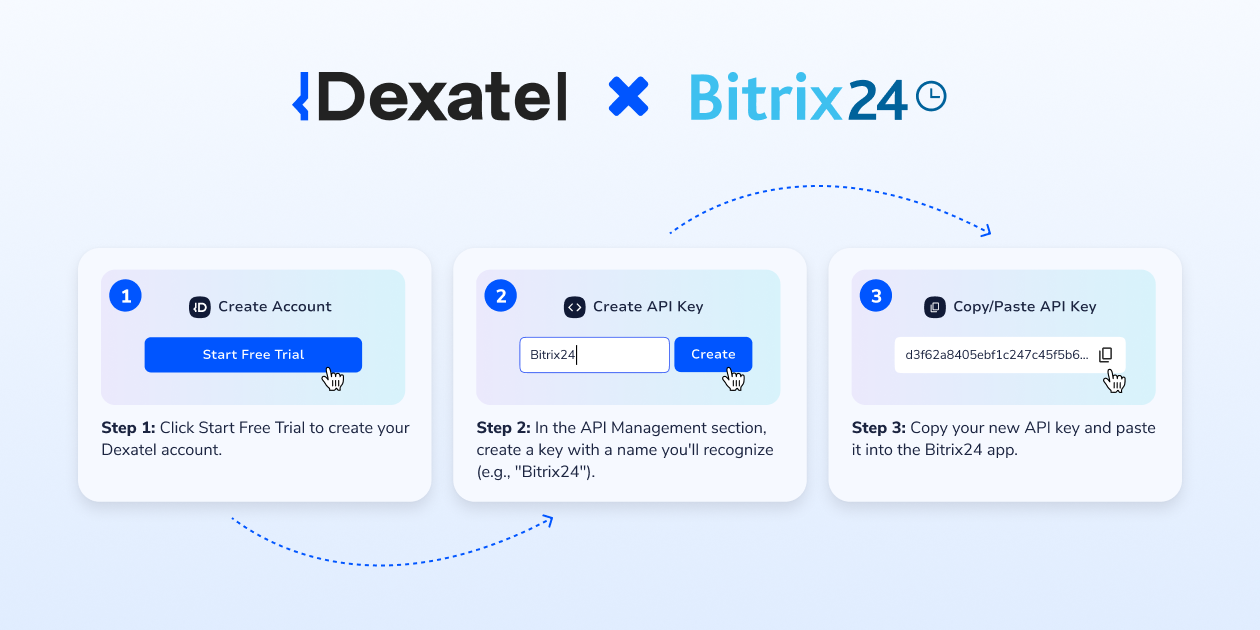
Connecting Dexatel to Bitrix24 does not require custom development. You need a fully set-up Dexatel account, either trial or paid, and an API key to authorize the connection.
Follow these steps to set up the integration:
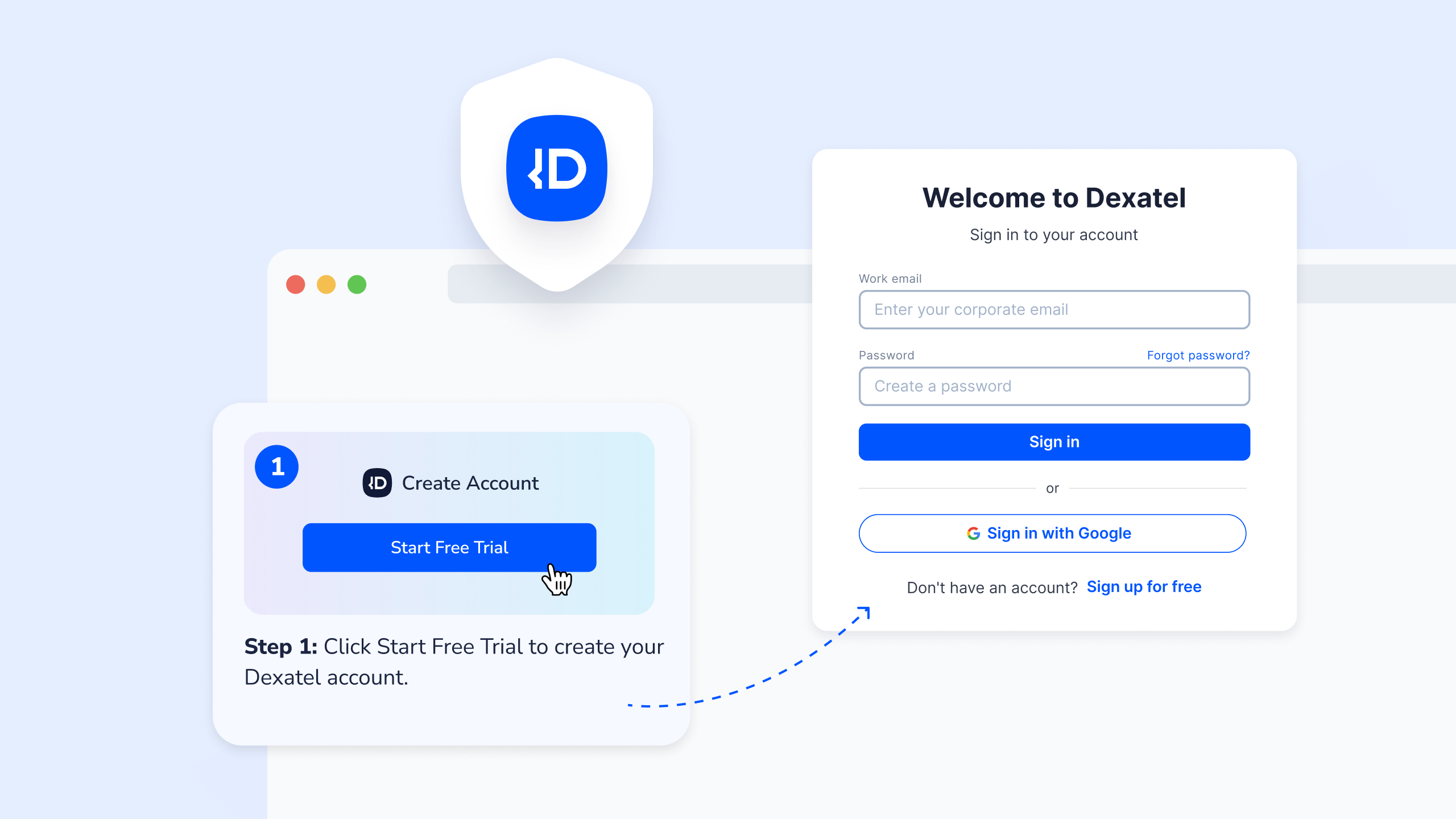
Register for a Dexatel account.Create your Dexatel account if you do not already have one, then complete the required account setup.
Install the Dexatel app. Open the Dexatel app in the Bitrix24 Marketplace and install it in your Bitrix24 workspace
Open the app in Bitrix24. Once installation is complete, launch the Dexatel app from your workspace.
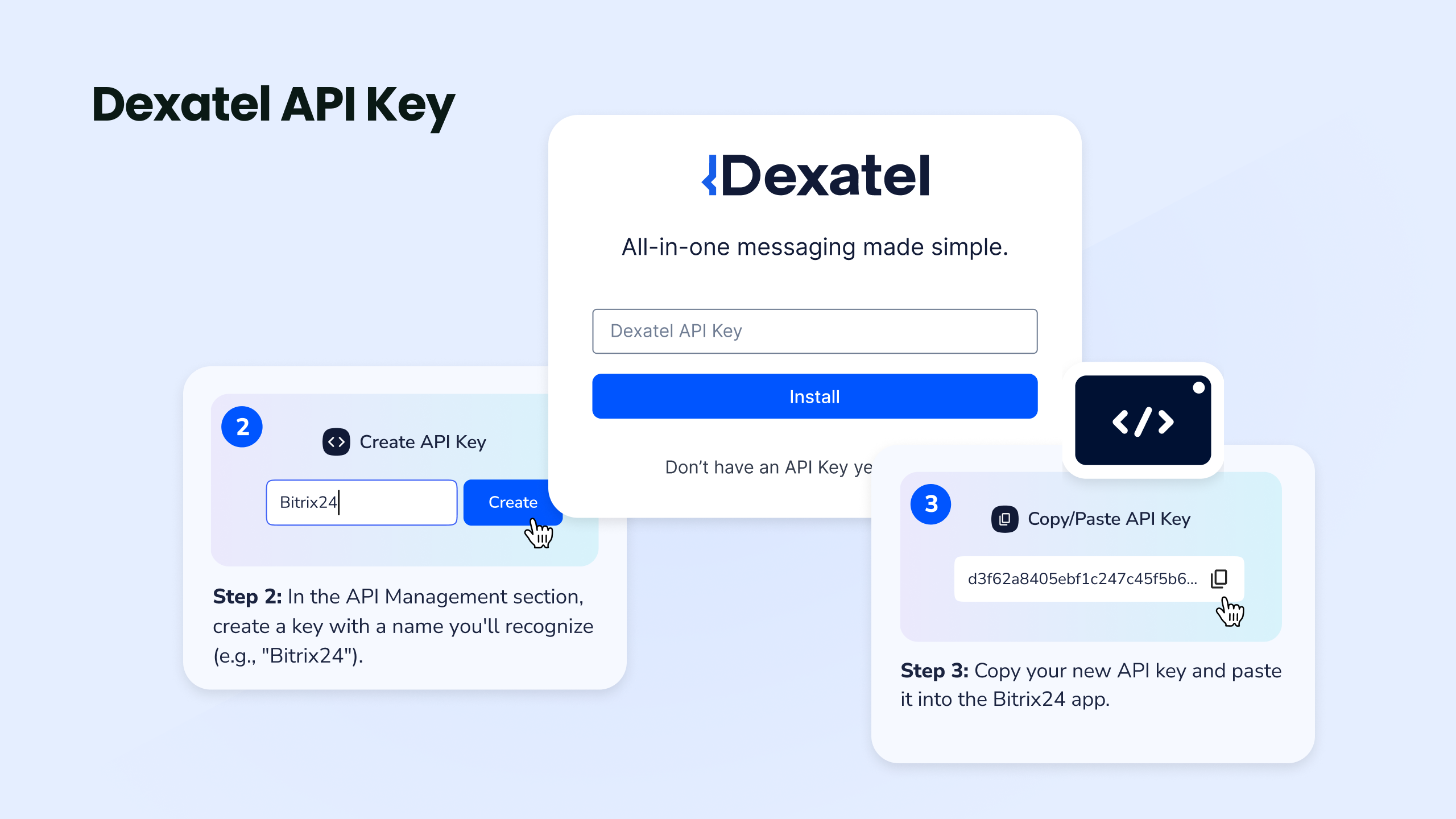
Get your Dexatel API key. Sign in to the Dexatel dashboard, go to API Management, select API Keys, and copy your key.
Connect your account. Paste the API key into the Dexatel app in Bitrix24.
Complete the verification. The integration will validate your account and activate Dexatel as a messaging provider.
Start creating campaigns. Once connected, you can prepare and send SMS, Viber campaigns through Bitrix24.
Your API key provides access to your Dexatel account, so it should be stored securely and shared only with authorized team members.
How to Send a Campaign Through Dexatel in Bitrix24
Once the integration is connected, you can prepare and send campaigns using the customer data stored in Bitrix24.
The general campaign workflow includes the following steps:
Select your audience. Choose the contacts or customer segment you want to reach. Before sending, make sure the contact details are accurate and that recipients have provided the consent required for the selected channel.
Choose Dexatel as your Bitrix24 messaging provider. Select Dexatel when configuring the campaign.
Select a channel. Choose SMS or Viber based on your audience, message type, and campaign goals.
Configure the sender. Select an approved sender that is available for the chosen channel and destination.
Prepare the message. Write the campaign content and include any relevant links, offers, reminders, or calls to action.
Review and send the campaign. Check the audience, sender, channel, and message content before launching.
Monitor the results. Use the Dexatel dashboard in Bitrix24 to review sent, delivered, and failed messages, as well as messaging spend and account balance.
Before launching a large campaign, it is sensible to send a test message and confirm that the content, sender information, and formatting appear as expected. Businesses should also check channel-specific requirements, as sender approval, templates, consent rules, and delivery conditions may differ between SMS and Viber.
How to Monitor Messaging Performance in Bitrix24
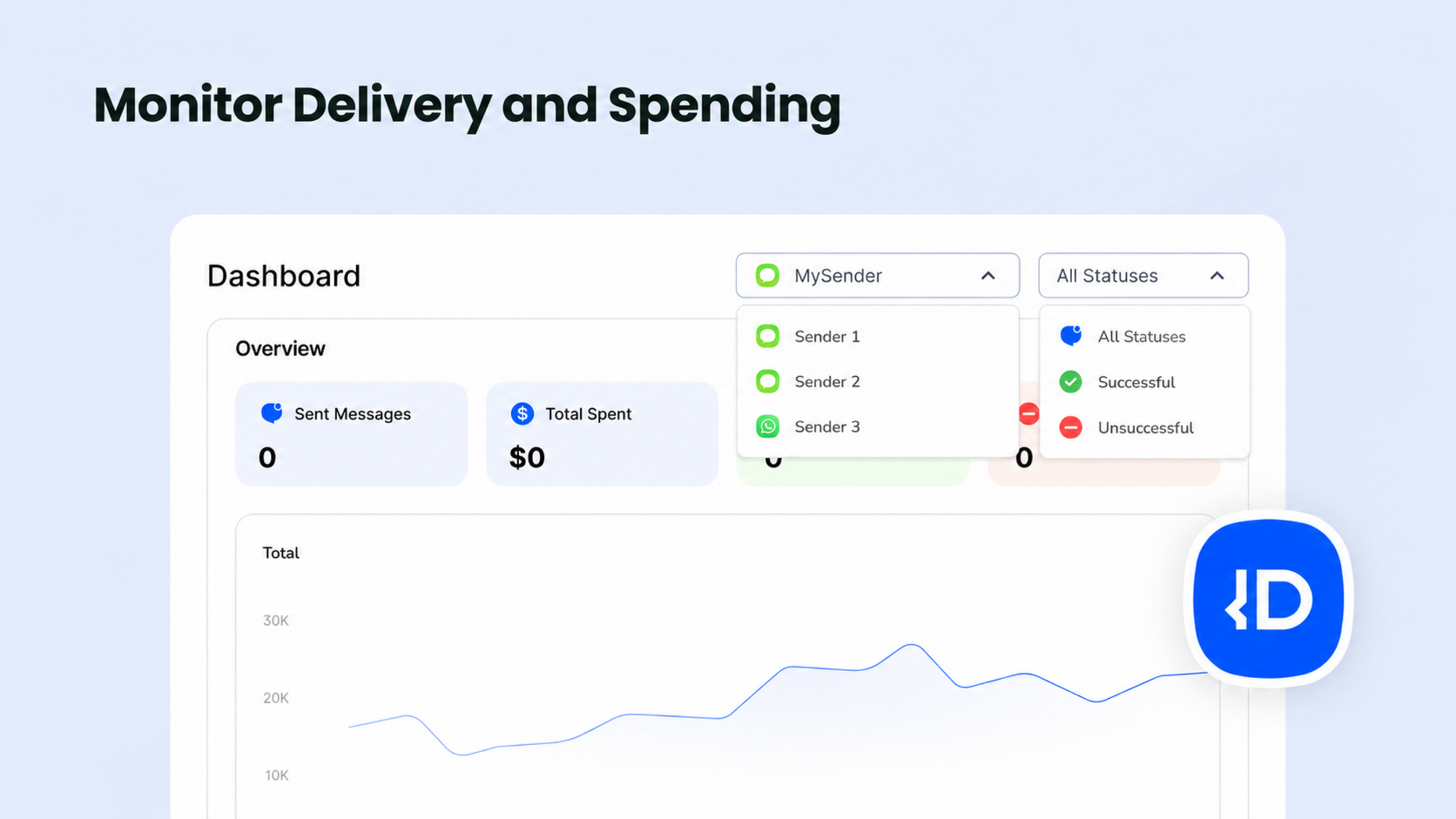
After launching a campaign, teams can use the Dexatel dashboard inside Bitrix24 to review essential messaging and spending data without switching platforms.
The dashboard shows:
Total messages: See how many messages were processed during the selected period.
Delivered messages: Check how many messages successfully reached recipients.
Failed messages: Identify messages that could not be delivered.
Messaging spend: Review the amount spent over a selected period and monitor changes over time.
Account balance: Check the available Dexatel balance before launching another campaign.
Filtered results: Narrow the data by delivery status, sender, or date range for a more focused view.
These insights help teams monitor delivery performance, control campaign spending, and identify unusual changes that may require further investigation.
However, delivery data should not be treated as engagement data. A delivered status indicates that the carrier or messaging platform reported successful delivery. It does not show whether the recipient read the message or acted on it.
Campaign Ideas for SMS and Viber
The integration can support different types of outbound customer campaigns. The best channel depends on the urgency of the message, the audience’s communication preferences, and the content being delivered.
Appointment and Event Reminders
Businesses can send reminders about appointments, bookings, deliveries, payment deadlines, or upcoming events. SMS is often suitable for time-sensitive reminders because customers can receive it without an internet connection or a particular messaging app.
Promotional Campaigns
Retailers, eCommerce businesses, and service providers can use Viber to share promotions, seasonal offers, product announcements, and discount codes. Before launching a promotional campaign, businesses should confirm that recipients have provided the required consent and that the content meets the chosen channel’s rules.
Service and Operational Updates
Teams can notify customers about changes to business hours, planned maintenance, delivery progress, service disruptions, or other important updates. The appropriate channel will depend on the urgency of the information and where the audience is most likely to receive it.
Customer Re-engagement Campaigns
Businesses can create campaigns for customers who have not purchased, booked, or interacted with the company recently. These messages might include a relevant offer, a reminder about an available service, or an invitation to return.
Invitations and Announcements
The integration can also be used to distribute webinar invitations, event announcements, new-location openings, and other company updates to selected customer segments.
Regardless of the campaign type, teams should use accurate contact data, respect customer preferences, and follow the consent, sender, and content requirements that apply to each channel and destination.
Requirements and Current Limitations
Before installing the integration, businesses should confirm that their Bitrix24 workspace and Dexatel account meet the necessary requirements.
Availability
The Dexatel app is currently listed in the Russian Bitrix24 Marketplace and is intended for Bitrix24 customers in Armenia. Businesses using another Bitrix24 location should confirm availability before planning their integration.
Dexatel Account and Balance
Users need a paid Dexatel account and an active API key to connect the two platforms. The account must also have sufficient balance to send campaigns through the selected channel.
Sender and Channel Approval
Sender requirements differ between SMS and Viber. Depending on the channel and destination, businesses may need an approved sender name, a registered Viber sender and message template.
Customer Consent
Businesses are responsible for obtaining the consent required to contact recipients. They must also follow the messaging, privacy, and opt-out rules that apply to each channel and destination country.
Current Integration Scope
The integration is designed for outbound messaging campaigns and read-only performance monitoring. It does not currently support two-way conversations, automatic CRM triggers, OTP verification, or automatic fallback between channels. Each campaign is sent through the channel selected by the user.
Reviewing these requirements in advance can help businesses avoid setup delays and choose the right channel for their audience and campaign.
Send SMS and Viber From Bitrix24 With Dexatel
The Dexatel Bitrix24 integration gives businesses a practical way to manage customer campaigns and monitor messaging performance from their existing CRM workspace. Teams can send SMS and Viber campaigns through one provider while keeping essential delivery, spending, and balance data visible inside Bitrix24.
Dexatel’s transparent channel pricing also makes it easier to estimate campaign costs before sending. Businesses can compare available channels, understand the applicable rates, and choose the option that best suits their audience and budget.
To get started, create your Dexatel account. A fully set-up account is required to use the integration. Once your account is ready, install the Dexatel app from the Bitrix24 Marketplace and connect it using your Dexatel API key.


