


Pipedrive SMS Integration: Send Individual & Bulk SMS with Dexatel


Published: Aug 10, 2026

Sales teams spend most of their day inside their CRM—managing leads, updating deals, scheduling meetings, and tracking customer interactions. But when it's time to follow up with a prospect, many still switch to a separate messaging platform to send a text message. While this may seem like a minor interruption, it quickly adds up. Switching between tools slows down sales workflows, increases the risk of mistakes, and makes it harder to keep customer communication organized.
A Pipedrive SMS integration solves this problem by bringing text messaging directly into your CRM. Instead of copying phone numbers, opening another application, and manually sending messages, your team can communicate with prospects and customers without leaving Pipedrive.
The Dexatel Pipedrive SMS integration enables businesses to send both individual and bulk SMS directly from the CRM. Whether you're following up after a missed call, confirming appointments, sending updates, sharing quotes, or running promotional campaigns every message can be sent from the same platform where your sales team already manages its pipeline. The integration is free to install from the Pipedrive Marketplace, so businesses only pay for the SMS messages they send through Dexatel.
In this guide, you'll learn how the Dexatel Pipedrive SMS integration works, what you can do with it, and practical ways to use SMS throughout your sales process.
What Is Pipedrive?
Pipedrive is a cloud-based customer relationship management (CRM) platform that helps sales teams organize leads, manage relationships, and move deals through the pipeline more efficiently. Instead of juggling spreadsheets, emails, and notes, sales representatives can manage every stage of the sales process in one place. Its visual pipeline makes it easy to track opportunities, schedule follow-ups, and keep customer information organized. For many businesses, Pipedrive becomes the central hub for daily sales activities, giving teams full visibility into their pipeline. However, many sales conversations still happen outside the platform. Representatives often switch between their CRM and messaging apps to send texts, confirm appointments, or follow up with prospects.
That’s where the Dexatel integration comes in—bringing SMS directly into Pipedrive so teams can communicate with customers without leaving the CRM.
Why Add SMS to Pipedrive?
While email and phone calls remain essential sales channels, they're not always the fastest way to reach a prospect. Emails can go unread for hours, phone calls are often missed, and following up across multiple tools slows down the sales process.
SMS offers a faster, more direct way to engage customers. Whether you're confirming a meeting, following up on a proposal, reminding a client about an appointment, or notifying them about an important update, a text message is more likely to be seen shortly after it arrives.
Without a Pipedrive texting integration, sales teams typically have to switch between their CRM and a separate messaging platform. They copy phone numbers, paste them into another application, send the message, and then return to Pipedrive to continue working. Besides being time-consuming, this process increases the risk of manual errors and makes it harder to keep communication organized.
A Pipedrive SMS integration eliminates these extra steps by bringing messaging directly into your CRM. Your team can communicate with leads and customers from the same place where they manage contacts, deals, and daily sales activities.
By integrating Dexatel with Pipedrive, businesses can:
Send individual SMS messages directly from contact, organization, and deal records
Launch bulk SMS campaigns without exporting contact lists
Automate SMS messages using Pipedrive Automations and Dexatel webhooks
Keep customer communication organized by sending SMS directly from Pipedrive
Reduce time spent switching between multiple platforms
Instead of treating SMS as a separate tool, the Dexatel integration makes it a natural part of your sales workflow, helping teams communicate more efficiently without disrupting the way they already work.
Key Features of the Dexatel Pipedrive SMS Integration
The Dexatel Pipedrive SMS integration gives sales teams everything they need to communicate with customers directly from their CRM. Whether you're following up with a single prospect or launching a campaign to thousands of contacts, you can manage your SMS communication without leaving Pipedrive.
Send Individual SMS
Reach out to leads and customers directly from their contact, organization, or deal records. Whether you're following up after a sales call, confirming an appointment, sending a payment reminder, or answering a customer inquiry, you can communicate without switching between platforms.
Send Bulk SMS Campaigns
Send promotional offers, product announcements, event invitations, reminders, and other mass communications to multiple contacts in just a few clicks. There's no need to export contact lists or rely on separate messaging software.
Automate SMS With Pipedrive Workflows
Trigger SMS messages automatically using Pipedrive Automations and Dexatel webhooks. Configure messages to be sent when contacts are created, deals change stages, or other workflow events occur, helping your team automate repetitive communication.
Customize Your Sender ID
Increase brand recognition by displaying your business name as the sender instead of a phone number, where supported by local carriers and regulations. A recognizable Sender ID helps customers instantly identify your messages and builds trust in your brand.
Keep in mind that alphanumeric Sender IDs are designed for one-way messaging. If you need customers to reply to your SMS, you'll need to use a supported phone number, such as a Toll-Free, 10DLC, or Short Code number, where available.
Write Messages in Any Language or Alphabet
Communicate with customers around the world using full Unicode support. Whether your audience speaks English, Spanish, Arabic, Russian, Chinese, Japanese, or any other language, you can send SMS in the appropriate script without limitations.
Best of all, the Dexatel Pipedrive texting integration is free to install from the Pipedrive Marketplace. There are no setup fees or monthly charges for the integration itself. You only pay for the SMS messages you send with transparent, pay-as-you-go pricing, so you always know exactly what you're paying for and can easily scale your messaging as your business grows..
Why Businesses Choose Dexatel?
✅ Free Pipedrive integration
✅ No setup or monthly fees
✅ Transparent pay-as-you-go pricing
✅ Individual, bulk, and automated SMS
✅ Global SMS delivery
✅ Unicode language support
Before You Start
Before sending SMS from Pipedrive, you'll need to create a Dexatel account, verify your email address and phone number, and install the Dexatel app from the Pipedrive Marketplace. Once your account is connected, you'll be ready to send individual and bulk SMS messages directly from your CRM.
How to Send Individual SMS From Pipedrive
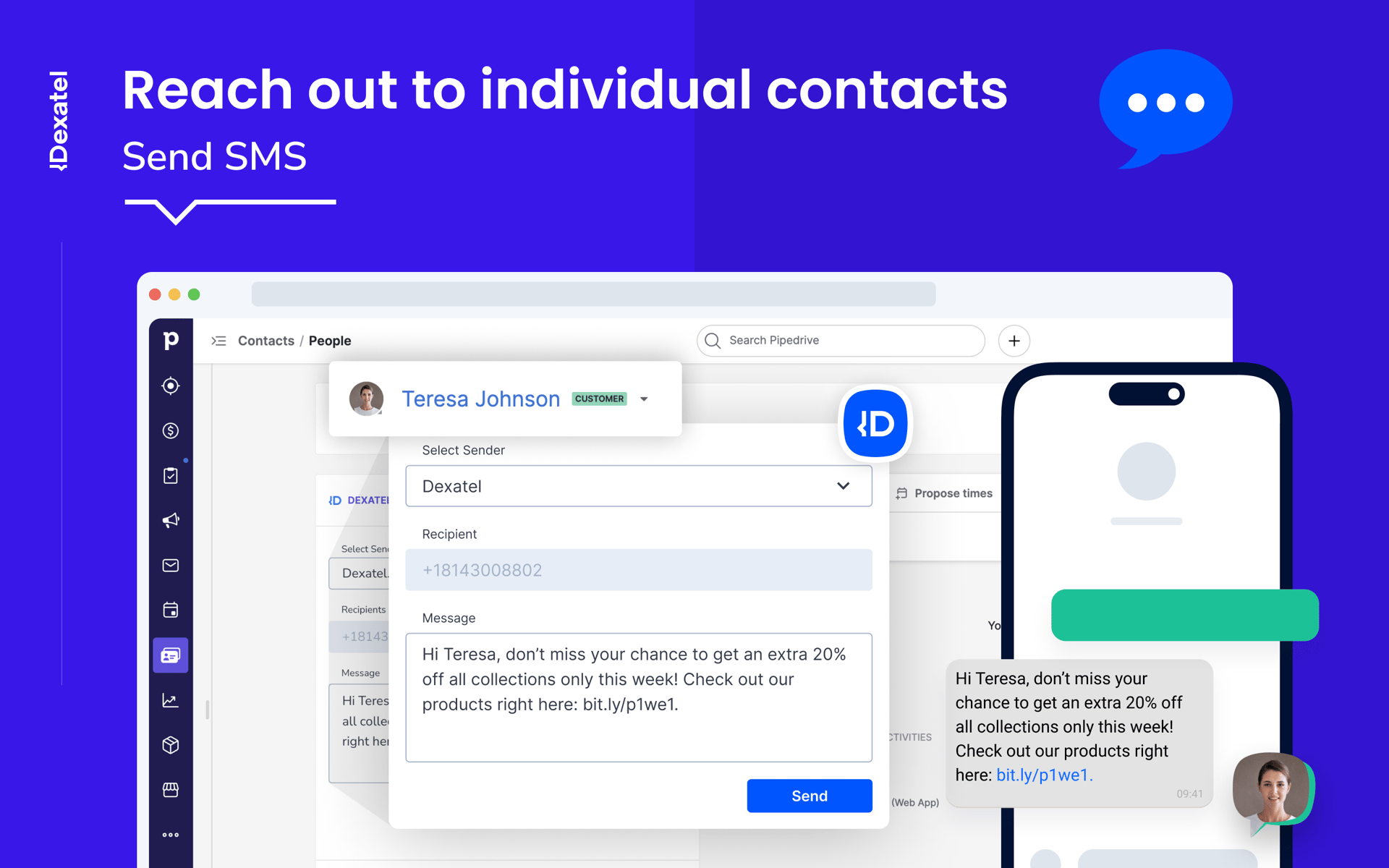
Sending an SMS with the Dexatel Pipedrive SMS integration takes just a few steps and can be done directly from your existing workflow. Whether you're contacting a new lead or following up on an active deal, there's no need to copy phone numbers or switch to another messaging platform.
To send an individual SMS:
Open the contact, organization, or deal you want to message.
Click the Send SMS button added by the Dexatel integration.
Enter your message in the SMS editor.
Choose your Sender ID.
Review your message and click Send.
Your message is sent directly from Pipedrive, allowing you to continue managing your sales pipeline without interrupting your workflow.
How to Send Bulk SMS Campaigns From Pipedrive

While individual SMS is ideal for one-to-one communication, businesses often need to reach multiple customers at the same time. With the Dexatel Pipedrive SMS integration, you can launch bulk SMS campaigns directly from your CRM without exporting contact lists or relying on separate messaging tools.
To send a bulk SMS campaign:
Select the contacts you want to include in your campaign.
Click the Send Bulk SMS option.
Compose your message.
Choose your Sender ID.
Review your campaign and send it to your selected recipients.
Bulk SMS is an efficient way to communicate with large audiences while keeping your customer data centralized in Pipedrive. Whether you're announcing a new product, promoting a special offer, inviting customers to an event, or sending important business updates, your campaigns can be managed from the same platform where your sales team already works.
How to Automate SMS in Pipedrive Using Webhooks
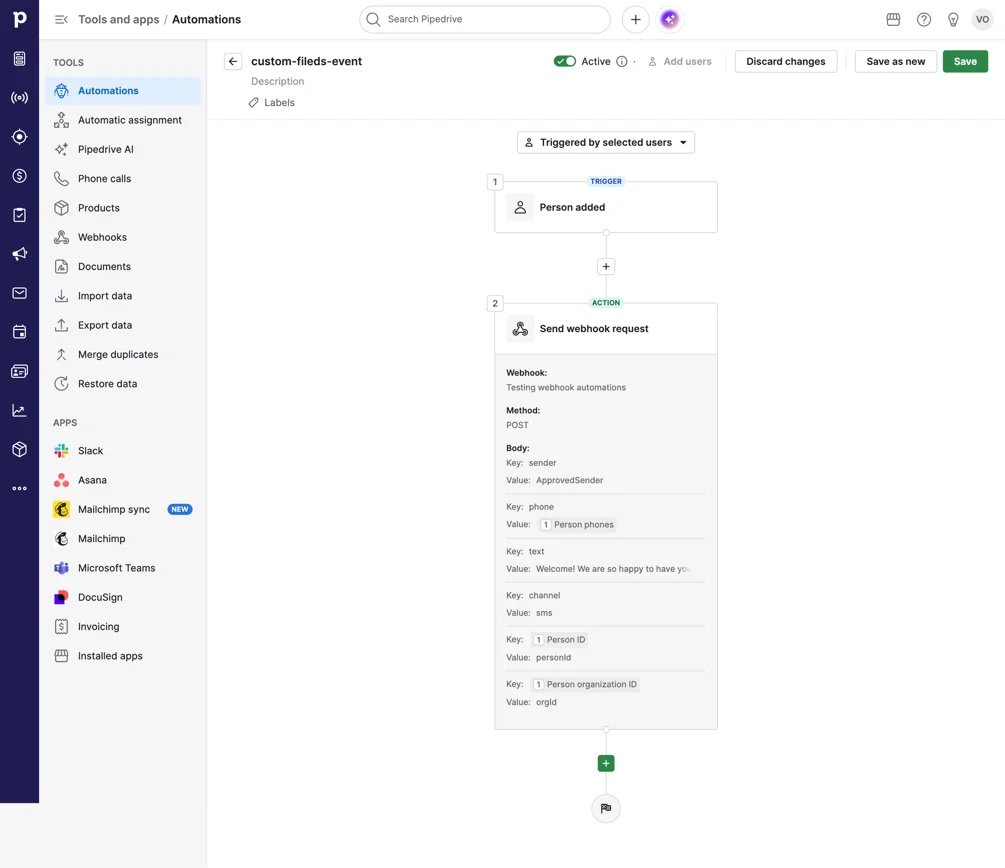
In addition to sending individual and bulk SMS messages manually, businesses can use Pipedrive Automations and Dexatel webhooks to trigger messages automatically based on activity inside the CRM.
For example, an SMS can be sent when:
A new person is added to Pipedrive
A deal moves to a specific pipeline stage
A new activity is created
A defined sales or customer workflow is completed
To set up webhook automations, you need:
A Pipedrive plan that supports Automations and webhooks
Global administrator access in Pipedrive
A Dexatel account with at least one approved sender
The setup involves copying the webhook username and password from Dexatel Settings → Integrations, creating an Automation webhook in Pipedrive using the Dexatel endpoint, and selecting Send webhook request as an action inside the relevant Pipedrive automation.
For detailed setup instructions, see our guide on how to set up Dexatel webhook automations in Pipedrive.
Real Business Workflows With the Dexatel Pipedrive SMS Integration
The Dexatel Pipedrive integration supports both manual messaging and automated SMS workflows. Sales teams can send individual messages, launch bulk campaigns, or use Pipedrive Automations and Dexatel webhooks to trigger SMS messages automatically based on events in their CRM.
Follow Up After a Sales Call
A prospect doesn't answer your call? Send a quick follow-up SMS while the conversation is still fresh. A short text can acknowledge the missed call, provide additional information, or invite the prospect to schedule another conversation.
Welcome New Leads Automatically
Create a workflow that automatically sends an SMS whenever a new person is added to Pipedrive. This helps you acknowledge new inquiries immediately without requiring manual follow-up.
Notify Customers When a Deal Reaches a New Stage
Use Pipedrive Automations to trigger SMS messages when a deal moves to a specific stage in your sales pipeline. For example, you can notify customers when their order is confirmed, onboarding begins, or another important milestone is reached.
Send Quote and Proposal Reminders
After sending a proposal, follow up with an SMS to let prospects know it's ready for review or encourage them to get in touch with any questions. A timely reminder can help keep deals moving through the pipeline.
Announce Promotions and Events
Launch bulk SMS campaigns to notify customers about limited-time offers, product launches, webinars, or upcoming events. It's an efficient way to reach large audiences directly from Pipedrive.
Keep Customers Informed
Use SMS to share important business updates, such as service notifications, onboarding instructions, or other time-sensitive information. Messages can be sent manually or triggered automatically through Pipedrive Automations, depending on your workflow.
Best Practices for Sending SMS From Pipedrive
Sending an SMS is easy, but sending one that gets a response requires a thoughtful approach. Whether you're communicating with a single prospect or running a bulk campaign, following a few best practices can improve engagement and create a better customer experience.
Keep Messages Short and Clear
SMS is designed for quick communication. Focus on one message, use simple language, and get straight to the point. Customers should be able to understand the purpose of your message within a few seconds.
Include a Clear Call to Action
Tell recipients what you want them to do next. Whether it's confirming an appointment, replying to your message, visiting a webpage, or scheduling a call, a clear next step makes it easier for customers to respond.
Send Messages at the Right Time
Consider your customers' local time zones and business hours before sending SMS campaigns. Well-timed messages are more likely to be read and appreciated.
Segment Your Audience
Not every message is relevant to every customer. Group contacts based on criteria such as industry, location, sales stage, or previous interactions to deliver more targeted communication.
Respect Local Regulations
Before sending promotional SMS campaigns, ensure you have the appropriate customer consent and comply with local messaging regulations in the countries where you operate.
Frequently Asked Questions
Can I send SMS directly from Pipedrive?
Yes. By installing the Dexatel Pipedrive SMS integration, you can send SMS messages directly from your contact, organization, or deal records without leaving your CRM.
Can I send bulk SMS campaigns from Pipedrive?
Yes. The integration allows you to send bulk SMS campaigns to multiple contacts directly from Pipedrive, making it easy to communicate with larger audiences without exporting contact lists.
Can I use my business name as the Sender ID?
Yes. Where supported by local carriers and regulations, you can customize your Sender ID so recipients see your business name instead of a phone number. Keep in mind that alphanumeric Sender IDs support one-way messaging only. If you need customers to reply, use a supported phone number instead.
Can I send SMS in different languages?
Yes. The integration supports Unicode, allowing you to send messages in virtually any language or alphabet, including Arabic, Armenian, Chinese, Japanese, Cyrillic, and many others.
Do I need to leave Pipedrive to send SMS?
No. The integration is designed to let you send both individual and bulk SMS directly from Pipedrive, helping you manage customer communication from a single platform.
Can I automate SMS in Pipedrive?
Yes. By combining Pipedrive Automations with Dexatel webhooks, SMS messages can be triggered automatically when events occur in your CRM, such as adding a new person or moving a deal to a specific stage. This requires a Pipedrive plan that supports Automations and webhooks.
Is the Dexatel Pipedrive SMS integration suitable for businesses of all sizes?
Yes. Whether you're a small business managing a growing customer base or a larger organization running high-volume SMS campaigns, the integration helps streamline customer communication within your existing sales workflow.
How much does the Dexatel Pipedrive SMS integration cost?
The Dexatel Pipedrive SMS integration is free to install and use from the Pipedrive Marketplace. There are no additional setup fees or monthly charges for the integration itself. You only pay for the SMS messages you send through Dexatel using a transparent pay-as-you-go pricing model. Message pricing depends on the destination country and your messaging volume, allowing you to scale your usage as your business grows.
Get Started With Dexatel for Pipedrive
Ready to manage SMS without leaving your CRM?
Install the free Dexatel integration from the Pipedrive Marketplace, create your Dexatel account, and start sending individual, bulk, or automated SMS in minutes.


