Viber Business Profile Optimization Guide


Published: Nov 28, 2025

The creation of Viber Business Account represents the first step in beginning to leverage Viber Business.
The real gain of having Viber Business, therefore, lies in how you can optimize your Viber Business Profile after creation.
An optimized Profile allows businesses to make a professional impression and impacts the rates at which messages are opened.
It’s not just an installation tutorial.
It embodies the exact requirements when using Viber, how experts optimize Viber, as well as how to understand the data analysis to ensure constant improvements.
Understanding Your Viber Business Profile Elements
Viber Business Profile consists of many important elements that work together to represent your brand.
If someone searches for you or sends a message to your Viber Business Profile, they will notice the following:
- The company name and logo shown in the chat list and message header.
- Verification badge indicating authenticity (Green tick mark in Android and Blue in iOS)
- The business description on your information page
- The website URL and contact information
- "Learn more" button with link to information about your company
- An unsubscribe feature, giving users the ability to manage communication
Each element has its own role in building trust and promoting engagement.
We plan to optimize every element in an organized manner.
Logo Optimization: Technical Requirements and Best Practices
In chat lists, message headers, search result pages, as well as your own company information page, your logo will appear.
For Viber to display your logo correctly, there are five different sizes that need to be provided.
Required Logo Specifications
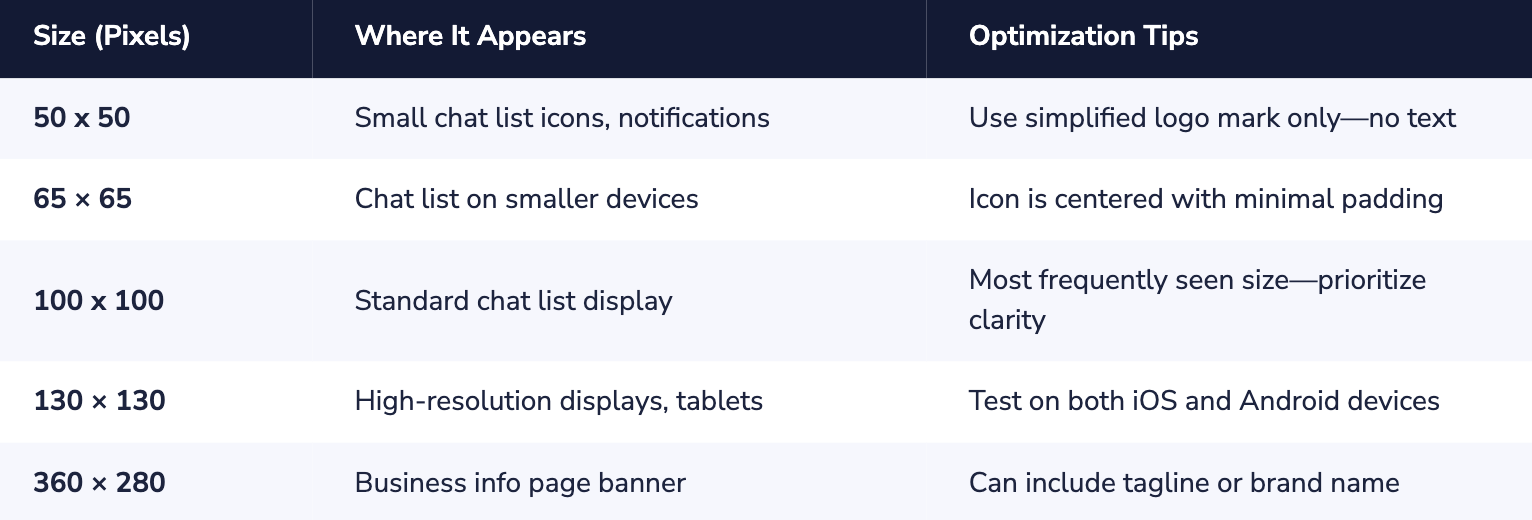
File format: PNG or JPG. It is preferred to use PNG images when there are any transparent or hard-edged elements in the logo. Images containing photos can use JPG format.
Logo Design Best Practices
- Include your official logo for your business. Using the same logo on all sites can easily build brand identity. Customers will easily notice your brand whether it is found through Viber or other means.
- Optimize for small screens. The most popular sizes are 50x50 and 65x65. For mobile apps, or when your complete logo does not scale well to small sizes, develop an iconic symbol (logomark) of your logo.
- Pick contrasting colors. It will help since your logo needs to stand out against Viber’s light interface. Dark or highly saturated colors always work best.
- Don't use text at small resolutions. Text in your logo becomes unreadable at 50x50 pixels. Reserve text-containing versions for the 360x280 banner only.
- Test across devices. Logo display might behave differently when viewed in both iOS and Android environments as well as when viewed in devices with varying display densities. Preview in various devices before finalizing.
Most Logo Design Errors Result in Logo Rejection
- Using competitor trademarks or copyrighted images
- Images of low resolution, which appear pixelated
- Logos that do not correspond to your registered business name
- Inappropriate or offensive imagery
- Inclusion of Viber brand elements in your logo
Business Name and Sender ID Optimization
Your Sender ID is represented by the business name that appears when you send out messages.
This is commonly the very first aspect that the receivers are exposed to and has direct implications for them opening it or ignoring it.
Sender ID Guidelines
- Maximum length: 30-35 characters, varying based on location
- Utilize your registered business name for easy recognition
- Do not use generic labels like “Support” or “Info” on their own
- No special characters other than hyphens and spaces
- Make sure it aligns perfectly with your brand as customers know you
Examples of Effective and Ineffective Sender ID
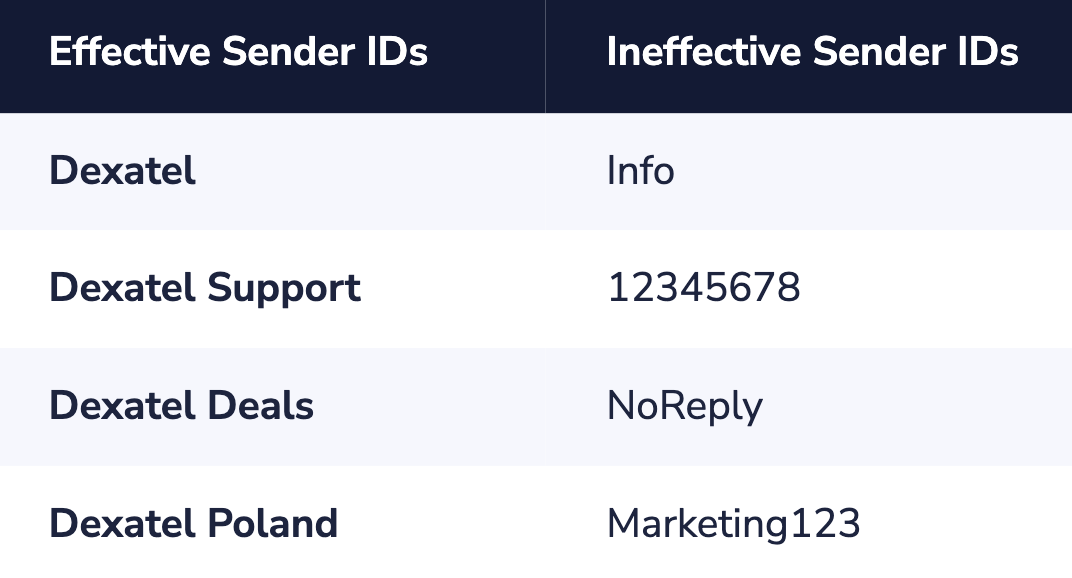
International brand note: International corporations may be required to include regional names (for example, “Zara Ukraine”) and must secure written approval from the brand owner or the regional office to use the brand name in that specific market.
Crafting a High-Converting Business Description
Your business description appears on your info page and helps users understand who you are before engaging.
A well-crafted description improves trust and sets expectations for the type of communication users will receive.
Description Optimization Framework
- Lead with your value proposition. What problem do you solve? What do customers get from engaging with you?
- Include relevant keywords. Users can search for businesses in Viber—ensure your description contains terms they might search for.
- Set communication expectations. Tell users what types of messages they'll receive (promotions, order updates, support).
- Add social proof if applicable. Mention years in business, customer count, or industry recognition.
- Include a call to action. Encourage users to start a conversation or visit your website.
Description Template
[Company Name] is [what you do/sell] serving [target audience] in [regions/countries]. Get [types of messages: exclusive offers, order updates, support] directly on Viber. [Social proof]. Message us anytime or visit [website].
Example Descriptions by Industry
- E-commerce: "Fashion Forward is Ukraine's leading online fashion retailer. Get exclusive deals, flash sales, and order tracking updates on Viber. Over 500,000 happy customers since 2018. Shop now at fashionforward.ua"
- Healthcare: "Smile Dental Clinic provides modern dental care in Kyiv. Receive appointment reminders, special offers, and health tips. Message us to book your next visit or call +380-XX-XXX-XXXX."
- Financial Services: "SecurePay delivers instant payment notifications and transaction alerts. Your financial security matters—we use end-to-end encryption. Questions? Message us 24/7."
Maximizing Verification Badge Impact
Each and every Viber Business Account obtains an automatic verification sign when approved.
It means that customers are communicating with an authentic business and not some scammer.
Relevance of Verification
- 77% of customers would choose authorized messages over normal messages
- Authentic profiles get higher open and engagement rates
- Protects you from being imitated or deceived by scammers
- Business messages are delivered to the Business inbox and are separate from messages delivered in personal chats.
Leveraging Your Verification Status
- In your advertising, you can state this: “Message us on Viber—look for the verified badge to confirm it is indeed us.”
- Employ it in customer communication. Verified ID can be used when sending out sensitive messages like OTPs or transaction confirmations.
- Feature it on your website. When linking customers to Viber, tell them about finding the verified account.
- Train customer service reps on this issue. Make sure customers are assisted on identifying legit business accounts.
Improving Discoverability in Viber Search
Users can look for businesses on the Viber platform itself.
Presence in these search results opens another acquisition channel for customers, albeit one that requires additional work beyond just keeping an active account.
Factors for Search Optimization
- Business name alignment: Sender ID must be closely aligned to what customers are looking for
- Location Relevance: Results are shown based on the current country of the user
- Descriptive keywords: Use industry-specific keywords that customers are searching for
- Activity level: Active accounts that have messaged recently may be ranked higher
Increasing Traffic to Your Viber Profile
Don't rely solely on in-app search.
Actively promote your Viber presence through:
- QR Codes on product packaging, receipts, and in-store promotions
- Deep links on your website and in email signatures
- Viber Web Chat widget on your website
- Social Media Promotion on existing channels
- Viber Ads: Desktop Ads, Post-Call Ads, and Marketing Stickers
Understanding and Acting on Your Analytics
An optimized profile will only be valuable if it is possible to measure its performance.
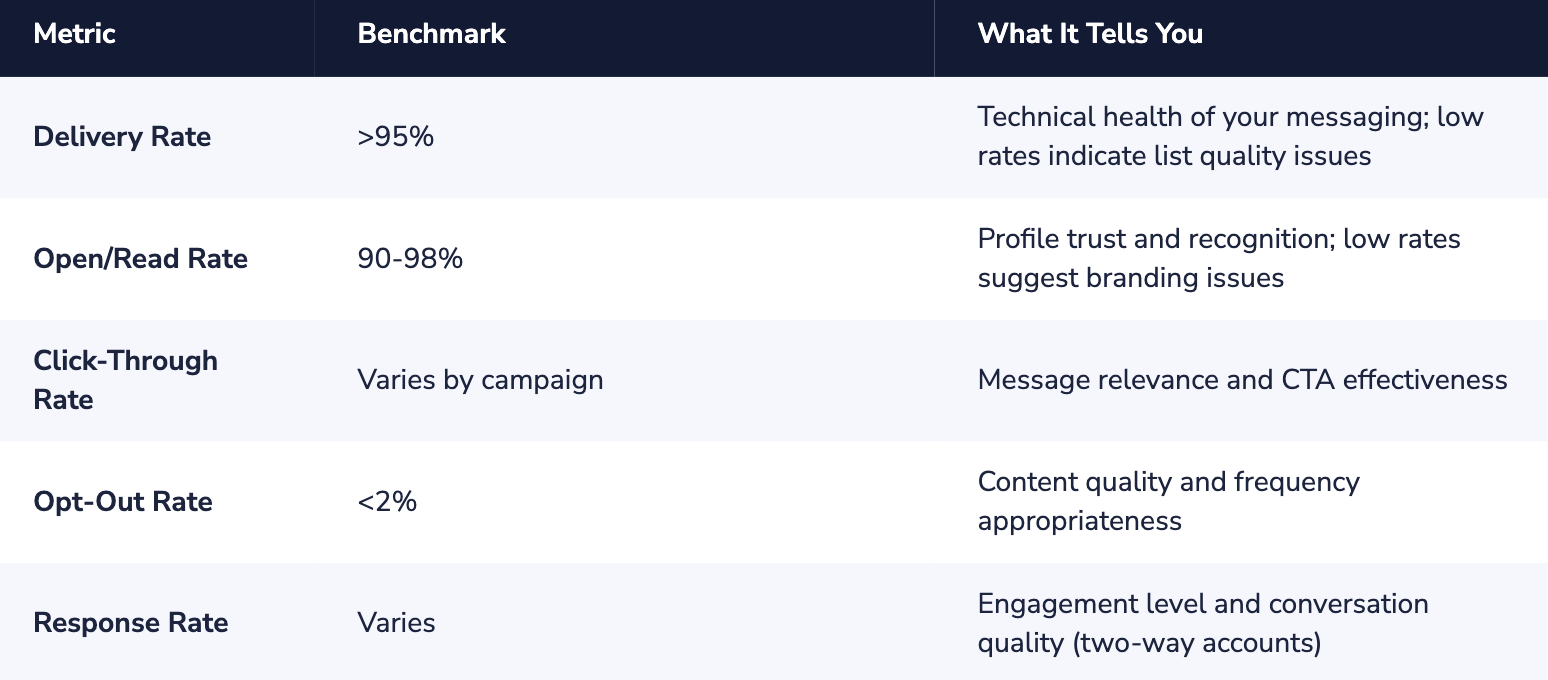
Viber Business Messaging has analytics that can help in understanding and optimizing profile performance.
Metrics to be Monitored
Interpreting Your Data
Low delivery rates?
Look at the contact list for invalid numbers.
Make use of double opt-in to verify that telephone numbers are accurate and that the recipients are willing to receive messages.
Poor open rates?
Your Sender ID or logo may be unrecognizable.
In this case, brand consistency is what makes it obvious to customers that it is coming from you.
High opt-out rates?
Could be due to messages that are too frequent or contain less-than-optimal content.
Look at messaging frequency (max of 2-4 messages per month) and message content targeting.
Click-through rates too low?
It may be that the message itself or the action button needs some work.
Try different types of messages and action buttons to see what appeals to this group.
Viber Business Profile Optimization Checklist
An optimized profile will only be valuable if it is possible to measure its performance. Viber Business Messaging has analytics that can help in understanding and optimizing profile performance.
Metrics to be Monitored:
Interpreting Your Data
Low delivery rates? Look at the contact list for invalid numbers. Make use of double opt-in to verify that telephone numbers are accurate and that the recipients are willing to receive messages.
Poor open rates? Your Sender ID or logo may be unrecognizable. In this case, brand consistency is what makes it obvious to customers that it is coming from you.
High opt-out rates? Could be due to messages that are too frequent or contain less-than-optimal content. Look at messaging frequency (max of 2-4 messages per month) and message contenttargeting. Click-through rates too low? It may be that the message itself or the action button needs some work. Try different types of messages and action buttons to see what appeals to this group.
Viber Business Profile Optimization Checklist
Please utilize this checklist in order to ensure that you have optimized your profile:
Logo
- Five different sizes were uploaded: (50×50, 65×65, 100×100, 130×130, 360×280)
- Format: PNG or JPG, and resolution: high.
- Simplified version for small sizes (no text).
- Tested on both iOS and Android devices.
- In line with other brand touchpoints.
Sender ID
- Fewer than 30 characters.
- Matches the registered business name.
- No special characters (except hyphens and spaces).
- Immediately recognizable to customers.
Description
- Clear value proposition in first sentence
- Relevant keywords included.
- Communication types mentioned
- URL firmware included.
- Call to action present.
Discoverability
- QR Codes for offline promotion.
- Deep links integrated in the website and emails.
- Concept and implementation of web chat widget.
- Social media promotion planned.
Next Steps
Profile optimization, or rather the process of continually improving it, is an ongoing process that doesn’t end after completing this step.
Analyze your metrics every month and work on different methods of optimizing it.
If you have yet to create your Viber Business Account, you need to start from that point, as you cannot optimize otherwise.
Once you have an active and verified account, you can refer back to this guide for improvement.
If you need help in embarking on Viber Business Messaging, Dexatel can assist you in making it easy to get started.