


What Is a WhatsApp BSP? The Complete Guide for Businesses


Published: Mar 9, 2026

So, you’re interested in using WhatsApp for business, and you’re probably aware of the word BSP.
The word is often used: in Meta’s documentation, in vendor reviews, in comments on Reddit, but no one really explains what it is.
Here’s the ultimate guide that will tell you what the word BSP means, what the system looks like, what the difference between the terms BSP and ISV is, what the concept of verified business means, and so on.
What Is a WhatsApp BSP?
A WhatsApp BSP, or Business Solution Provider, is a Meta-approved partner that offers businesses programmatic access to WhatsApp.
They do this by providing access to the WhatsApp Business Platform, formerly known as WhatsApp Business API.
You can check if a BSP is officially approved by looking at Meta’s publicly available directory of BSPs.
You cannot simply sign up for WhatsApp Business API and begin sending messages at scale.
Meta is very strict about who gets access. BSPs are the gateway.
They're vetted, approved companies that have built the infrastructure, toolset, and compliance framework needed to operate on Meta’s platform, and then pass that access on to businesses like yours.
To illustrate, think of it like this: Meta is like a telecom carrier.
The WhatsApp Business Platform is like a network.
And a BSP is like a service provider who gets you access to that network.
How the WhatsApp BSP Ecosystem Works
Understanding this structure will allow you to make a smarter decision.
Here’s how these pieces fit together:
- Meta sits at the top. They own WhatsApp, set the rules, approve message templates, and control who gets to use the API.
- BSPs are official Meta partners. They handle the technical and compliance layer – infrastructure, uptime, phone number provisioning, template submission, etc.
- Businesses (that's you) use a BSP to get a WhatsApp Business Account and use the capabilities of the Platform.
When you use a BSP, you’re not just buying an API.
You’re buying everything around it – onboarding, compliance support, template support, delivery infrastructure, analytics, and customer support.
The quality of everything around the API can differ dramatically from BSP to BSP.
BSP vs. ISV vs. Direct API: What's the Difference?
When researching how to access messaging with the WhatsApp API, there are three different terms that are commonly used: BSP, ISV, and Direct Cloud API.
The difference between these is as follows:
BSP (Business Solution Provider)
A BSP is an organization that is responsible for providing and managing WhatsApp Business Accounts for other businesses.
If you are a business and want to use WhatsApp at scale, then you are the end customer of the BSP.
ISV (Independent Software Vendor)
An ISV is an organization that provides software products such as a CRM system, helpdesk software, an e-commerce solution, and so forth.
An ISV also provides the integration of WhatsApp messaging into their software products.
The difference is that while the BSP is selling WhatsApp Business accounts as their primary product, the ISV is selling their software products and WhatsApp messaging as an additional feature.
Direct Cloud API (Meta)
As an alternative to BSPs, Meta now provides businesses with the opportunity to connect their WhatsApp accounts directly to Meta Cloud API since 2022.
However, this requires you to have the technical team handle the entire stack yourself.
The majority of businesses find that working with BSPs is significantly faster and more efficient.

What Can You Do With the WhatsApp Business API Through a BSP?
Once you're set up with a BSP, the WhatsApp Business Platform gives you access to many more powerful capabilities:
- Send transactional messages at scale, such as: Order confirmations, Shipping updates, Appointment reminders, WhatsApp OTPs
- Run marketing campaigns with rich media: Images, Videos, Documents, Interactive buttons
- Build customer service experiences with chatbot automation and human agent handoff
- Broadcast messages to your opted-in contact lists at scale
- Power your e-commerce experiences: Abandoned cart recovery, Delivery updates, Post-purchase support
- Manage your agents across one WhatsApp Business number
- Use pre-approved message templates to proactively reach your customers
How to Get Started With a WhatsApp BSP: Step by Step
The setup process is a bit more involved compared to most other messaging channels.
Here is a breakdown of it:
- Setting up a Meta Business Manager account, which is the foundation. You'll need a Facebook account, a verified business name, as well as business details.
- Selecting and signing up with a BSP. The BSP will assist in integrating your Meta Business Manager account with their platform, as well as setting up your WhatsApp Business Account.
- Adding and verifying a phone number. You'll need a phone number that is not already in use by another WhatsApp account. You'll receive a verification code via a call or text message.
- Completing business verification. You'll be asked to submit your business details to Meta via the Business Manager account. This is necessary if you're looking to attain high messaging limits, as well as a green tick verification badge.
- Submitting message templates. You'll need to submit the templates you'll be using for sending messages. The BSP will be instrumental in ensuring these templates comply with Meta's content policy requirements.
- Integrating the API. You'll need to integrate the BSP API into your CRM, platform, or code. Good BSPs will provide SDKs, Postman collections, as well as a sandbox for development purposes.
- Going live. You'll begin with low volumes, monitor delivery rates, as well as quality scores, and then scale up progressively. WhatsApp has messaging 'tier limits' that increase in line with quality.
Average time from sign-up to first live message: 3-7 business days with an experienced BSP.
Most delays occur in Meta's business verification queue, not the BSP.
What Makes a Good WhatsApp BSP? 5 Criteria to Evaluate
Meta's approval process is just the starting point.
However, the level of service provided by each BSP can vary greatly.
Here's what to look out for:
Reliable Delivery Infrastructure
Uptime, message delivery speed, and queue management are critical considerations, especially if you're dealing with OTPs or messages that have a time constraint.
You should ask your potential BSPs about their service level agreement, uptimes, and how they manage high volumes of messages.
Ease of Integration
A good BSP will have well-documented REST APIs, language-specific SDKs, and pre-built integrations into the major CRM systems.
Lack of documentation is a major red flag.
Template Management and Compliance Support
A good BSP will have good template management, explain the reason for rejected templates, and help you optimize your submissions for maximum time-to-live.
Transparent Pricing
Conversational costs are set by Meta and charged by WhatsApp.
BSPs apply their own markups or platform fees.
You can check out the pricing structure of Dexatel's WhatsApp service as an example of transparent pricing.
Quality of Support
WhatsApp issues, like account flags, delivery issues, and policy changes can change quickly.
You require support that is responsive and informed, with real response times, rather than just a ticket system.
WhatsApp BSP Comparison: How the Main Providers Stack Up
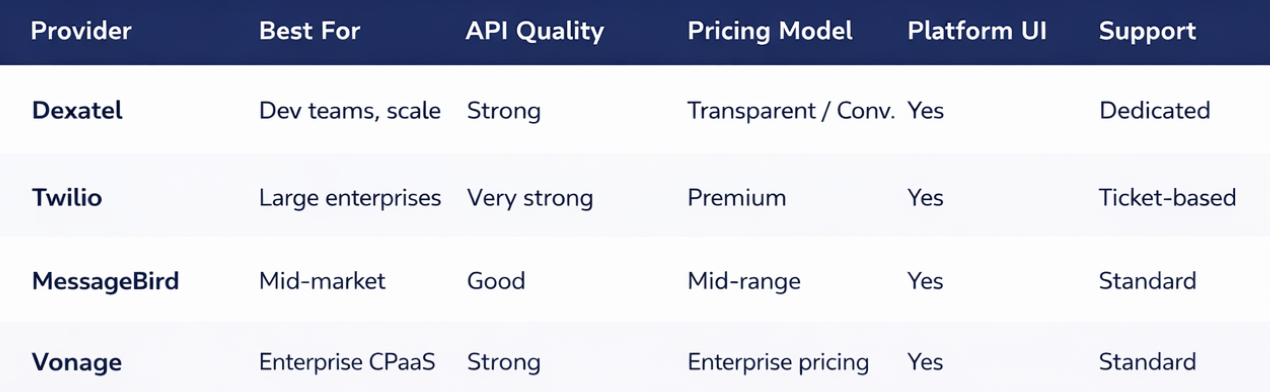
There are dozens of Meta-approved BSPs.
The table below shows the most commonly evaluated service providers for the most important factors:
How to Migrate From One WhatsApp BSP to Another
It’s no secret that switching BSPs is something that most service providers will not openly admit.
Businesses change for various reasons: pricing, support, features, or restructuring their technology stack.
The good news is that you don’t have to give up your phone number.
What transfers and what doesn't
- Your phone number - this will be transferred with you through the number migration process at Meta
- Your WABA (WhatsApp Business Account) - this will be migrated or recreated depending on the circumstances
- Approved message templates - these will be retained in the Meta system and available to you
- Message history - this will not be transferred. The history of the conversations is stored in the BSP's system, not in the Meta system.
The migration process
- Sign up for your new BSP and create or connect your Meta Business Manager
- Initiate your number migration request – your new BSP will work with Meta to move your phone number
- Export what you can from your existing BSP – your content templates, your contact lists, and any analytics you need
- Test and integrate with your new BSP before switching over production traffic
- Communicate the change to your team and update any integrations that were pointing at the API of your old BSP
The process of migrating your business takes 1-3 business days.
You'll want a brief window of downtime and be prepared to proactively inform your customers if you rely on WhatsApp as a customer support channel.
Why Dexatel for WhatsApp Business API Access
To be transperent, Dexatel is not official Meta-approved BSP for now.
But we guarante the following with SLAs.
- High Throughput Infrastructure – Built for Production, Not Pilots
- Clean & Well-Documented REST API – Easy Developer Onboarding
- Full Support for Transactional, Marketing, Authentication, and Conversational Messaging
- Transparent Conversation-Based Pricing – No Hidden Fees
- Dedicated Account Support – Not a Ticket Queue
- Expert Team for Your Green Tick Verification, Template Submissions, and BSP Migrations
Selecting a WhatsApp BSP is one of the most critical decisions in the technical setup of your business.
A wrong decision will lead to unreliable delivery, confusing pricing, poor support, and painful migrations.
A right decision will mean you go live fast, scale safely, and focus your engineering team on your product, not your messaging infrastructure.
The requirements for a WhatsApp BSP are quite straightforward: have good infrastructure, have fair pricing, have good support, and have a team that knows enough about the regulations and guidelines of WhatsApp Business to ensure you stay compliant.
So, test your potential BSP against these requirements before making a decision.
Ready to get access to the WhatsApp Business API through Dexatel?
Let's get in touch.


.jpg&w=828&q=75)
