


WhatsApp for Business: Messenger vs Business App vs Business API


Published: Dec 28, 2025

An inappropriate selection of a WhatsApp product may lead to a loss of thousands of dollars in business opportunities or, in extreme cases, a ban on your phone number.
Having more than 3 billion active users with an unprecedented 98% open rate on messages, WhatsApp is the most effective channel of customer communication that exists today.
However, which version do you have in your organization?
Below is the detailed guide that outlines all the relevant information related to WhatsApp Messenger, WhatsApp Business App, & WhatsApp Business API, including the features, limitations, pricing, & the exact usage of each.
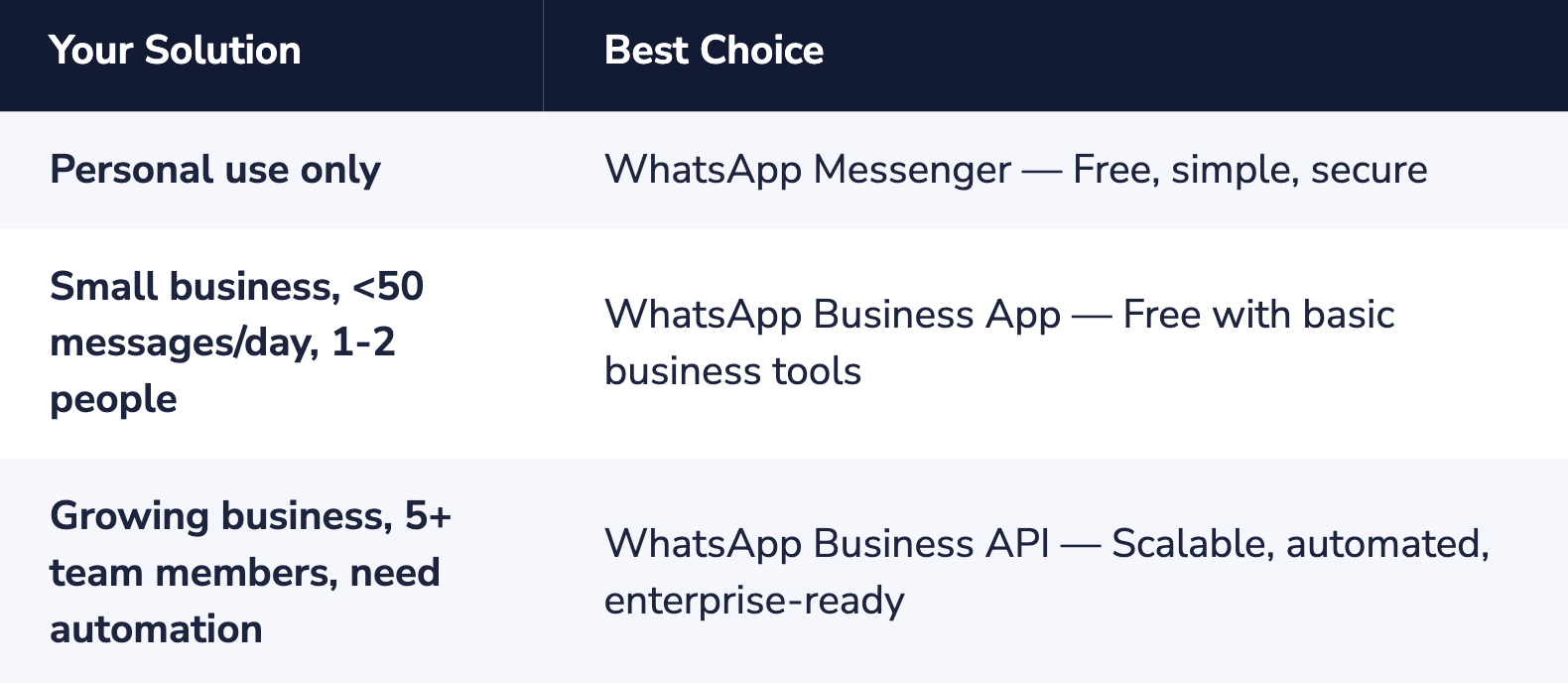
Quick Answer: Which WhatsApp Should You Use?
Understanding the Three WhatsApp Options
WhatsApp offers three distinct products that are suited to particular uses.
These needs require a thorough understanding prior to allocating resources to implement them.
WhatsApp Messenger (Personal App)
The WhatsApp Messenger is the standard consumer client that is used by billions globally for private communication.
It was founded in 2009 and later bought by Facebook, now Meta, for $19.6 billion in 2014 and has revolutionized the way the world communicates.
Key Features:
- All messages, calls, and media are encoded with end-to-end encryption.
- Voice and video calls are free; even group calls are free.
- A group chat supports a maximum of 1,024 participants.
- Sharing of files is possible up to 2 GB.
- Status updates and channels are supported.
- Cross-platform support includes iOS, Android, Web, and Desktop.
Limitations for Business Use:
- Business profiles or branding are not provided.
- There are no automated messages or quick replies available.
- Messages on the broadcast feature are confined to 256 contacts who save your number.
- Usage for one device only: enforced (up to four networked devices permitted).
- Using app for commercial purposes contradicts the Terms of Service set by WhatsApp.
WhatsApp Business App
Rolled out in January 2018, the WhatsApp Business App is a free messaging application created exclusively for small business owners.
It provides necessary features to create a professional identity and communicate with customers effectively.
Key Features:
- Business Profile: Show business name, description, address, hours of operation, email, and website.
- Product Catalog: Allow a maximum of 500 products with pictures, descriptions, and pricing.
- Automated Messages: Allow setting welcoming messages for new contacts and away messages outside the business hours.
- Quick Replies: Use keyboard shortcuts to save and re-use common responses.
- Labels: Organize contacts and chats into labels like "New Customer," "Pending Payment."
- Basic Analytics: Track messages sent, delivered, and read.
- Short Links & QR Codes: Click-to-chat links can be generated for convenient customer access.
Critical Limitations:
- Device Limit: One phone and a maximum of four other connected devices altogether.
- Single User: Lack of ability to monitor which employee has dealt with a certain customer.
- Broadcast Cap: A maximum of 256 recipients per broadcast list, and only those who have saved your contact receive messages.
- There is no integration with CRM, helpdesks, or e-commerce software.
- No Chatbots: No capability to automate conversations and use AI.
- GDPR Issues: Automatically accesses all phone contacts, posing privacy concerns.
- No Verified Badge: The green validation mark is unattainable.
Best For: Solo entrepreneurs, micro-businesses, and small shops handling fewer than 50 customer messages per day with 1-2 people managing communications.
WhatsApp Business API (Business Platform)
Launched in the year 2018, the WhatsApp Business API, or the "WhatsApp Business Platform," is Meta’s offering for medium and large-sized businesses.
While the consumer application has a user interface, the API contains none; the API is a programmable backend service meant for integration into existing systems within an organization.
User interface is provided by BSPs, like Dexatel.
Key Features:
- Unlimited Users and Devices: The whole team can use the same WhatsApp number simultaneously.
- Verified Green Tick: Ability to use an official verification tick that increases trust among customers.
- Unlimited Broadcasts: Sending messages to more than 100,000 users per day, including users who have not saved the number.
- CRM & System Integration: Dexatel offers integration with Zapier, Pipedrive, Customer.io, and more.
- AI Chatbots & Automation: Ability to build complex chatbot flows, auto-responses, and AI-driven support services.
- More Interactivity: Templates can contain buttons, quick replies, lists, and rich media to increase engagement.
- Team Shared Inbox: The capability to view who among the team of agents handled a particular conversation.
- Advanced Analytics: Reporting with granular detail regarding delivery, response time, and outcomes.
- Automated Notifications, which include order confirmation, shipping, and appointment reminders, and abandoned cart recovery.
- GDPR Compliance: Designed with the purpose of complying with the GDPR regulations.
Important Considerations:
- There is no Native Interface: A BSP like Dexatel has to be used.
- Per-Conversation Pricing: Rates depend on the type of conversations and the country; there are 1,000 free service conversations per month.
- 24 Hour Messaging Window: Free-form responses are allowed only within 24 hours of the customer's last message, after which approved templates are to be used.
- Meta Business Verification: Requires a verified Facebook Business Manager account.
- Voice/Video Calls: Not available as an API feature at present.
Best For: Growing businesses with 5+ team members, high message volumes, need for CRM integration, marketing automation, or customer support at scale.
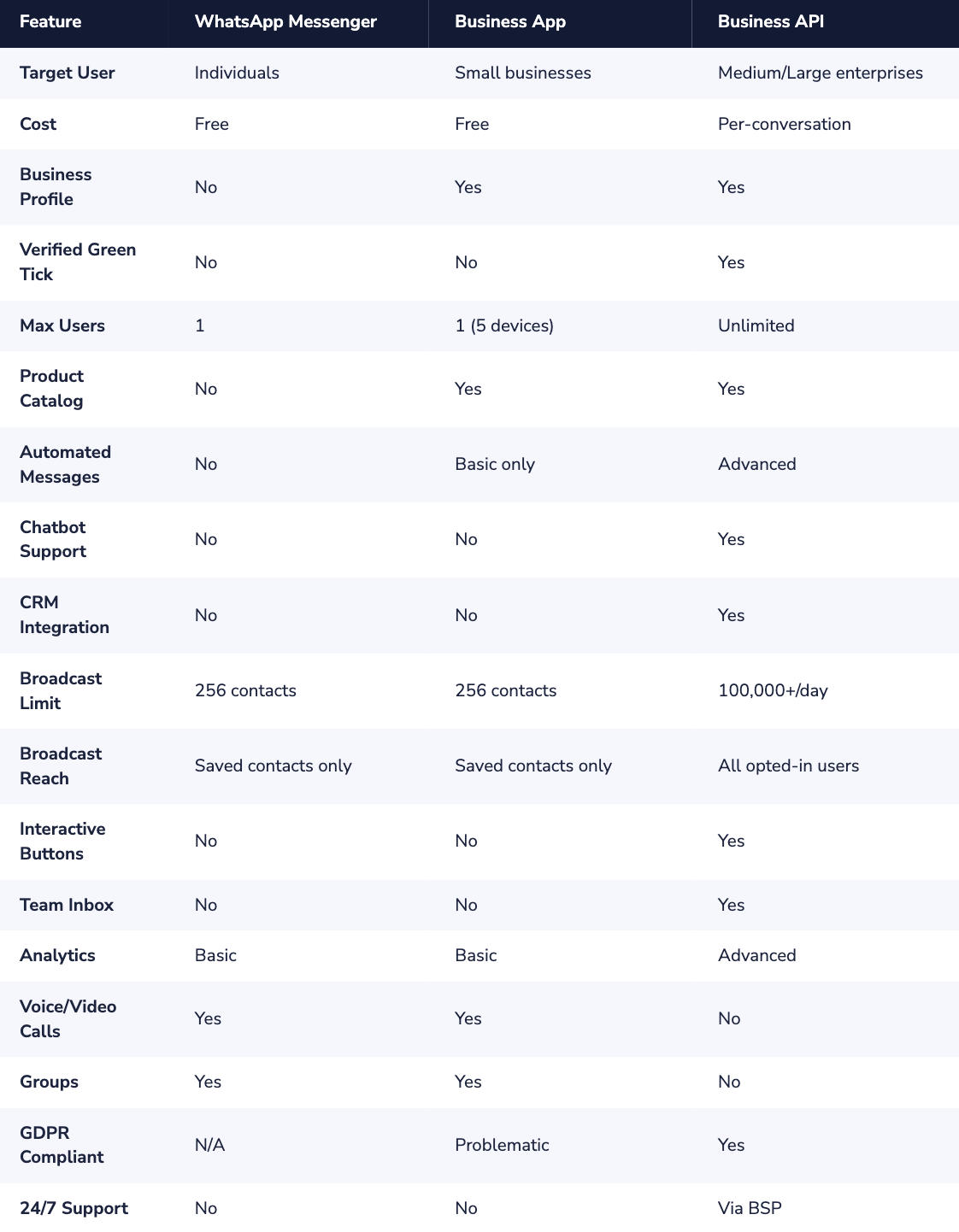
Complete Feature Comparison
The following table provides a detailed side-by-side comparison of all three WhatsApp options:
WhatsApp Business API Pricing Explained
A comprehension of WhatsApp Business API pricing is paramount in budgeting.
Meta uses a pricing model based on conversation, where the payment is made per 24-hour conversation window rather than per message.
Conversation Categories & Costs
Conversations are divided into four types and each has its own rate:
- Service Conversations: Customer inquiries on support, or any questions. Free for the first 1,000 conversations per month.
- Utility Conversations: These include messages related to orders, like order receipts or shipping notifications.
- Authentication Conversations: One-time passwords and verification codes:
- Marketing conversations: These include promotional transmissions, product releases, and re-engagement campaigns.
Note: Country-specific pricing is different. It is understood that marketing-oriented conversations tend to be costlier than service-oriented conversations. Service-oriented conversations include conversations for utilities.
Real-World Use Cases by Industry
E-Commerce & Retail
- Abandoned cart recoveries (recover 15-25% of lost sales)
- Order confirmations and shipping updates
- Product suggestions based on purchase histories
- Flash sale announcements with direct buy buttons
- Cash On Delivery (COD) verification: failed deliveries minimized
Healthcare
- Scheduling and reminders for appointment times
- Prescription Refill Notification
- Laboratory Result Transmission
- Follow-up surveys post-visit
Financial Services
- Transaction alerts and account updates
- Two-factor authentication (2FA)
- Payment Reminders and Due Date Alerts
- Fraud alerts and security notifications
Travel & Hospitality
- Booking Confirmations and Itinerary Updates
- Flight reminders & boarding passes
- Real-time flight or schedule changes
- Concierge Services and Area Information
How to Get Started with WhatsApp Business API
There are two possible ways for acquiring access to the WhatsApp Business API:
Option 1: Direct Access (For Developers)
- Open a Meta Business account and perform the business verification
- Apply for WhatsApp Business API Access via Meta’s Developer Portal
- Setup Cloud API or On-Premises API infrastructure
- Building custom integration with the existing system
- Developing and submitting message templates for approval
Pros: Full control, no middleman markup. Cons: Requires significant developer resources, longer setup time, and ongoing maintenance.
Option 2: Business Solution Provider (Recommended)
- Moreover, select a Meta-approved Business Solution Provider (BSP), e.g. Dexatel:
- Finish the guided set up process (usually 24-48 hours)
- Connect your phone number and verify your business
- Start messaging through the ready-made interface of BSP
- Connect seamlessly with existing tools via pre-built connectors
Pros: Fast setup, no development required, dedicated support, pre-built features. Cons: Additional platform fees on top of WhatsApp's conversation costs.
Migrating from WhatsApp Business App to API
If you are already using the WhatsApp Business App and need an upgrade to the API solution, the following points are relevant to you:
Can I retain my number?
Yes - you can migrate your existing WhatsApp Business App number to the WhatsApp Business API.
The migrating process is a one-way process and is irreversible.
After migrating, you will not be able to use the Business App again.
What Happens to My Chat History?
The chat history between parties within the Business App will not carry over to the API, so you will start with a clean slate.
If the retention of the history feature is a requirement, please export it before you begin.
Coexistence Mode
There are also certain BSPs, called "coexistence" BSPs, that allow the simultaneous use of the Business App and the API on the same number.
This makes it easier to undergo the transition process without ceasing the already established business processes.
Making the Right Choice for Your Business
The final decision between the WhatsApp options depends on the size of your business and your growth plan:
- WhatsApp Messenger: Maintain its personal aspect. Not suitable for business purposes, for use among friends and family.
- WhatsApp Business Application: This is the preferred starting point for small businesses. You can use this to create your WhatsApp presence, create a catalog, and even carry out day-to-day customer interactions.
- WhatsApp Business API: Essential for scaling. When teamwork, automation, connectivity, and proactive engagement with customers at a large scale are necessary.
A large number of the most successful businesses start with either the Business App or move to the API as their business grows.
The essential consideration is recognizing that the free version of the software is no longer optimal once surpassed in terms of messaging capacity beyond a certain threshold and loss of client retention due to the time taken to process responses.
Having over 3 billion users and engagement levels that exceed those of both email and SMS, WhatsApp has grown to be more than a channel; it has progressed to being the most prominent channel that customers communicate with.
It is not whether you should use it, but which solution is best suited to help a you succeed.


