


WhatsApp eCommerce: Complete Guide


Published: Dec 28, 2025

Boasting over 3 billion monthly active users and an open rate on messages of over 98%, the platform has transformed from a simple messaging platform to the most potent eCommerce platform despite the fact that most businesses are yet to harness its full benefits.
While competitors are struggling with declining email open rates and rising ad costs, forward-thinking brands are closing sales, recovering abandoned carts, and building customer loyalty - all in the same chat.
This guide covers all aspects of implementing WhatsApp for e-commerce, including its definition, functioning, successful practices throughout the customer lifecycle, actionable steps, and related KPIs.
You might be assessing WhatsApp for business purposes or want to optimize your existing setup; there are lessons in this article to help you turn conversations into conversions.
What Is WhatsApp eCommerce?
WhatsApp eCommerce is the usage of the WhatsApp platform for the overall purposes of commerce, including, but not restricted to, customer service, product exploration, negotiation, payments, and more.
Unlike conventional eCommerce, where customers browse the website or apps by themselves, the nature of WhatsApp commerce is conversational.
Customers can:
- Browse catalogs of products through WhatsApp.
- Make queries and get instant answers.
- Get recommendations based on personal preferences.
- Pay for items without exiting the chat.
- Order tracking and return management through messaging.
- Get proactive notices about shipping updates and promotions.
The growth in conversational commerce is driven by the natural preference for this kind of shopping method.
Looking at the experience of going to a real-life store, customer is able to ask questions, seek recommendations, and make decisions.
This shopping experience is emulated in the digital world of WhatsApp, where a personal experience is created instead of a transactional one.
Why eCommerce Brands Are Prioritizing WhatsApp
The numbers tell a compelling story:
Reach and Engagement
- Over three billion monthly active users in more than 180 countries.
- The average user accesses WhatsApp between 23-25 times daily.
- 175 million people message a WhatsApp Business account daily
- A message open rate of 98% compared to 20% for email.
- Usually messages are read within three minutes after receipt.
Commercial Impact
- Sixty-six percent of consumers have made a purchase following a messaging conversation on WhatsApp.
- Sixty-nine percent of consumers reported that they would be more likely to shop with companies that communicate via WhatsApp.
- Recovery rates of abandoned carts of 45-60% on WhatsApp, versus only 5-10% on email.
- According to research conducted by Forrester, the average three-year ROI is $72,000 for medium-sized businesses and $723,000 for large businesses.
Customer Preference
- Seventy percent of consumers feel that communicating with a brand builds a positive perception.
- Fifty-seven percent receive content and offers from brands on a regular basis via WhatsApp.
- Customers are expecting live and immediate assistance.
WhatsApp Business App vs. WhatsApp Business Platform (API)
En route to analyzing strategic aspects, it is crucial to identify the two WhatsApp services for business purposes that are being used:
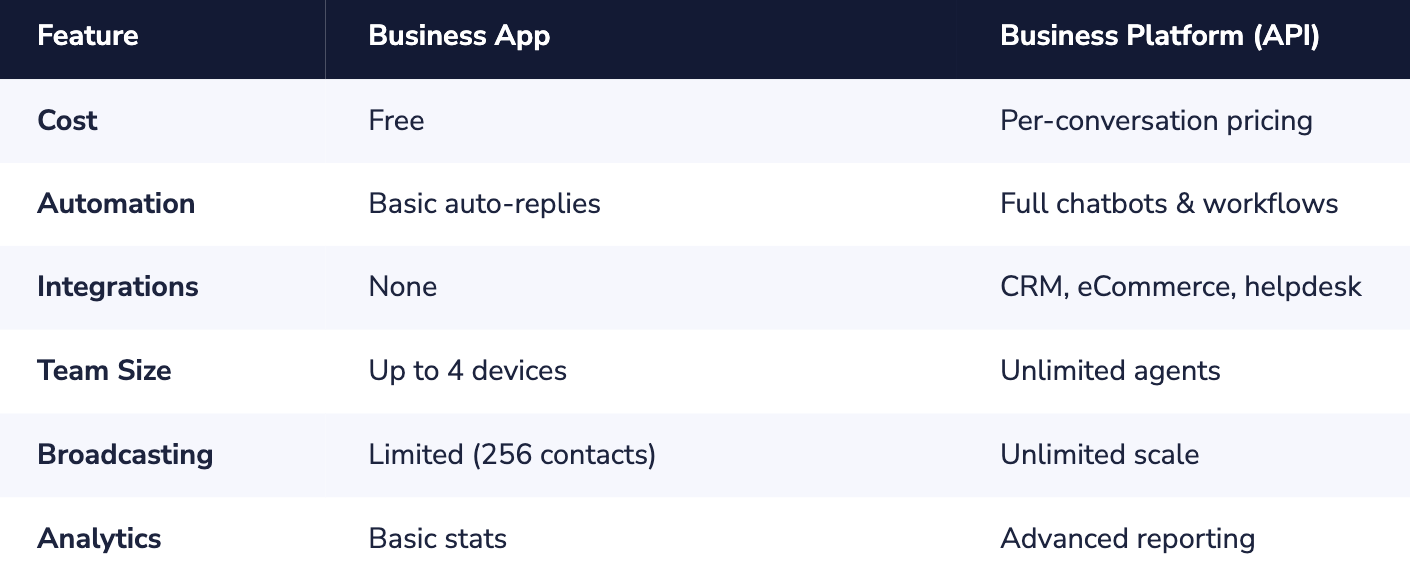
WhatsApp Business App
Best suited for: Solopreneurs and small businesses that send a smaller volume of messages
Features:
- Download and use for free
- Business profile with description, address, hours, website
- Product catalog (up to 500 products)
- Quick Responses for Frequently Asked Questions
- Greeting & away messages
- Conversation labels to stay organize
- Supports up to 5 devices concurrently
Limitations:
- Manual messaging without automation and chatbot use
- There is no integration with other systems (CRM, e-commerce systems).
- Limited analytics
- Inability to process large volumes of messages
WhatsApp Business Platform (API)
Most appropriate for e-commerce businesses scaling up, companies that acquire large customer bases
Features:
- Automation abilities in full, featuring chatbots
- Integration with CRM, helpdesk, marketing, and eCommerce systems
- Unlimited number of team members and agents
- Advanced Analytics and Reporting
- Broadcasting messages to opted-in recipients
- Interactive types of messages (buttons, lists, product cards)
- WhatsApp Flows for structured customer journeys
- In-chat payments
- Green Tick Verification: For Enhanced Brand Trust
Quick Comparison
Setting Up WhatsApp for eCommerce: Step-by-Step
Step 1: Establish Your WhatsApp Business Presence
Create and optimize your business profile:
- Use your brand name as it is used in official documents.
- Use a high-quality profile picture (your logo would be great).
- Add a brief description of the business (maximum 256 characters).
- Include your website, email, and physical address, if available.
- Define business hours to manage customer expectations.
Step 2: Connect Your Tech Stack
For API users, integrate WhatsApp with your existing systems:
Essential integrations:
- eCommerce platform (Shopify, WooCommerce, Magento) Integration: Sync product listings, inventory, and orders.
- CRM system (Salesforce, HubSpot, Zoho)
- Help Desk Software (Zendesk, Freshdesk): Support conversation routing and management.
- Marketing automation systems (e.g., Klaviyo, Mailchimp):
Step 3: Build Your Product Catalog
WhatsApp's native catalog feature allows customers to browse products without leaving the app.
Catalog best practices:
- Incorporate high-quality images with a consistent style.
- Use clear and brief product descriptions.
- Offer the correct prices and availability.
- Categorize products in a sensible way.
- Make sure to update the inventory status to prevent dissatisfaction.
Step 4: Create Your Message Template Library
For business-initiated messages, you'll need approved templates. Categories include:
- Marketing: Promotions, product launches, and invitations to events.
- Utility: Order confirmations, shipment notifications, appointment notices
- Authentication: One-time passwords, verification codes, and login alerts.
Step 5: Design Your Chatbot and Automation Flows
Automation handles routine interactions, freeing your team for complex conversations.
Essential automated flows:
- Welcome sequence: greeting the contact, brand introduction, and preference collection.
- FAQs: Answer typical questions regarding shipping, returns, as well as sizing.
- Product Discovery: Help customers navigate the product catalog based on their preferences.
- Order status: Provide functionality for checking the status of orders based on their numbers.
- Feedback Collection: Collect reviews after delivery.
Step 6: Establish Entry Points
Make it easy for customers to start WhatsApp conversations:
WhatsApp chat widget on your website
- Click-to-WhatsApp ads on Facebook & Instagram.
- QR codes on packaging, receipts, physical materials.
- Making WhatsApp links in email signatures and campaigns.
- The WhatsApp button on social media profiles.
WhatsApp eCommerce Strategies Across the Customer Journey
Stage 1: Awareness and Acquisition
Click-to-WhatsApp Ads
Advertisements on the platforms of Facebook and Instagram have the ability to directly link to WhatsApp conversations.
The intentually targeted customer, engaging creative storytelling to drive conversations, and chatbots must be set up for the instant qualification of leads.
Lead Magnets and Opt-In Incentives
There are various ways to increase the audience base for WhatsApp, and these include:
- Exclusive discount codes (10%-15% discount for the first order)
- Early access to sales and new products
- Free shipping on the first WhatsApp order
- Entering contests and giveaways
Stage 2: Consideration and Product Discovery
Conversational Product Recommendations
Direct customers to relevant products via conversation.
Leverage interactive buttons and quick reply functions to help customers narrow down choices based on their preferences, budgets, and needs, similar to how the recommendations would be offered by the sales assistant.
Product Questions and Objection Handling
Make answers instantly accessible:
- Fit and size information (such as size charts and fit guides)
- Materials and care information
- Comparison of Similar Products
- Availability and Replenishment Time of Stocks
- Shipping times and cost
Stage 3: Purchase and Conversion
Abandoned Cart Recovery
Cart recovery on WhatsApp is extremely effective compared to email.
Well-designed WhatsApp funnels deliver recovery rates for abandoned carts ranging from 45% to 60%, while email can only manage 5% to 10%.
Recommended sequence:
- Message 1 (after 1 hour of abandonment): A friendly reminder with a product image
- Message 2 (24 hours later): A incentive of 10% discount and a sense of urgency because of limited stock
- Message 3 (after 48 hours): Final reminder for cart expiration
Stage 4: Post-Purchase and Fulfillment
Transactional Notifications
Keep customers informed at every step:
- Order Confirmation: Itemized Receipt, Approximate Delivery Date, and Support Information.
- Payment confirmation: Charge details, method of payment, and invoice link.
- Shipping notification: Carrier name, Tracking Number, Tracking URL.
- Delivered: Delivery confirmation, feedback request, and options for help availability.
Proactive updates will decrease the number of “Where is my order?" inquiries by as much as 70%.
Stage 5: Retention and Loyalty
Personalized Re-Engagement
Re-engaging inactive customers with targeted outreach:
- We miss you. Enjoy 20% off your next order.
- Based on your previous purchase, you might like the following newly arrived products.
- It has been 30 days—consider restocking your favorites.
Loyalty Program Integration
Incorporate the WhatsApp service within your loyalty program to communicate balance notifications, reward alerts, and tier level updates to your customers.
Measuring WhatsApp eCommerce Performance
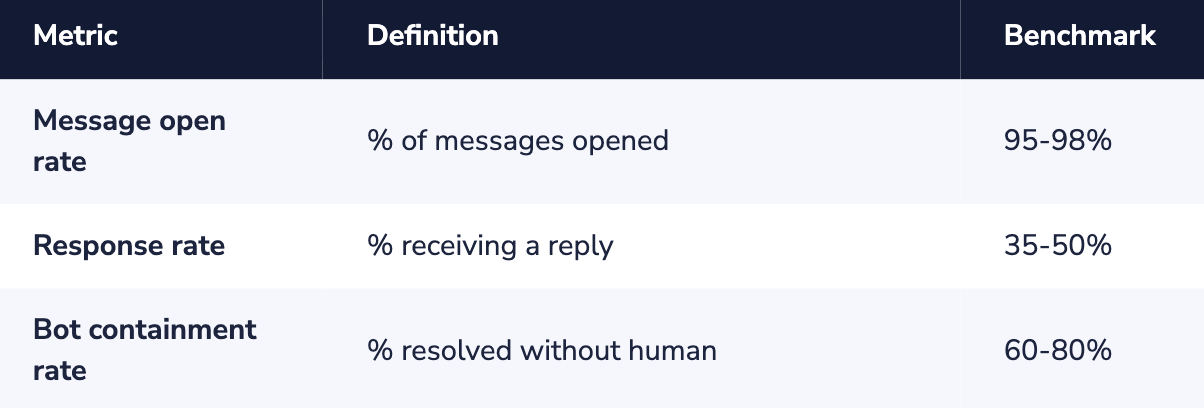
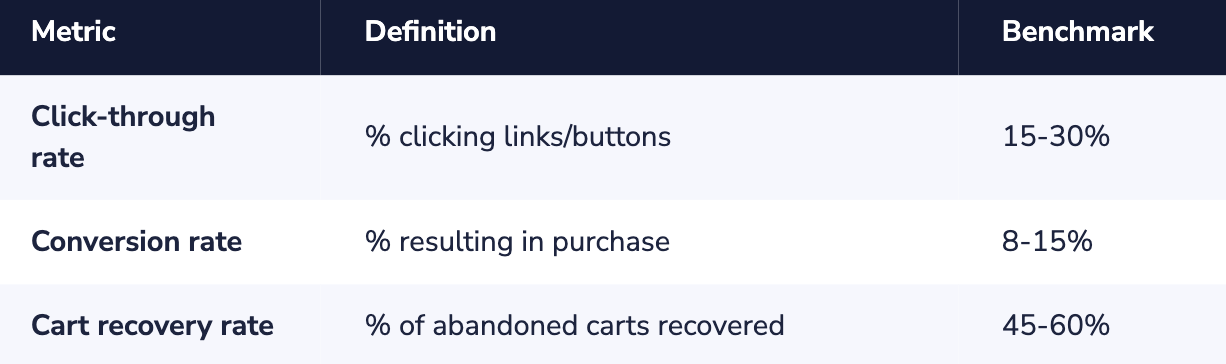
Track these metrics to optimize your WhatsApp commerce strategy:
Engagement Metrics
Conversion Metrics
WhatsApp Commerce Compliance and Best Practices
Opt-In Requirements
WhatsApp needs consent prior to sending messages that have been sent by the company.
Valid opt-in methods:
- Website form that includes a WhatsApp checkbox
- Opt-in confirmation message via SMS
- Click-to-WhatsApp Advert (Consent assumed for Response)
- QR code scan accompanied by clear opt-in messaging
Opt-in best practices:
- Specify the kinds of messages that will be received
- Define the expected frequency of messages
- Confirm the number that will receive the messages
- Make opt-out steps simple and easily available
Prohibited Business Categories
Certain industries cannot use WhatsApp Business:
- Adult materials and services
- Alcohol (regional restrictions may apply)
- Drugs and pharmaceuticals (with some exceptions)
- Gambling and Betting
- Tobacco & Vaping
- Weapons and ammunition
- Cryptocurrency (as applicable in respective jurisdictions)
Common WhatsApp eCommerce Mistakes to Avoid
Treating WhatsApp Like Email
The communication on WhatsApp should be chat-like.
A lengthy and heavily formatted newsletter is not an effective one.
Keep messages short, use formal chat language, and have two-way communication.
Over-Messaging
More messages mean higher risks of opting out.
Promotion broadcasts should be limited to 2 to 4 a month.
Messages should provide value.
Slow Response Times
Customers expect an immediate reply.
Therefore, automate your system to respond instantly to messages and redirect questions to available customer service representatives.
Generic, Impersonal Messages
Make it personal.
Use names, refer back to previous buys, and offer recommendations based on personal data.
Poor Bot Design
Bots ought to be enablers, not gatekeepers.
Ensure options are provided for connecting with human service, and improve the system based on unsuccessful conversations.
Getting Started: Your 4-Week Action Plan
Week 1: Foundation
- Request access to the WhatsApp Business Platform through a provider, like Dexatel
- Conduct business verification.
- Configure and optimize business profile settings.
- Integrate with the eCommerce site.
Week 2: Content
- Upload the product catalog.
- Develop message templates (initial 5-10 messages).
- Prepare the FAQs.
- Develop the welcome message and basic chat flows.
Week 3: Launch
- Add the WhatsApp widget to the website.
- Automated abandoned cart messages.
- Train employees on conversational matters.
- Soft-launch with a small audience.
Week 4: Optimize
- Analyze initial performance data
- Gather customer feedback
- Refine templates and flows
- Expand to additional use cases
Conclusion: The Future of eCommerce Is Conversational
WhatsApp e-commerce represents a revolution in the manner in which brands and consumers interact.
Instead of using one-way communication broadcasts and self-service engagements, organizations today can build relationships on a two-way communication model.
The potential is vast – 3 billion users, 98% open rates, and the ability to prove ROI in multiple sectors.
Yet, becoming successful does not mean simply having a WhatsApp account.
A more complex relationship requiring a considered strategy across the customer journey, investment in automation and integration, compliance and customer experience, and optimization based on data is described in this guide.
The brands that get WhatsApp commerce right today will begin to accumulate advantage after advantage: bigger opt-in audiences, more customer data, finer automation, and deeper relationships.
The question is not whether to use WhatsApp as an eCommerce platform:
What matters most is how quickly you can deliver and how well you can provide the experience and dialogue that the customer expects.
Are you ready to grow your eCommerce business through WhatsApp?
Dexatel offers the WhatsApp Business API, expertise on implementing the API, and the solutions required to get started, grow, and optimize your commerce business on WhatsApp.


