


How to Identify a Phone Number Carrier


Published: Oct 29, 2026
Want to know which carrier a phone number uses? You might be tempted to read the first few digits, but that often gives the wrong answer. A live carrier lookup gives you the current carrier, and you can run it on one number or on thousands.
With Dexatel, you can check a single number for free with the free carrier lookup tool, upload a CSV file to check a whole contact list, or connect carrier checks to your own system with the Lookup API.
This guide explains why prefixes can mislead you, how to run each type of check, and how to read the results.
Can You Identify a Phone Carrier by Its Number Prefix?
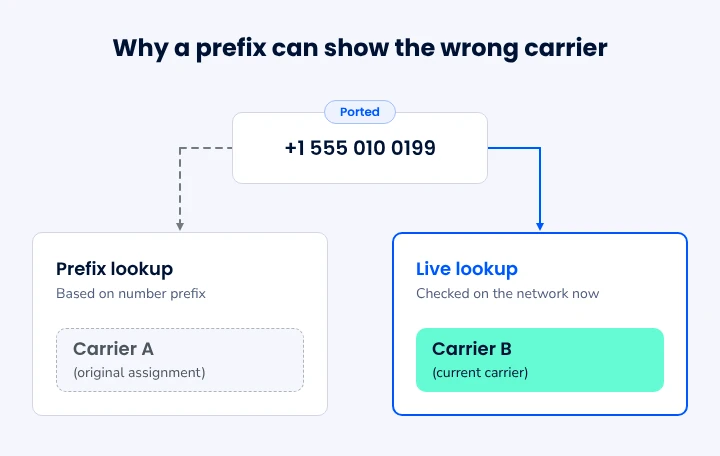
Not reliably. A prefix shows the carrier a number was first assigned to. It doesn't always show the carrier serving that number today.
People can switch providers and keep their number. This is called number porting. In the US, the FCC explains that you can keep your number when you switch providers within the same geographic area, including between wireline, IP, and wireless services.
That means a number that started with one mobile operator might now run on another. Prefix tables and old databases can miss the change and keep showing the original carrier. A live lookup checks the network itself, so you get the current answer.
3 Ways to Find a Phone Number's Carrier
Which method you use depends on what you need to do. Are you checking one number, cleaning a contact list, or running checks automatically inside your product?
| Method | Best for | What you need |
|---|---|---|
| Free carrier lookup tool | Checking a single phone number | The full number, with country code |
| Bulk lookup | Checking or cleaning a contact list | A Dexatel account and a CSV file |
| Lookup API | Automating checks at signup, before campaigns, or in a CRM | A Dexatel account and an API integration |
Method 1: Check One Number With the Free Tool
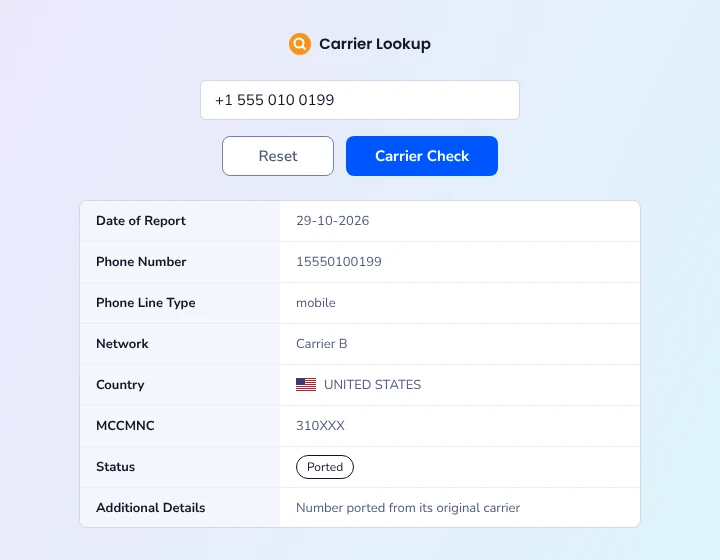
- Open the free carrier lookup tool.
- Enter the full phone number, including the country code.
- Click Check carrier.
- Review the carrier name, line type, and number status.
You can run a few checks a day without logging in. If you need more, you can create a free Dexatel account, which also unlocks bulk lookups.
Method 2: Check a Contact List in Bulk
Checking numbers one by one doesn't scale. For a full list, use bulk lookup in the Dexatel dashboard.
- Sign in and open Lookup in the dashboard.
- Upload a CSV file with numbers in international format. Dexatel recommends up to 50,000 numbers per file.
- Wait for the lookup to finish. Bulk runs happen in the background, so large files take longer.
- Download the results, remove invalid or inactive numbers, and review the unreachable ones before your next campaign.
Method 3: Automate Checks With the Lookup API
If your product or CRM needs carrier data on its own, use the Dexatel Lookup API. Each request returns the full result in the response, so you don't need a webhook or callback. The API reference has the details, and the HLR Lookup API overview explains how it works.
Lookups fit well at several points in your workflow:
- At signup: check a number before you send a verification code.
- Before a campaign: confirm that numbers are valid and active before you pay to message them.
- In your CRM: keep carrier, line type, and status up to date on each contact.
What a Carrier Lookup Tells You
Each lookup returns five details:
| Field | What it tells you |
|---|---|
| Carrier | The network operator currently serving the number |
| Line type | Whether the number is mobile, landline, or a service number |
| Ported flag | Whether the number has moved to a new provider since it was first assigned |
| Number status | Whether the number is valid and reachable on its network |
| Country | The country, shown as an ISO country code and a country name |
What the Status Results Mean
The status tells you whether a number is worth messaging. Before it checks the network, Dexatel cleans the number by removing extra characters and leading zeros, then checks the format. If the format is wrong, you get invalid_number back right away, with no network check.
If the format is valid, the live check returns one of these results:
| Status | What it means | What to do |
|---|---|---|
valid | The number exists and is active | Check the line type and confirm consent before you send |
inactive | The number exists but isn't active right now | Remove it from campaigns, or ask the contact for an updated number |
unavailable_network | The network couldn't be reached during the check | Try again later before you remove the number |
hlr_error | Something went wrong during the network lookup | Retry later |
invalid_number | The format is wrong | Fix the format or remove the number |
The live network check is called an HLR lookup. HLR stands for Home Location Register, the database mobile networks use to track their subscribers.
Why Businesses Check Phone Carriers
Knowing a number's carrier, line type, and status helps you make better decisions before you contact anyone.
- Fewer failed messages. Removing dead numbers before a campaign saves you from paying to send messages that will never arrive.
- The right channel. Most landlines can't receive SMS. If a number is a landline, you might call it instead, or ask for a mobile number.
- Better routing. A number can move to a new carrier without changing its digits. Checking the current carrier, including for ported numbers, gets your messages to the right network.
- No codes to dead numbers. Checking a number at signup means you won't send a one-time password to a number that can't receive it. You can then send the code with Dexatel Verify.
- Cleaner CRM data. Carrier, line type, and status show you which contacts are usable and which need updating.
How Much Does a Carrier Lookup Cost?
Single lookups with the free carrier lookup tool are free. Bulk and API lookups start at €0.005 ($0.0059) each, with lower prices at higher volumes. The price is the same for every destination country. See the Lookup pricing page for full details.
You're billed for each completed lookup, even if the result shows the number is inactive or unreachable. You aren't billed when no lookup runs, such as when the format is invalid, when a number appears more than once in a bulk file, or when the lookup fails on Dexatel's side.
New accounts get 20 free lookups to test the service. These can be used for single or bulk lookups.
Tips for Accurate Carrier Lookups
- Always include the country code. It's how the number is matched to the right country and network.
- Check numbers close to when you need them. Numbers can be ported or deactivated, so an old result may be out of date.
- Recheck temporary errors. An
unavailable_networkorhlr_errorresult doesn't mean the number is invalid. Run the lookup again before you remove it. - Remove duplicates first. Dexatel doesn't charge for duplicate rows, but cleaning them up makes the results easier to read.
- Use single lookups or the API when you need an answer now. Bulk runs take longer, so use them for list cleanup rather than live signups.
Check Your First Number
Start with the free carrier lookup tool to see the carrier, line type, ported status, and live status for one number.
Need to check more? Create a free account to run bulk lookups with your 20 free trial lookups. Developers can start with the HLR Lookup API overview. Before you message a list, you can also run it through the free phone number validator.
FAQ
How can I find out which carrier a phone number belongs to?
Enter the full number, including its country code, into Dexatel's free carrier lookup tool. It checks live network data and returns the current carrier, line type, and number status.
Can I identify a carrier from the phone number prefix?
Not reliably. A prefix shows the carrier a number was first assigned to, but the number may have been ported to another provider. A live lookup shows which carrier serves it now.
What is a ported number?
A ported number has moved from one provider to another without changing its digits. Dexatel Lookup includes a ported flag that shows whether a number has changed providers.
Does a carrier lookup show who owns the number?
No. A carrier lookup returns network information, including the carrier, line type, number status, and country. It doesn't reveal who owns the number.
Is a carrier lookup free?
Yes, for single numbers. You can check one number at a time for free with the carrier lookup tool. Bulk and API lookups start at €0.005 ($0.0059) each, and new accounts get 20 free test lookups.
What is an HLR lookup?
An HLR lookup checks a mobile number against the network's Home Location Register to see whether it's active and which network serves it. Dexatel Lookup uses this live check to return the number's status.


