


Two-Step Verification vs Two-Factor Authentication: What's the Difference?


Published: Nov 17, 2026
Two-step verification and two-factor authentication are often used to mean the same thing. But there is an important difference. Two-step verification requires two login checks. Two-factor authentication requires two different types of proof. For teams building login systems, that distinction affects how well an account is protected if someone steals a password. Here is how the methods compare and how to choose the right login flow.
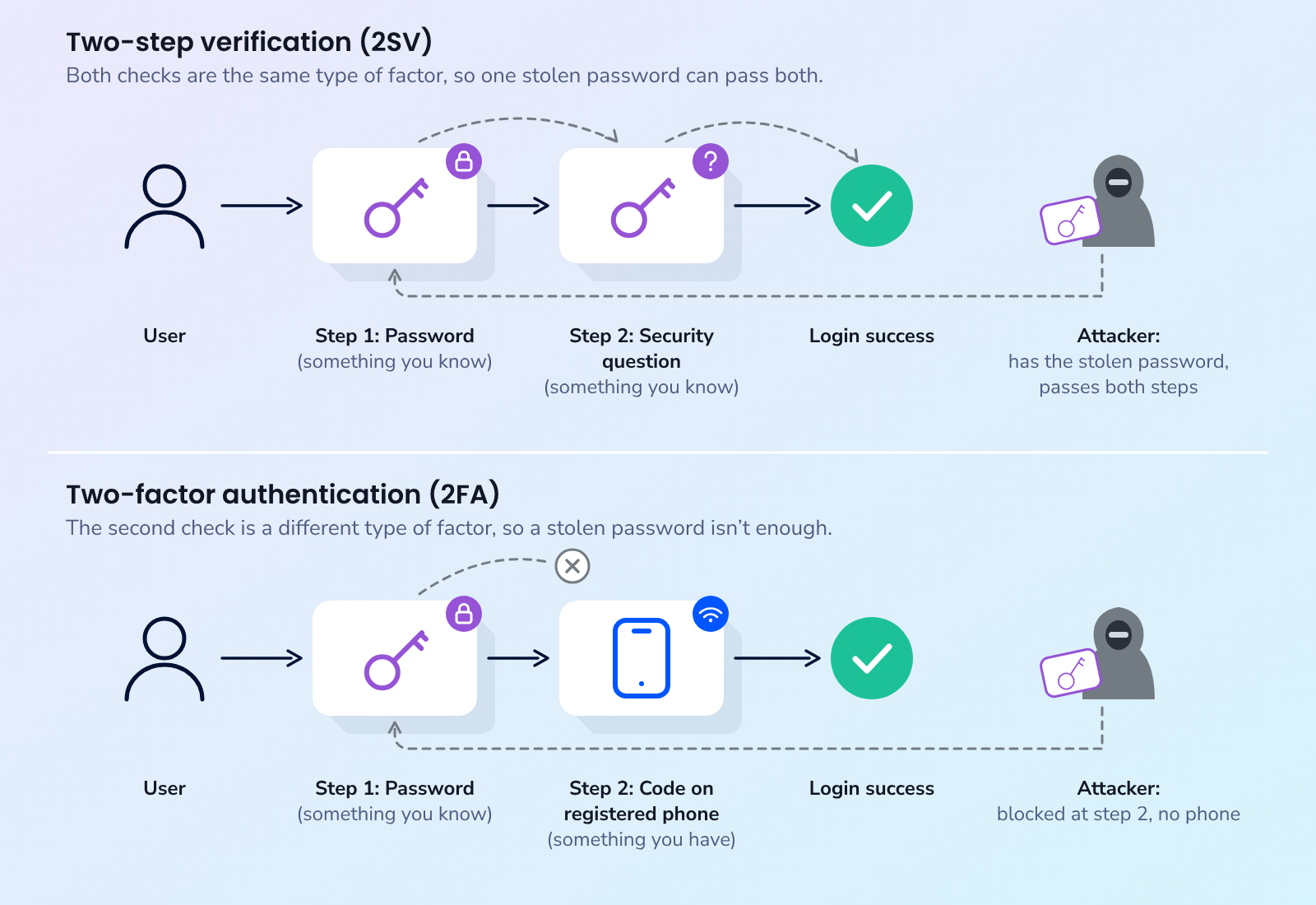
Short answer: Two-factor authentication (2FA) asks for proof from two different types of factor, such as a password (something you know) and a phone (something you have). Two-step verification (2SV) asks for two checks in a row, but both checks can be the same type. Every 2FA flow is a two-step flow, but not every two-step flow is 2FA.
What is two-factor authentication?
Two-factor authentication (2FA) requires users to prove their identity in two different ways. According to NIST's digital identity guidelines, authentication factors fall into three categories:
- Something you know: a password, a PIN or the answer to a security question.
- Something you have: a phone that receives a code, a security key or an authenticator app on a registered device.
- Something you are: a fingerprint or a face scan.
NIST defines multi-factor authentication (MFA) as a system that requires "more than one distinct type of authentication factor" (NIST SP 800-63B-4 glossary). 2FA is the most common form of MFA and uses exactly 2 factors. The important word is distinct. Two passwords are still one factor, because an attacker who can steal one can usually steal the other in the same way.
What is two-step verification?
Two-step verification (2SV) means completing two checks to sign in. Unlike 2FA, the checks do not have to use different types of proof. For example, a password followed by a security question is 2SV, but not 2FA. Both checks rely on something the user knows.
The term is also a product name. Google calls its account protection 2-Step Verification and lets users pick the second step from options such as Google prompts, authenticator apps, text or call codes, security keys and backup codes. Most of those options are a separate factor, so in practice Google's 2-Step Verification usually works as 2FA. The label describes the flow, not the strength.
Two-step verification is also different from identity verification, which checks who a person is when they first sign up. If that is the question you are working on, see authentication vs verification.
Two-step verification vs two-factor authentication: key differences
Two-step verification is about the number of checks. Two-factor authentication is about the types of proof required. Here is how they compare.
| Two-step verification (2SV) | Two-factor authentication (2FA) | |
|---|---|---|
| What it requires | Two checks in sequence | Two checks from different factor types |
| Can both checks be the same type? | Yes | No |
| Example | Password, then a security question | Password, then a code sent to a registered phone |
| If the password is stolen | Protection depends on the second check | The attacker also needs the second factor |
| How the terms relate | The broader term | A stricter form of two-step verification |
A second step only helps if the attacker cannot get it the same way they got the first. If a phishing page asks for a password and a security answer in the same form, the second step adds work for the user and none for the attacker.
Which login flows count as two-factor authentication?
Not every login with two checks qualifies as 2FA. The difference depends on what each check proves.
| Login flow | Two steps? | Two factors? | Why |
|---|---|---|---|
| Password, then a security question | Yes | No | Both are something you know |
| Password, then a code sent by email | Yes | No, under NIST | NIST says email "SHALL NOT be used for out-of-band authentication" |
| Password, then an SMS or voice code to a registered phone | Yes | Yes | The phone is something you have. NIST treats this channel as restricted |
| Password, then a code from an authenticator app | Yes | Yes | The app runs on a registered device |
| Password, then a push approval on a registered device | Yes | Yes | The device is something you have |
| Passkey unlocked with a fingerprint, face or PIN | One step | Yes | The device holds the key and the unlock adds a second factor |
Email codes can be confusing. Someone can often access an inbox from multiple devices using a password, so receiving an email code does not necessarily prove possession of a particular device. The NIST guidelines exclude email from out-of-band authentication but still allow email codes for confirming an email address and for account recovery (NIST SP 800-63B-4).
The passkey row shows the opposite case. NIST describes a multi-factor authenticator as a device that provides more than one factor, such as a cryptographic device with a built-in biometric sensor. Google notes that signing in with a passkey skips the second step because it already confirms you have your device. For more on this approach, see passwordless authentication.
Is SMS OTP two-factor authentication?
Yes. A one-time password (OTP) sent by SMS to a phone number the user registered earlier is a possession factor, because the user must have that phone to read the code. NIST describes an out-of-band authenticator as "a physical device that is uniquely addressable" and classes it as something you have.
NIST also marks the phone network as a restricted channel. The guidelines state that "Use of the PSTN for out-of-band verification is restricted" and that services using it "SHALL ensure that alternative authenticator types are available to all subscribers." NIST also recommends checking risk indicators such as "device swap, SIM change, number porting, other abnormal behavior" before sending a code over the phone network.
CISA, the US cybersecurity agency, ranks SMS and voice codes as the weakest MFA option for organizations facing targeted attacks, while noting that "any form of MFA is better than no MFA" (CISA fact sheet).
SMS codes remain useful because users can receive them without installing an authenticator app. But they should be one of several authentication options, supported by checks for phone-number risks.
Which is more secure, two-step verification or two-factor authentication?
2FA generally provides stronger protection than two checks that rely on the same factor. However, not all 2FA methods are equally secure. CISA groups common MFA methods from strongest to weakest:
- Phishing-resistant MFA, such as FIDO and WebAuthn (the standards behind passkeys) and PKI-based methods
- App-based one-time passwords, push notifications with number matching and token-based OTP
- Push notifications without number matching
- SMS or voice codes
Most consumer apps end up mixing these. Users who want the strongest option can choose a passkey, and everyone else still gets a real second factor through a code on their phone.
What should product teams build?
A secure login flow should use different authentication factors, give users more than one way to verify themselves, and add protection for higher-risk actions. Here is what product teams can do:
- Make the second step a different factor. Use email codes to confirm an address at signup or for low-risk actions, not as the second factor at login.
- Offer more than one option. NIST requires an alternative when you use the phone network. Passkeys or an authenticator app suit users who want them, and phone-based codes cover everyone else.
- Send codes on the channel users actually read. Not every user reads SMS first, and a code that arrives late or not at all ends the login. Dexatel Verify covers SMS, WhatsApp, Viber, Telegram, RCS, Voice, Flash Call and Email through a single integration, and you set a fallback order so that if a send fails, the next channel in the sequence is tried. The guide to channels for OTP delivery compares the options.
- Check the number before you trust it. NIST names number porting as a risk signal. Dexatel Lookup returns the line type (mobile, landline or service), the current operator, whether the number has moved from its original operator and its network status. Use it at enrollment to reject landlines and to review ported numbers before you bind them to an account. Lookup reports data and leaves the decision to your rules.
- Ask again for risky actions. Request the second factor for password changes, new devices and payouts, not only at login. The post on OTP bypass covers how attackers try to get around these checks.
- Protect the flow from abuse. Public OTP endpoints attract fake requests that cost money. Verify includes real-time number checks, rate limits and abnormal-behavior detection, and you can block countries you do not serve.
If you are planning a 2FA rollout, the Dexatel two-factor authentication page shows how the pieces fit together.
FAQ
Is 2-step verification the same as 2FA?
Not always. Two-step verification means two checks in a row. It is 2FA only when the two checks use different factor types, such as a password and a code sent to a registered phone.
What does 2SV mean?
2SV stands for two-step verification, a login process with two checks in sequence. The checks can use the same factor type or different ones, so 2SV is not always as strong as 2FA.
Is MFA the same as 2FA?
2FA is one type of MFA. MFA means two or more distinct factor types, and 2FA uses exactly 2.
Is a code sent to email two-factor authentication?
Under NIST guidelines, no. NIST says email shall not be used for out-of-band authentication, so a password plus an email code is two-step verification but not 2FA in NIST terms.
Can you still get hacked with 2FA?
Yes. A real-time phishing page can capture a password and a one-time code together, and phone numbers can be moved to another SIM or operator. Passkeys reduce the phishing risk, and number checks before sending a code reduce the phone risk.
What to do next
Review your login and account-recovery flows. Identify where two checks rely on the same factor or where email is the only additional check. Then choose which authentication methods to offer and which sensitive actions require another check. To test phone-based codes across channels, you can start a Dexatel Verify free trial with verification credits and no credit card.
Table of Contents


Subscribe to OurNewsletter
Never miss out on our latest news and exclusive offers.