How to Send Viber Bulk Messages with Dexatel Campaigns


Published: Dec 12, 2025

Viber, with more than a billion subscribers across the world, has proven itself as a prominent messaging service enabling businesses to reach large numbers of customers.
Viber leads the market significantly within the Eastern Europe, Southeast Asia, and Middle Eastern regions, with penetration rates as high as 92 percent within Ukraine and 89 percent within Belarus.
As a business opportunity, it is enormous.
Viber Business Messaging allows reaching thousands, or even millions, of customers with rich and engaging content at a cost substantially lower compared with traditional SMS services, with a savings potential of up to 85%.
Below is a detailed walk-through on how to send Viber bulk messages using Dexatel Campaigns, covering everything from setting up your Viber business account to running your first campaign.
Why Choose Viber for Bulk Messaging?
Unmatched Reach in Key Markets
Viber transcends beyond being an ordinary messaging app because it represents something much more.
Viber is the preeminent communications platform within high-value markets.
The regions whereby Viber exhibits its greatest strengths include:
- Ukraine: 35 million users (penetration 92%)
- Belarus: 8 million users - 89% penetration
- Serbia: 6 million subscribers (penetration rate 82%)
- Greece: 8 million users, 78% market penetration
- Israel: 7 million users, 75% market penetration
- Vietnam: 68 Million Users (70% Penetration)
- Philippines: 74 million users (68% internet penetration)
Viber should be given importance in the messaging plan if the target audience lives within these regions.
Viber vs. SMS: The Clear Advantage
Why Viber instead of traditional SMS?
There are several benefits.
To better evaluate Viber texting, we recommend visiting our Viber vs. WhatsApp article for an objective examination of Viber compared with other competing services:
- Rich media support: Capability to send images, videos, GIFs, documents, and interactive buttons, aside from text.
- Messages length: Up to 1,000 characters compared with 160 characters for an SMS message.
- Verified business profiles: Your business will be shown with a blue checkmark, generating an immediate trust reaction. Find out more about your Viber Business Profile configuration.
- Read receipts: Know exactly when your messages have been delivered and read.
- Interactive CTAs: Use interactive buttons that encourage people to act on an email directly.
- Significant savings on costs: As much as 85% cheaper compared with SMS.
What is Dexatel Campaigns?
Dexatel Campaigns allows for omnichannel messaging and serves as a platform for businesses that want to set up and optimize messaging campaigns on Viber, WhatsApp, and SMS.
Dexatel is an official Viber business messaging partner and thus allows businesses to connect with Viber’s business messaging infrastructure at the greatest possible deliverability and with competitive pricing.
Key Features for Viber Campaigns
Dexatel Campaigns stands out from Viber mass messaging services in the following ways:
- Viber dedicated campaign builder: A feature exclusively created for developing Viber campaigns, taking advantage of Viber’s capabilities.
- Text generation with AI: Use the AI assistant in case writing copy is difficult. Generate engaging message text in mere seconds with AI.
- More than 50 pre-approved templates: Launch your campaigns with tried-and-tested templates designed for all sorts of industries.
- Message Personalization: Use custom variables for message personalization. Variables include names, order numbers, appointment times, and so on.
- Multi-channel fallback: A fallback to SMS will be enabled if the addressee is not on Viber.
- Built-in link shortener: Keep track of link clicks with an integrated link shortener.
- Unified Inbox: Manage customer conversations from a single platform using Viber Business Inbox.
- Real-time analytics: Real-time analytics enable measurement of delivery rates, read rates, and click-through rates.
Rich Media Capabilities
Through Dexatel’s Viber Business solution, subscribers can share:
- Images: JPEG and PNG format, maximum size 500 KB and high resolution.
- Videos: MP4 files no larger than 26 MB with accompanying preview images.
- GIFs: Typically animated images intended to draw focus.
- Files: PDF, DOCX, and XLSX up to 200 MB.
- Stickers and Emojis - Branded stickers that add personality.
- Interactive buttons: Call-to-action buttons leading to website links, phone numbers, and deep links.
- Location-sharing: Store locations or locations for meetings can be directly shared via the message.
Setting Up Your Viber Business Account with Dexatel
Prior to engaging in Viber mass messaging, it is necessary to set up your Viber business account via Dexatel.
A marked aspect about this process is that it is done on the Dexatel platform with 24/7 support.
Prerequisites
To commence:
- A registered business entity
- A Dexatel account: sign up for a free trial with $2 worth of credits. No credit card necessary.
Setup Process
Creating your Viber Business account is a three-step process:
- Apply: Fill out your application on the Dexatel platform with your company details, business name, registration number, and use case.
- Sign the warranty letter: The anti-spam agreement is an assurance that you will not use Viber for unsolicited messages. It should be signed as it is an essential requirement from Viber.
- Sign the business agreement: Fill out and sign the Dexatel agreement regarding business pricing and terms. Once approved, your business will get an verified Viber Business Profile with a blue tick on all Viber messages, thus immediately boosting trust among receivers.
How to Create a Viber Bulk Campaign: Step-by-Step
It’s finally time for you to carry out your first Viber Bulk message campaign.
Below are steps on how you can do it using Dexatel Campaigns:
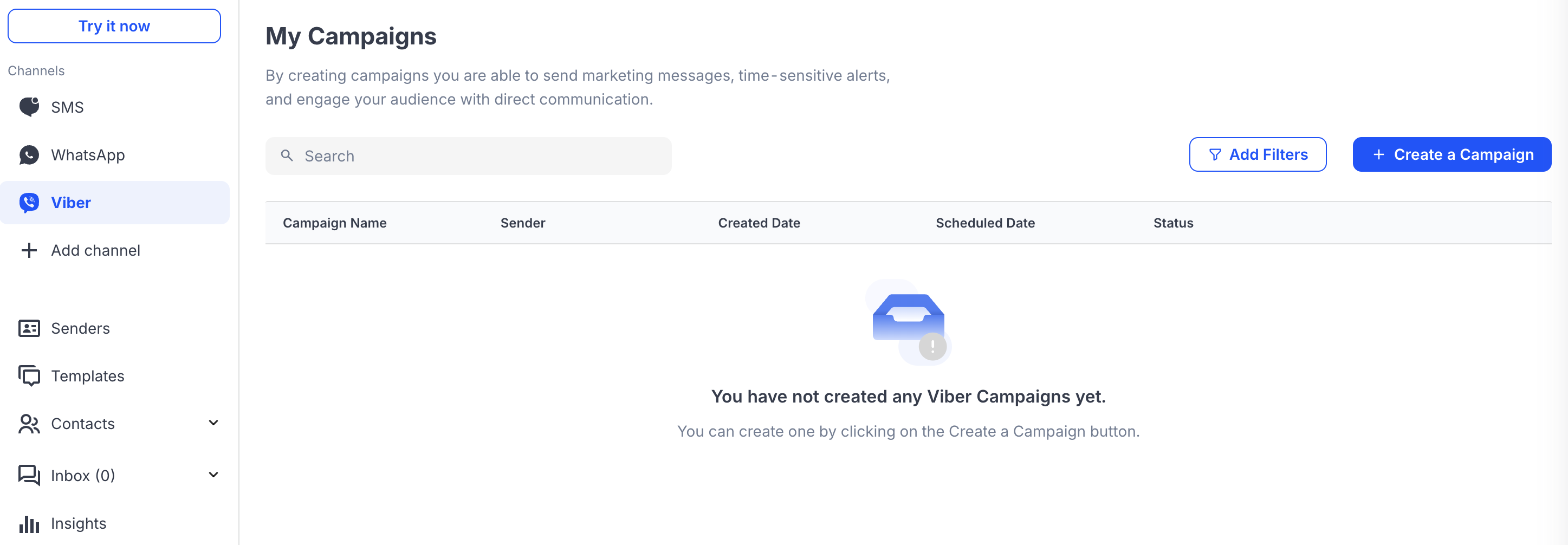
Access the Campaign Builder
- Log into your Dexatel account at dashboard.dexatel.com
- Locate and click on the Campaigns option within the main menu.
- Click on Create Campaign to start a new campaign
Choose Viber as Your Channel
Select Viber among the messaging channels.
To achieve better deliverability, it is possible to set a fallback option for SMS.
That is, if a user doesn’t have Viber on their device, messages will be sent via SMS.
Compose Your Message
At this point, your campaign begins to form.
You have several options:
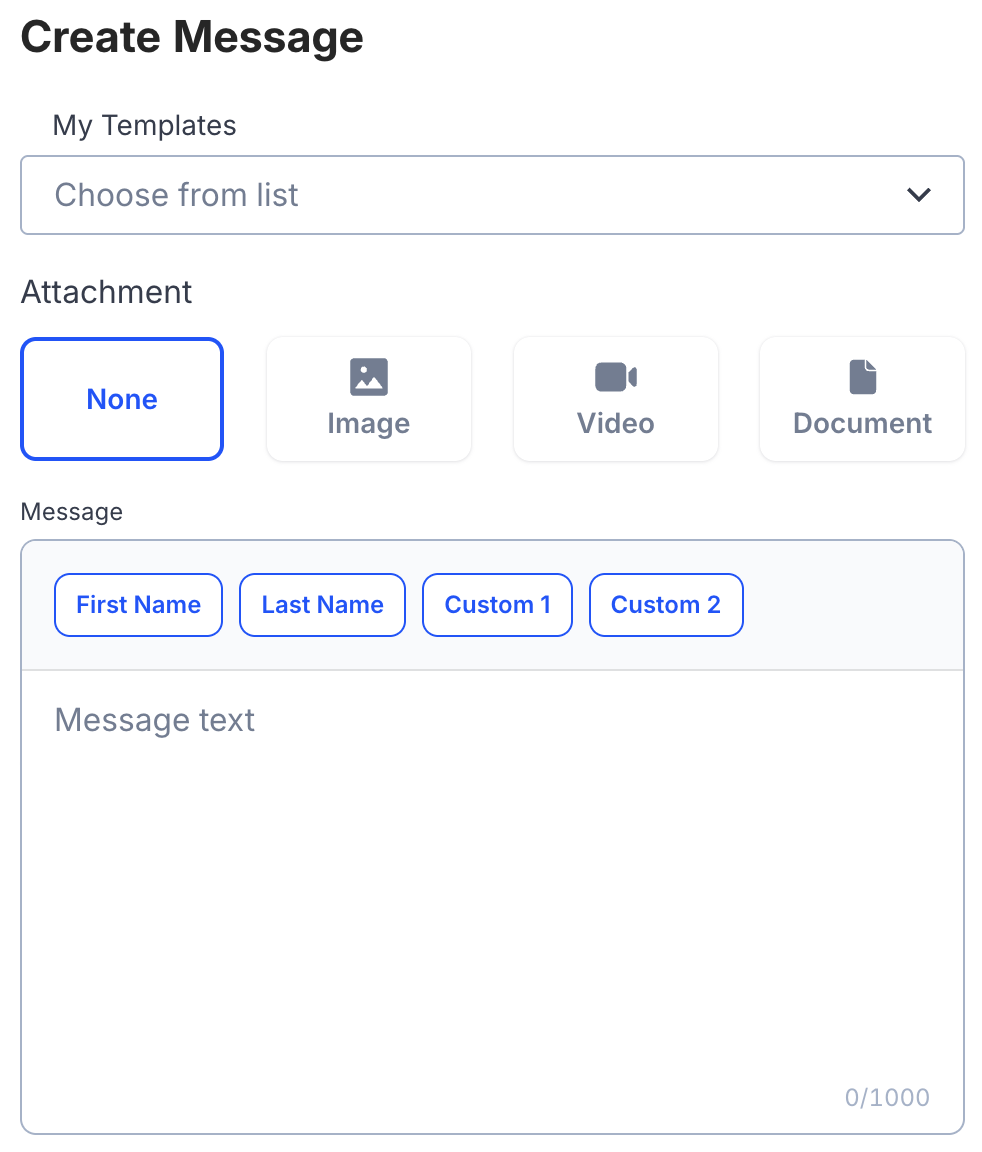
- Create your own copy: Write an engaging message with a character limit of 1,000. It should be brief, result-driven, and value-centric.
- Utilize AI support: To get suggestions based on your campaign goals, click on the AI Text Generator button.
- Template selection: There are more than 50 pre-approved templates that have been designed for specific industries.
- Adding Personalization: Use variables like {first_name}, {order_number}, or {appointment_time} and include these personalizations within your messages.
Add Rich Media (Optional)
To better communicate your message, incorporate images:
- Upload images, videos, and GIFs that relate to your message
- Insert CTA buttons with personalized labels and destination URLs
- Use shorter links with tracking capabilities via the internal link shortener
Define Your Audience
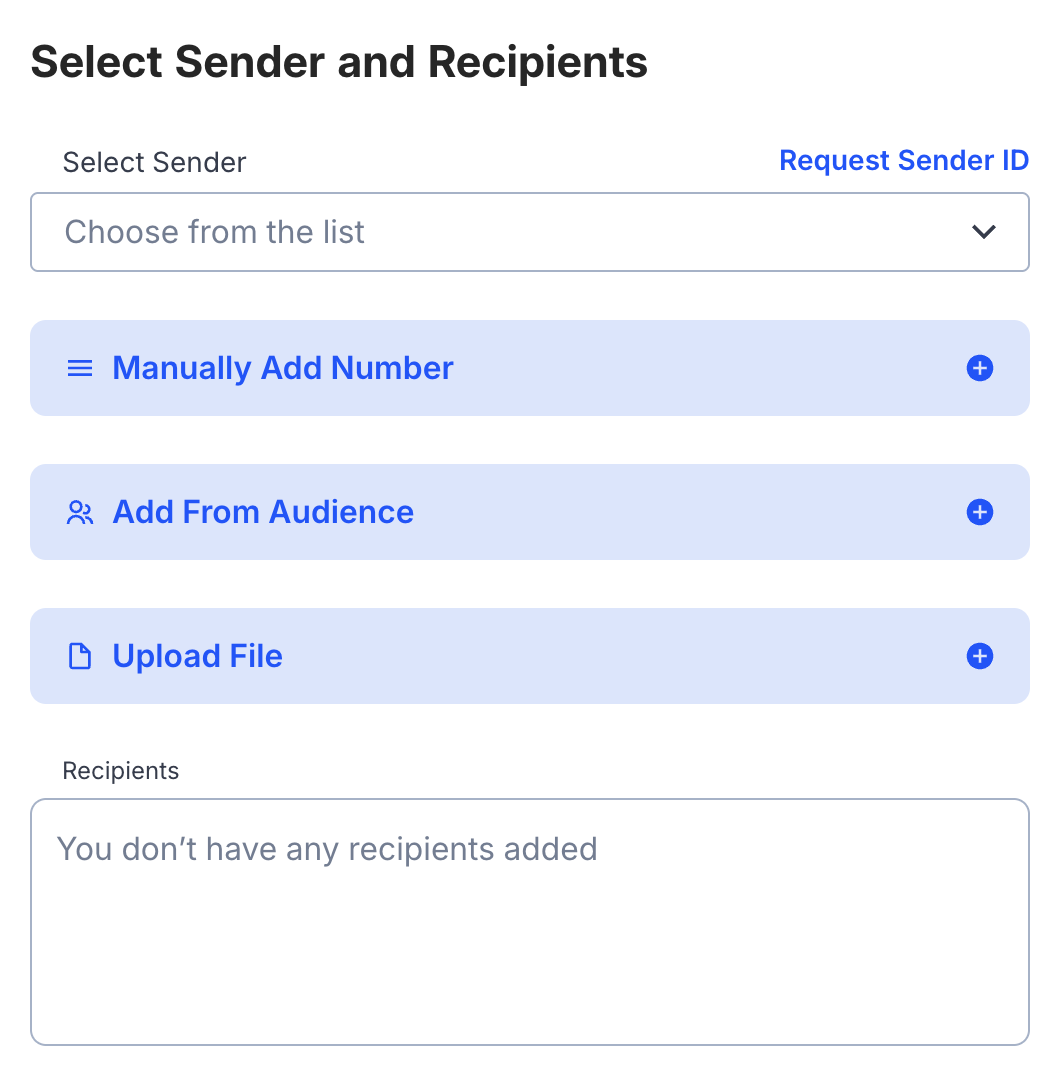
Define who will receive your campaign messages:
- Importing contacts: Upload a CSV file with phone numbers and any personalization information
- Select existing contacts: Pick from saved contact lists.
- Segment your audience: Filter your contacts based on factors like location, previous engagement, and user-defined tags
Pro tip: Use Dexatel’s Number Lookup service before sending your message so that you will be billed only for messages sent to active Viber subscribers.
Schedule and Send
With all the Finally, identify the timing for delivery:
- Send immediately: Start running the campaign immediately
- Schedule for later: Include specific date and time, taking into consideration the time zone applicable for the audience
Check all the information and press Send.
Your Viber bulk message campaign is set up.
Sending Viber Messages in Bulk via API
Dexatel provides an efficient API for Viber message communications programmatically.
Dexatel's services are appropriate for businesses requiring an advanced level of features.
Use Dexatel Viber API as necessary.
When to use the API
- Automated high volume campaigns: Send millions of messages triggered by actions within your system.
- System Integration: Viber messaging can be integrated with your CRM, e-commerce site, or custom apps.
- Triggered messages: Enable triggered messages that are sent instantly based on user actions. These actions include ordering, password reset, and appointment reminders.
API Functions
Dexatel’s REST API supports:
- Multiple programming languages: cURL, Java, Node.js, PHP, Python, and so on
- Native SDKs for accelerated integration
- Delivery status updates via real-time webhooks - Detailed documentation available at developers.dexatel.com
Integration Options
Dexatel supports integrations with leading business applications like Zapier, Pipedrive, and Customer.io.
Also, for custom integrations, all necessary information can be obtained from the API document.
Viber Campaign Pricing with Dexatel
An understanding of pricing concepts will help you plan your Viber campaigns.
How Pricing Works
Dexatel uses a transparent and pay-as-you-go system with no hidden charges:
- Monthly minimum fee: A fee charged every month for your Viber Business account to remain active.
- Per-message pricing: You will be charged for messages that have been successfully delivered.
Message Types
Viber charges depending on the type of message:
- Transactional messages: Order status updates, shipping confirmations, and account notifications.
- Promotional messages: Marketing messages, sales promotions, and promotional offers.
- Session-based: Messages exchanged within a 24-hour period or up to 60 messages.
Learn more about Viber Business pricing here.
Best Practices for Viber Bulk Campaigns
To make your Viber campaigns more successful, we recommend that you follow these best practices.
Message Content
- Keep it brief: The fact that a person can type 1,000 characters does not mean they should. A shorter message will get better results.
- Lead with value: Begin your message with value. What value do they get from your message?
- Leverage rich media effectively. Images and videos are very engaging. However, it should have value addition. It should not be added for its own sake.
- Use a call-to-action: Communicate clearly with your audience on exactly what you would like them to do. Use action buttons whenever possible.
- Personalize if possible: Messages with the person’s name or some level of personalized information will result in better levels of engagement.
Audience Management
- Promotional messages need opt-out option, but for transactional emails like updates and OTPs, opt-out are not necessary.
- Clean your lists on a regular basis: Purge inactive numbers and numbers that are causing bounces.
- Validate numbers beforehand: Use Dexatel’s Lookup service to check which numbers have Viber before sending.
- Segment your audience: Send targeted messages to certain groups instead of posting the same message on all accounts.
Creating Community
Apart from broadcasting, you might want to set up a Viber Community.
Raising awareness about your Viber Community among your audience will help you build a strong customer loyalty base.
Timing and Frequency
- Test your send times: The best times will be different depending on your audience. You should test different times and see what works.
- Be aware of time zones. Messages should be sent based on local times for international campaigns.
- Message fatigue - Do not message excessively. Find a frequency that keeps people engaged without annoying them.
Compliance
- Follow Viber guidelines: Be sure to follow Viber’s guidelines so that your account doesn’t get suspended.
- Honor Opt-outs: Give easy unsubscribe options and act on them immediately.
- GDPR Compliance: To address people from the EU, it is imperative to align your data processing operations with GDPR standards. Dexatel is GDPR-compliant.
Tracking and Optimizing Your Campaigns
The job will not be complete once your campaign goes out.
You will need to monitor and optimize based on data.
Key Metrics to Monitor
- Delivery rate: The percentage of successful messages that were delivered.
- Read rate: How many people have opened your message.
- Click-through rate. When your messages included links or buttons, what percentage were clicked on?
- Conversion rate: Number of people who took the required action.
- ROI: ROI evaluates the return on your messaging investment.
Optimization Strategies
- Run A/B testing: Test various messages, images, CTAs, and send times to identify what works best.
- Break down your analysis by segment: This will allow you to see what works well on different segments.
- Iterate based on data: Use learnings from previous campaigns and improve every subsequent campaign.
- Monitor Trends: Monitoring the performance will enable you to identify the prevailing trends.
To start, sign up for a free trial with Dexatel and get $2 credit for Viber messaging.
Dexatel Campaigns makes Viber large message broadcasts easy and affordable for delivering your market campaigns, transaction messages, and OTPs.
To start using our services, click on sign up and fill out a short form.