


Webhook vs API: Key Differences and When to Use Each


Published: Nov 16, 2026
The main difference between a webhook and an API is who sends the request. With an API, your application asks another system for information or tells it to take an action. With a webhook, that system sends an update to your application when something happens. Messaging teams often use both. Here is how they work and when to use each one.
Short answer: An API is pull: your code sends a request and gets a response. A webhook is push: the provider sends an HTTP POST to your URL when an event happens. Use the API to send messages and look up records. Use webhooks to hear about delivery results and inbound replies without asking.
What is the difference between a webhook and an API?
With an API, your application requests information. With a webhook, the provider sends an update when something happens. This difference affects how quickly you receive updates, how often you send requests, and what you need to build.
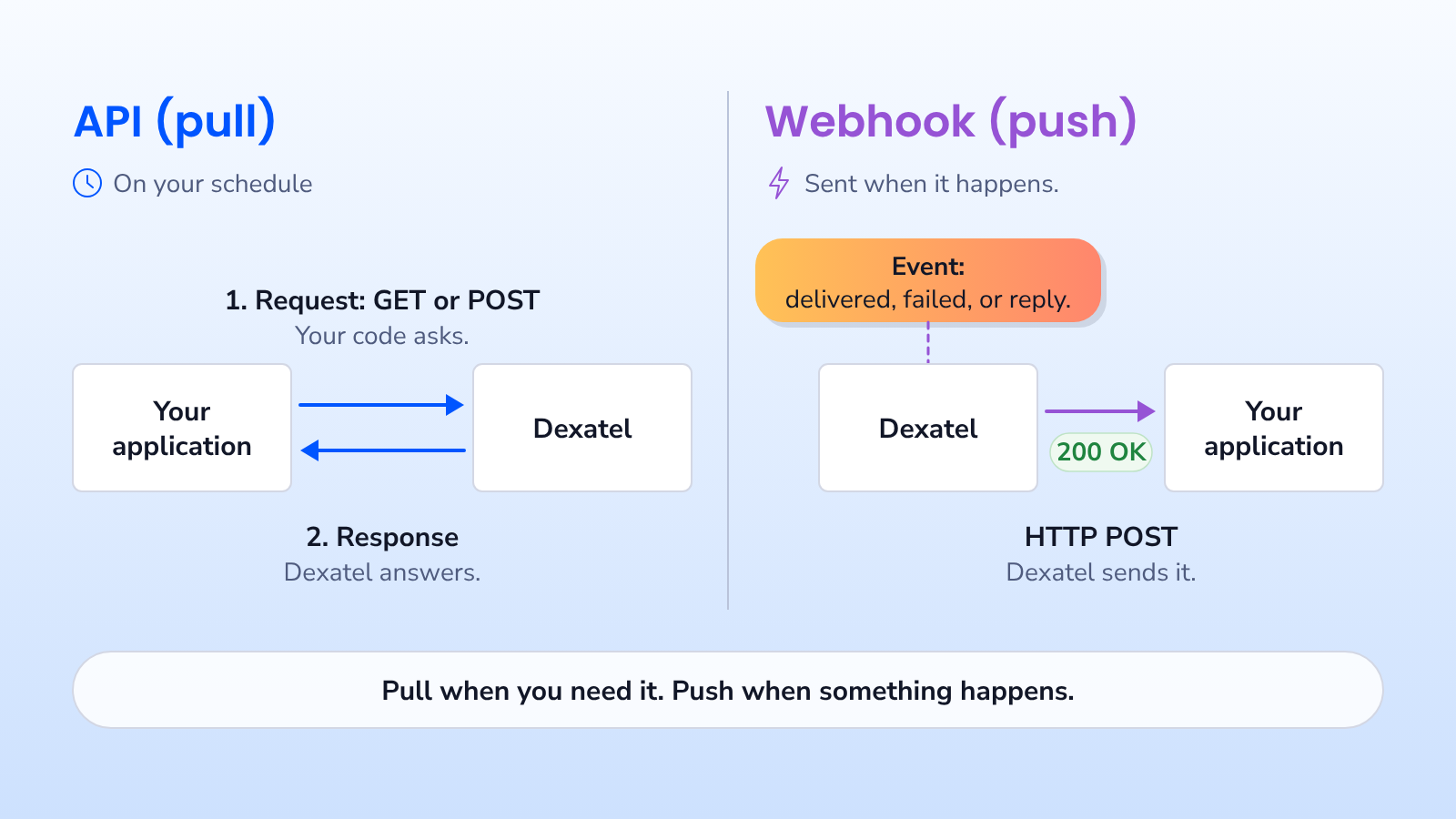
Imagine your application sends an SMS through a messaging API. The API responds with a message ID, but that does not mean the SMS has reached the recipient. Delivery can take longer because the message still has to pass through carrier networks. You can repeatedly check its status through the API, or receive a webhook when the status changes.
The choice is not always webhook vs API. Often, the better approach is to use each one for the part of the process it handles best.
What is an API?
An API (application programming interface) lets one application communicate with another. Your application sends a request, such as asking for data or starting an action, and receives a response.
In messaging, you use APIs to send messages, start verifications, create templates, and retrieve records. For example, with the Dexatel Messaging API, you send a POST request containing the sender, recipient, and message text. The response tells you whether the request was accepted.
You can also use an API to look up information whenever you need it. Dexatel's Get Your Messages endpoint (GET /v1/messages) lets you retrieve message history and filter it by status, channel, country, recipient, or date range. It returns up to 1,000 records per page, making it useful for scheduled reports and audits. For more background, see what is an SMS API.
What is a webhook?
A webhook lets another system notify your application when something happens. You provide a URL, and the provider sends an HTTP POST request to that URL when a selected event occurs. Your server receives the event details and responds to confirm receipt.
Unlike an API request that your application starts, a webhook starts with an event on the provider's side. You do not have to keep checking for updates. For example, a webhook can notify you when a customer replies or a carrier reports that a message was delivered.
With Dexatel, you create a webhook through the API by providing a URL, name, secret, and event type. The webhook reference lists two types: DELIVERY for delivery reports and MESSAGE for incoming messages sent to your sender IDs. The SMS webhook feature page explains how this helps messaging teams.
Webhook vs API at a glance
The table below compares the two on the points that matter when you design a messaging integration.
| API | Webhook | |
|---|---|---|
| Direction | Pull: your app calls the provider | Push: the provider calls your app |
| Who starts it | Your code, on your schedule | An event on the provider side |
| Data freshness | As fresh as your last request | Sent when the event happens |
| What you build | A client that sends requests | A public HTTPS endpoint that receives them |
| Best for | Sending messages, lookups, reports, backfills | Delivery status, inbound replies, real-time alerts |
| Main risk | Wasted requests and stale data if you poll | Missed or duplicate events if your endpoint fails |
| Security | Your API key authenticates you | A signature proves the request came from the provider |
You do not have to choose only one. APIs and webhooks often work together in the same messaging process.
How do webhooks and APIs work together in a messaging flow?
In a typical messaging flow, your application uses an API to send an SMS and webhooks to receive updates. Here is what that looks like with Dexatel.
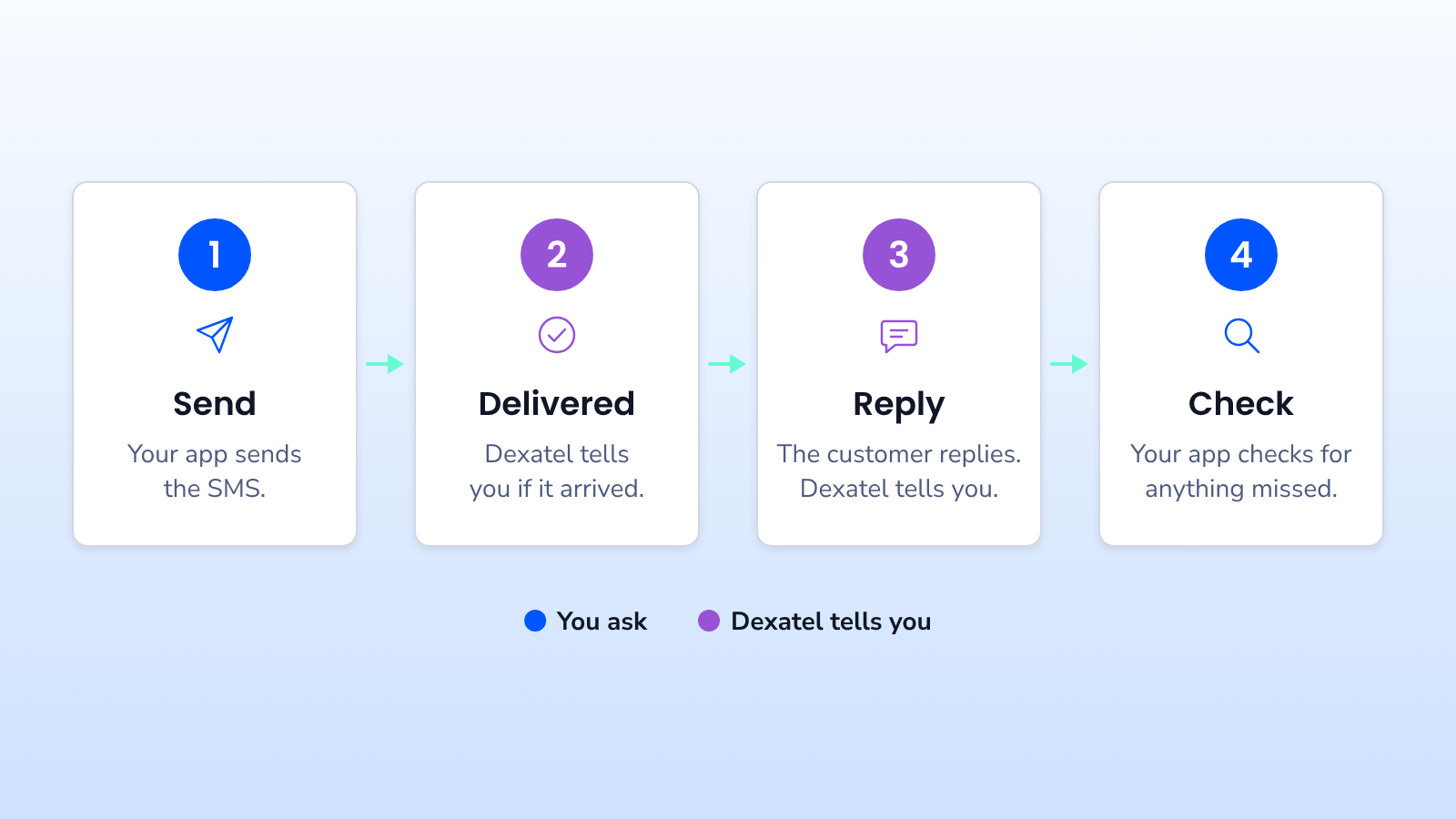
- Send the SMS through the API. Your application sends the recipient and message text to the Messaging API. The response includes a message ID that you can save with the related order or user record. You can also include an optional
payload, such as an order ID, of up to 500 characters. - Get the delivery update through a webhook. When a delivery report is available, Dexatel sends a POST request to your
DELIVERYwebhook URL. The update includes themessage_id, deliverystatus(such as delivered, failed, rejected, or expired),channel, network code (mccmnc),price, andtimestamp. If you sent apayload, it is returned too, helping you connect the update to the right order. - Receive customer replies. If someone replies, Dexatel sends the sender's number, message text, and channel to your
MESSAGEwebhook. Your application can forward the reply to support, send an automatic response, or record an opt-out. - Check for missed updates through the API. Once a day, or after an outage, call
GET /v1/messagesand filter by date and status. Compare the results with your records to find updates your webhook receiver may have missed.
You can use a similar approach for verification. When sending an OTP through the Dexatel Verify API, you can include an optional payload and receive delivery updates through a webhook. This helps you decide whether to offer a resend or another channel. Webhooks can also report read status for WhatsApp and Viber messages.
For a deeper look at what a delivery report contains and why messages fail, see SMS delivery reports: common issues and solutions.
Webhook vs polling: what does polling really cost?
Polling means repeatedly calling an API to check for updates. Many of those requests return the same information, but they still use network resources and count toward any applicable rate limits.
Consider an example. You send 10,000 OTP messages a day and check each message's status every 10 seconds for 2 minutes. That means 12 checks per message, or 120,000 API requests a day. If you receive one webhook event per message instead, you could get those 10,000 updates without making 120,000 status requests. This is an illustration, not a measured usage figure.
Polling can also delay an update. If you check every 10 seconds, you may not notice an OTP delivery failure until the next check. A webhook sends the update when the provider has the event, without waiting for your next request.
Polling is still useful when your application cannot receive public HTTP requests. It also works well for scheduled checks that compare your stored records with the provider's data.
When should you use an API, and when should you use a webhook?
Use an API when your application needs to request an action or information. Use a webhook when you need an update about an event that happens elsewhere.
An API is the better fit in these cases:
- You are taking an action, such as sending a message, starting a verification or creating a campaign.
- You need data on your own schedule, such as a daily cost report or a filtered message export.
- You are backfilling or auditing records after downtime.
- Your service cannot accept inbound HTTP requests.
A webhook is the better fit in these cases:
- You need to react fast to an event you cannot predict, such as a reply or a delivery failure.
- The volume of events is high, so polling each item would waste requests.
- Other systems depend on the status, for example a CRM that marks a lead as contacted only after delivery.
- You want to trigger a follow-up automatically, such as a fallback to another channel when an SMS fails.
For that last case, you do not always need to build the logic yourself. Dexatel's transactional messaging fallback lets you send one request that moves to the next channel when the first one does not deliver.
What are the disadvantages of webhooks?
Webhooks are useful, but your application needs to receive and handle them reliably. Here are four common challenges.
Missed events. If your server is down or returns an error, you may miss an update. Whether it is sent again depends on the provider's retry behavior. Regular API checks help you find missing records.
Repeated or out-of-order updates. A webhook event may arrive more than once. Updates may also arrive in the wrong order. Your application should avoid processing the same event twice or replacing a newer status with an older one.
Security. Your webhook URL is publicly reachable, so other parties could try to send requests to it. Verify each request's signature before trusting the data.
Local testing. A provider usually cannot reach a webhook running only on your laptop. You may need a secure tunnel or a staging server with a public HTTPS URL to test it.
These challenges are manageable if you design your webhook receiver to handle them.
How do you build a reliable webhook receiver?
A reliable webhook receiver must verify incoming requests, respond quickly, handle repeated events, and check for missed updates. Here are five practical steps.
- Use HTTPS. Webhook requests can contain phone numbers and message text. HTTPS protects that information while it travels over the network.
- Verify the signature on every request. Dexatel signs each webhook with HMAC-SHA256 using the secret you set when you created the webhook, and sends the result in the
X-Dexatel-Signatureheader, according to the delivery webhook docs. HMAC is a standard way to prove a message came from someone who holds a shared key, defined in RFC 2104. Recompute the signature on your side and compare the two with a constant-time function such as Node.jscrypto.timingSafeEqual, which avoids leaking the secret through response timing. - Respond quickly and process later. After safely receiving and storing a valid event, return a
2xxsuccess response, such as200 OK. A 2xx response tells the sender the request succeeded. Use a queue and background worker for slower tasks, such as updating your database or CRM. - Handle duplicate events. Your system should produce the same result even if it receives an event twice. Save a unique combination, such as
message_idandstatus, so you can skip updates already processed. Check thetimestampbefore changing a message's status to avoid replacing a newer update with an older one. - Check your records regularly. Once a day, use
GET /v1/messageswith date and status filters. Compare the response with your stored data and correct any differences.
Here is an example of creating a delivery webhook with Dexatel. You can use a separate webhook URL for each channel. A DEFAULT webhook receives delivery updates for channels that do not have their own URL.
POST https://api.dexatel.com/v1/webhooks
X-Dexatel-Key: YOUR_API_KEY
Content-Type: application/json
{
"data": {
"name": "delivery-status",
"url": "https://api.example.com/webhooks/dexatel/delivery",
"secret": "YOUR_WEBHOOK_SECRET",
"event": "DELIVERY",
"channel": "DEFAULT"
}
}
If you want to build automated two-way messaging using the MESSAGE webhook, see the SMS chatbot guide. If you prefer a ready-made inbox, Dexatel Conversations helps support teams manage SMS, WhatsApp, and Viber replies in one place.
FAQ
Are webhooks push or pull?
Webhooks are push. The provider sends data to your URL when an event happens, while an API call is pull because your code requests the data.
Is a webhook an API?
A webhook is part of an API, not a replacement for it. The provider defines the events and the payload format, and you usually create and manage webhooks through the provider's API.
What is the difference between a webhook and a REST API?
A REST API exposes resources that your code reads or changes with HTTP methods such as GET and POST. A webhook is a single HTTP POST that the provider sends to you when an event happens, so it carries news rather than waiting to be asked.
What are webhooks used for in messaging?
In messaging, webhooks are used to receive delivery reports and inbound messages in real time. Teams use them to update order and login flows, trigger fallbacks and route customer replies to support.
What to do next
Start with the events your application needs to know about, such as SMS delivery failures, OTP delivery updates, or customer replies. Use webhooks for those updates and APIs for actions and information you request yourself. The Dexatel developer docs explain how to set up a webhook, while the Messaging API provides message IDs to match with incoming events.


