


How to Use Viber for Business: A Complete Operational Guide


Published: Feb 17, 2026
You have a Viber Business account.
Now what?
Most guides end here.
They explain to you how to set up your account, what a sender ID is, and leave you looking at a dashboard wondering what to do next.
This is where our guide picks up from there and provides you with a simple plan to use Viber as a business communication channel – not just something you signed up for and forgot about.
We’ll walk you through a simple plan to create a communication strategy using Viber, use it to send transactional, promotional, and support messages, manage your contact list, and check if it’s actually working.
If you haven’t created your account yet, check out our Viber Business Account setup guide and come back here later.
Define Your Viber Communication Strategy Before You Send Anything
The biggest trap is to think of Viber as another blast tool.
People join Viber, send out a promo to all their contacts, and wonder why people don't respond after the second message.
Viber is not like this when you think it through.
First, think about the content you should be sending on Viber for your business.
There are three main categories.
Most businesses will need all three, but you don't need to do all three at once.
- Transactional messages are related to some action the customer took or some event in your system, like order confirmations, shipping notifications, appointment reminders, password reset notifications, or other account notifications. These are expected, time-sensitive, and help people trust your brand. If you're already doing these on SMS or email, Viber is a better option because it's cheaper and looks nicer.
- Promotional messages are campaigns, product announcements, flash sales, coupon notifications, re-engagement campaigns, etc. These are initiated by your brand, require customer opt-in, and are the most expensive per message. These also generate the most revenue for your business when done correctly.
- Conversational messages are those where the conversation will be two-way: customer support questions, pre-sale questions, feedback collection, and any other time the customer expects a response. This is where the messaging style of Viber stands out compared to email, where the response time may be hours or days.
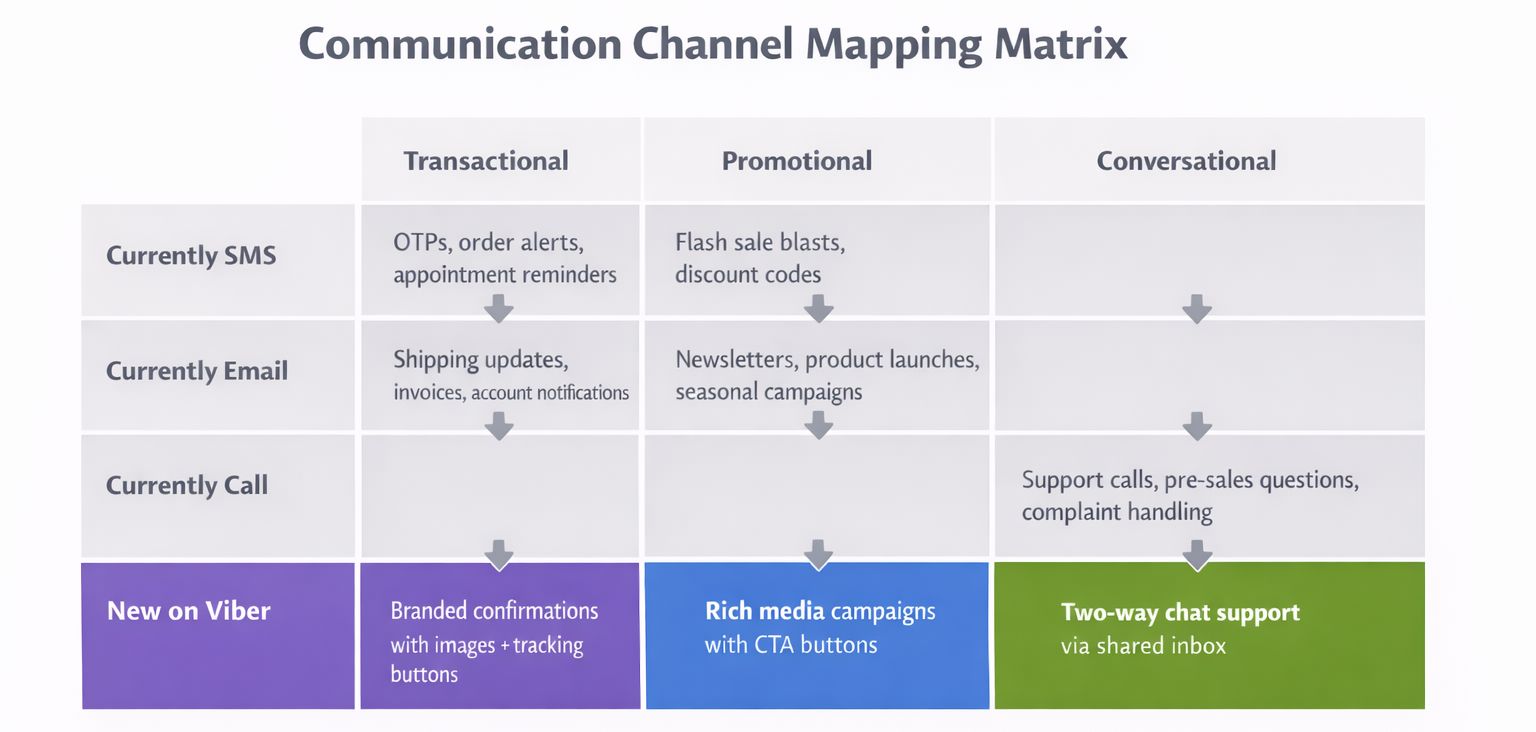
First off, identify your existing messages with the above three categories.
Which of your existing SMSes could be migrated to Viber?
Which of your email campaigns could be migrated to the rich messaging of a chat-based app?
Which of your customer interactions, currently done through voice calls, could be done through the conversation flow of a messaging app?
It may not be required to migrate all your existing interactions to the new platform.
Some businesses may use Viber for just sending OTPs, while others may use it for their entire promotional campaign.
The scope will depend on where your customers are: geographically as well as in terms of the messaging channels they prefer.
Also, determine whether you will be using Viber as the main messaging platform or as a secondary platform to SMS.
In the Eastern European region, the CIS countries, Southeast Asia, or the Middle Eastern countries, Viber may be the main platform with SMS as a secondary option.
In other parts of the world where Viber may not be as popular, it may be used for a particular purpose, for example, sending OTPs or for handling VIP customers, with SMS being the main platform.
Set Up Your Viber Business Operation
With your plan in place, it is easy to set everything up since every decision is based on what you decided earlier.
Before you begin to send, you will need to have three things in place: a Viber Business account, which is verified along with your sender ID; the method to send, whether it is the Dexatel Campaign Builder for manual campaigns, the API for automated messages, or both; and finally, the inbox to receive the replies.
If you are running campaigns, especially the promotional ones, it is likely you will be using the Campaign Builder.
This is because it is easy to use, especially for marketing teams, since it does not require coding.
On the other hand, if you want to send automated messages, especially the ones triggered by events happening within your system, such as the confirmation of orders the moment the purchase is made, this is where the API comes in.
For the majority, it is likely you will be using the Campaign Builder for the campaigns and the API for the automated ones.
For more on the technical aspects, including the guide on how to send Viber messages via the API, you can check our guide.
Make sure SMS fallback is enabled from the very beginning.
This is important because not all customers may be using Viber.
In addition, those that are may be offline for a while.
This way, if you are unable to send a message via Viber, you will be able to send it via SMS.
This is important for transactional messages where success in sending is critical.
To receive messages, you need to set up a shared inbox.
This way, you and your team will be able to receive Viber messages via a desktop browser and not just one mobile phone.
Our Viber Business Inbox guide shows you how you can set this up via the Dexatel platform.
Without this inbox, only one person in your company will be able to receive all Viber messages via one mobile phone.
This will not work very well.
How to Send Transactional Messages on Viber
Transactional messages are the heart of every Viber business, as they address the customer, who is expecting to hear back from you.
For instance, someone has just made an order, someone has requested a password reset, or someone is due for an appointment tomorrow.
These are, by definition, relevant to the customer, so they get opened, read, and acted on more frequently than other, less relevant messages.
Let’s take a look at the actual process.
A customer performs some action on your system, like making an order, asking to reset their password, or booking an appointment.
This action, in turn, makes the Dexatel API send a pre-defined Viber message to the customer’s phone number.
If the customer is a Viber user, they will receive the Viber Business Inbox message with your brand’s name, logo, and verification mark.
If the customer is not a Viber user, the message will be sent automatically as an SMS.
What makes Viber’s transactional messaging better than SMS is the content.
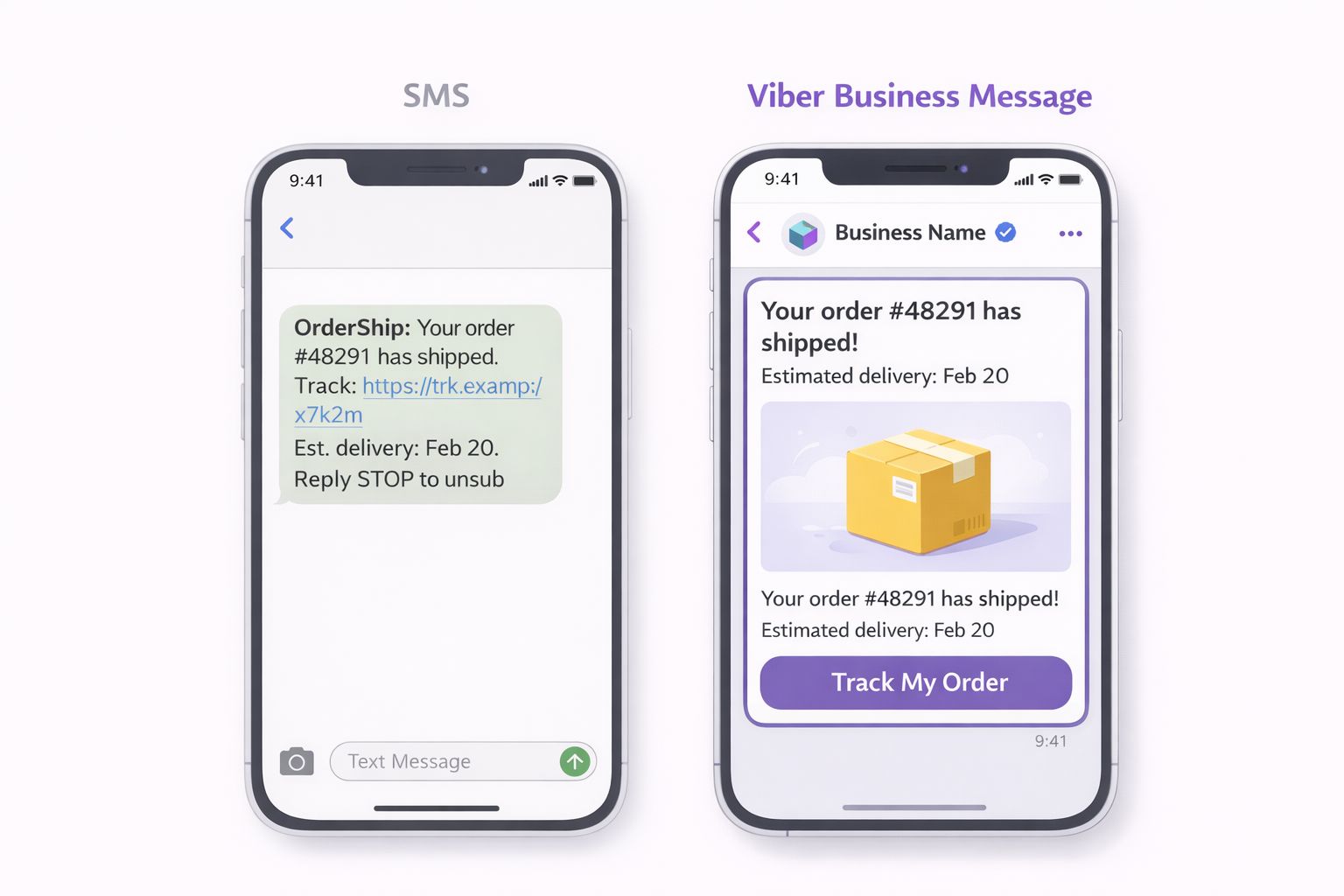
For instance, the order confirmation sent as an SMS is limited to plain text within 160 characters.
The same order confirmation sent as a Viber message can contain the product image, order number, expected delivery date, tracking link, etc.
It is not only more visually appealing but also more functional, reducing the number of “where is my order?” queries, since the customer receives everything they need in one place.
When it comes to urgent content, you need to set appropriate TTL values.
A password reset code that reaches the customer two hours after sending is useless.
Set appropriate values depending on how urgent the message is: a few minutes for OTPs, a few hours for appointment reminders, etc.
If the TTL period is over for Viber, the message will be sent via SMS anyway.
This way, you ensure that the customer receives the message via another method.
Another important point: transactional messages don’t need opt-in.
However, they need to be transactional in nature.
For example, if you send a discount coupon with an order confirmation message, you risk getting banned.
How to Run Promotional Campaigns on Viber
Promotional campaigns on Viber differ from transactional messages.
Transactional messages are sent as a result of the actions of the client, and they are sent one by one.
A promotional campaign, on the contrary, is sent by you and to a part of your client base, at a time you decide.
First, you need to decide who to send the message to.
Don’t send the message to the entire list.
Segment the list according to certain criteria, such as purchase history, location, interaction with the message, or the client lifecycle.
A promotional message like “20% off winter jackets” will have different effects on the client who viewed winter coats the previous week and the client who bought swimwear in July.
The more precise the target group, the higher the result and the lower the unsubscription rate.
Then, you need to write the message.
Viber has a 1,000-character limit, and you can add images, videos, and interactive call-to-action buttons.
The temptation to use all the tools available is great, but don’t do it.
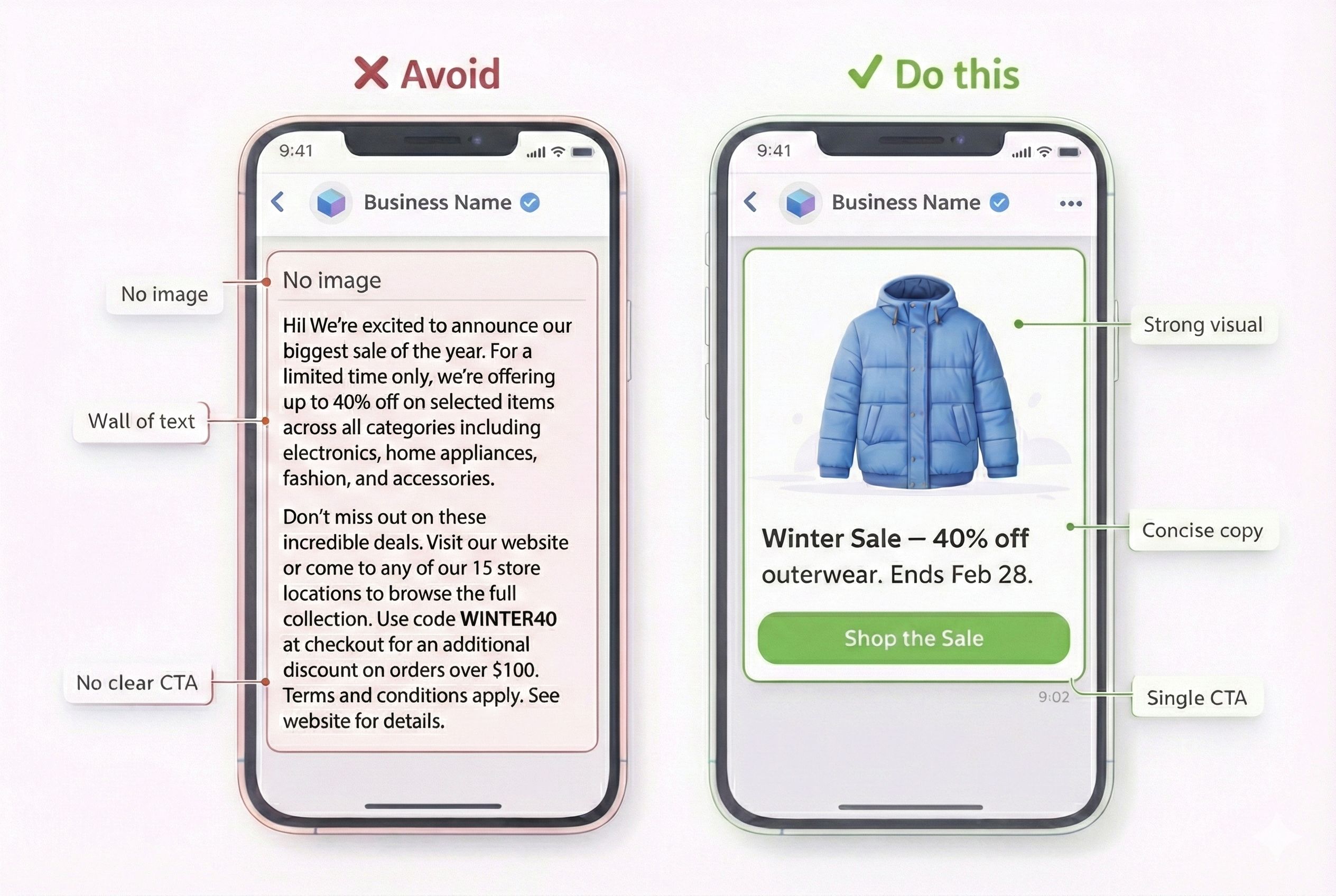
The most efficient promotional messages are short and sweet: a strong message, an image, and one call-to-action button that leads the client to the action.
The appropriate format for your objective.
- For a product launch, use an image with a button saying ‘Shop Now.’
- For a flash sale, use a short, urgent text with a countdown style message.
- For a seasonal campaign, use a short video.
- For a loyalty reward, use a personalized text with a link.
Sometimes, text without images can work even better.
The buttons for calls to action need attention.
Use action words like ‘Shop Now,’ ‘Claim Offer,’ ‘Book Today,’ or ‘Buy Now.’
These are better than ‘Learn More,’ ‘Click Here,’ or ‘Find Out More.’
The button should lead directly to the product page or the landing page, not the home page.
The extra clicks will cost you customers.
For personalization, use dynamic variables like the customer’s name, the last product the customer bought, or the store location.
This will turn your message from a broadcast to a conversation.
If the customer sees ‘Hi Sarah, the running shoes you viewed are now 30% off,’ the chances of a reply are higher.
The message will be different from ‘Big sale on footwear.’
Timing can make or break your message.
Sending at 3 AM will only waste your message.
Sending at times when people commute will find people checking their phones.
Sending on payday will find people ready to spend.
Send at different times for your audience.
Use the insights to decide the timing.
For a detailed walkthrough of scheduling and fallbacks in Dexatel, refer to the Viber bulk messages guide.
One more thing about consent: promotional messages need to have an explicit opt-in.
Again, this is not something you can choose to do, and it is not something that is recommended to do; it is something Viber requires.
Your customers have to have opted in to receive marketing messages before you send them any promotional content.
Be sure to keep track of how and when this consent was collected.
If you are ever in doubt about the rules, it is better to be safe than sorry.
It is much more expensive to have your account restricted for consent violations than it is to have a slightly smaller audience.
How to Use Viber for Customer Support
Many businesses use Viber for outbound messages such as campaigns, notifications, and OTPs, but they become aware of the support features of Viber when the customer starts responding.
The first operational decision is staffing.
Who will handle the incoming Viber messages?
In a small business, one person can handle Viber and email support.
In larger businesses, you will need dedicated people working from a shared inbox.
In any case, set the goals for the response time.
People expect fast response times on messaging apps, not hours.
If you cannot provide people to answer Viber messages quickly during certain hours of the day, consider setting up an automated greeting that says, “Thanks for reaching out.
Our team will get back to you within 30 minutes during business hours (9 AM – 6 PM EST).”
Canned responses are critical in Viber support operations.
Plan out the top 10-15 frequently asked questions, such as “What is the status of my order?” or “What is the return policy?” and write out the standard response for each question.
This will help agents choose from the list of standard responses instead of typing from scratch every time they need to answer the question.
The 24-hour session window is the next aspect of Viber support operations.
When the customer sends the first message, the Viber support session is active for 24 hours during which up to 60 messages can be exchanged in either direction.
During the session, the messages will not be charged individually but will be included in the session fee.
So, the business will need to resolve the customer issue during the session itself.
For more details on the Viber support operations, see the Viber session messaging guide.
In practice, this means that your support workflow should focus on providing quick initial responses (to begin the session while the customer is still engaged) and ensure that issues are resolved within the same session (to avoid sending follow-up responses after the session has ended, which would incur another charge).
For handling after-hour messages, you have two options.
The easy solution is to have your bot send out an automated acknowledgment of receipt and queue the message for the next business day.
The more sophisticated solution is to have your bot handle routine issues automatically, such as answering questions about the status of orders or providing tracking information, and then have human support agents handle more complex issues when they return online.
If you're interested in this solution, read about Viber bots in general.
To measure the quality of your Viber bot or human support team, you should track three key statistics: the average time to initial response (how fast you acknowledge the customer’s message), resolution within the same 24-hour session, and customer satisfaction (measured by sending out one more message after the session to ask how everything went).
Combine All Three: Building a Multi-Use Viber Operation
The strength of Viber for business is not in the variety of messages it supports.
It’s in the ability to have a continuous flow of messages throughout the customer journey when we use all three types of messages.
Let’s consider an example of an online store.
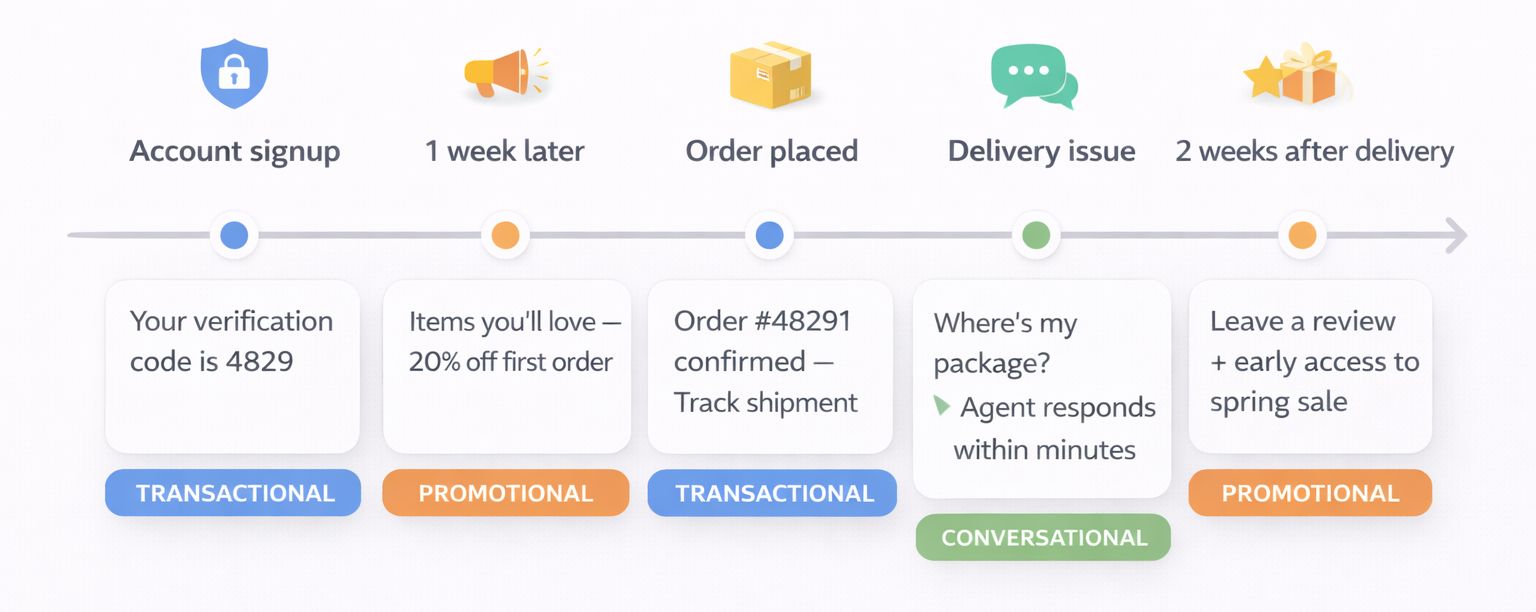
A customer subscribes to the store’s online service and receives a Viber OTP to activate their account.
This is a transactional message.
One week later, the customer receives a promotional message with the items they looked at during the previous shopping session, along with a “Shop Now” button.
The next day, the customer completes the purchase and receives a rich media message with images of the items they ordered, along with a button for tracking the order status.
This is a transactional message again.
The customer contacts the support agent because the delivery is delayed and asks about the status of the order through the shared inbox feature of Viber Business Platform.
The support agent replies with the new estimated delivery date and offers the customer a discount on the next purchase as compensation for the inconvenience caused.
This is a conversational message.
Two weeks after the delivery, the customer receives a promotional message asking for a product review, along with an exclusive offer for the next sale.
From the customer's point of view, it's one single conversation, with a brand they know and trust.
From your point of view, it's three separate systems working together: API-based transactional messages, scheduled campaigns, and inbox-based support.
The thread of trust builds over time: each successful transactional message makes the next promotional message feel more welcome, and fast, helpful support makes the customer more likely to engage with future messages.
The risk of using too many messages is "message fatigue."
If you send an order confirmation, a shipping update, a delivery notice, a review request, and a promotional message to a customer within five days, they'll ignore you or unsubscribe.
Think about how often you send messages, not just within each use case, but across all use cases.
Establish rules, such as:
- "Don't send a promotional message within 48 hours of sending a transactional sequence."
- "Don't send a campaign to someone who has an open support issue."
- "Don't send more than X business-initiated messages to each customer within Y days."
These rules will keep your channel healthy over time.
Manage and Grow Your Viber Contact List
Your success on Viber depends on the list you have behind it.
If you have a large unverified list, you will end up spending money on messages you can’t deliver.
On the other hand, a small, well-maintained list will work better for you every time.
The best way to start building your list for Viber is to start collecting opt-ins.
The best time to collect them is when the customer already interacts with you, such as when they make a purchase online and you offer them the option to receive order updates and offers via Viber.
Make sure you clearly state what the customer will receive when they sign up.
For example, instead of using the phrase "stay in touch," use "order updates and occasional promotional offers via Viber."
If you already have an SMS contact list where the customers opted-in to the messages you send them, you can use the same list for Viber as long as the customers opted-in for the type of message you want to send them.
However, keep in mind that not all customers on your SMS list will have Viber on their phones.
List maintenance is an ongoing process rather than a one-time activity.
Regularly clean the list of people who’ve unsubscribed, whose number isn’t active, or whose last interaction was beyond some defined time period (typically 90 days for promotional lists).
Inactive customers on the list will cost you money and can eventually harm your sender reputation and deliverability.
Growing the list is another ongoing process.
The best way to acquire new Viber contacts is through existing customer touchpoints.
Ensure Viber Opt-in is included in the footer of all transactional emails, on all post-purchase confirmation pages, and as part of all customer service interactions.
If someone contacts you via customer support, make sure the customer service representative lets them know that you can also help them via Viber.
If you’ve created a Viber Community, use it as a way to funnel engaged customers into the business messaging Opt-in process.
The most effective way to grow the list is to make Viber the most convenient and rewarding way for customers to interact with you.
Measure What Matters: Viber Analytics and Optimization
Sending messages without measuring outcomes is guessing.
Viber provides granular delivery and engagement data, and Dexatel's platform makes it accessible without requiring custom analytics infrastructure.
The metrics that matter depend on the use case.
For transactional messages, focus on delivery rate (what percentage of messages reach the recipient) and fallback rate (what percentage fall back to SMS).
A high fallback rate might indicate that your contact list includes too many non-Viber users, or that you're sending during periods when users are offline.
For OTP messages specifically, delivery speed matters more than anything — track the time between API request and message delivery.
For promotional campaigns, delivery rate is the starting point, but read rate is where the real insight begins.
Viber provides seen status, so you know not just that a message was delivered but that the customer actually opened it.
After read rate comes click-through rate on your CTA buttons — this tells you whether the message content and offer were compelling enough to drive action.
And ultimately, conversion rate (tracked through your own analytics by attributing purchases or signups to specific campaigns) tells you whether the campaign generated revenue.
For support conversations, measure first response time, messages per resolution (fewer is better — it means you're solving issues efficiently), and session utilization (are you resolving issues within the 24-hour session window, or are conversations spilling into more expensive business-initiated follow-ups?).
Benchmarks vary by region and industry, but as directional guidance: Viber delivery rates in strong markets (Eastern Europe, CIS) typically exceed 95%.
Read rates for well-targeted promotional messages range from 70–90%.
Click-through rates vary widely based on offer quality, but 15–30% is achievable for relevant, well-crafted messages.
If your numbers fall significantly below these ranges, the issue is likely in your targeting, message quality, or send timing rather than the channel itself.
Optimization is iterative.
Test one variable at a time: message copy, send time, audience segment, media format, CTA text.
Run each test with a large enough sample to be meaningful and give it enough time to see results before drawing conclusions.
The businesses that get the most from Viber aren't the ones with the best first campaign — they're the ones that improve every campaign based on what the last one taught them.
Common Mistakes to Avoid
Common Viber failures can be identified in any industry.
Understanding these common mistakes will help you avoid learning the hard way.
Sending promotional messages without proper documentation of consent
This can get your account restricted in no time.
Viber takes consent seriously, and having the other party’s phone number is not the same as having proper documentation of consent for promotional messages.
Sending long essays instead of short messages
Having 1,000 characters is not the same as using 1,000 characters in the message.
The best Viber messages have less than 300 characters, with proper visual content and clear calls-to-action.
Ignoring the economics of the session window
Every message sent outside of the active session is charged as a more expensive business-initiated message.
Treating Viber like email
Viber is not email, and email is not Viber.
People check email once or twice a day, but they check Viber many times a day.
Not setting up SMS fallback correctly
For every message not delivered, the opportunity is lost.
For transactional messages such as order confirmations, security codes, and reminders, not being able to deliver the message breaks the customer experience.
Sending the same message to everyone
Segmentation is not optional for Viber but is essential for Viber.
People in different age groups and different places want different messages.
Proper use of available data is essential in segmenting the right message for the right people.
Skipping the use of media in Viber messages because text is easier
For promotional messages, the use of images is essential in Viber, and images have more impact than text in promotional messages.
Viber’s use of media is one of the biggest advantages of Viber over SMS.
What Comes Next
The above framework, which includes strategy, setup, transactional execution, promotional campaigns, support operations, list management, and analytics, represents the core of using Viber for business.
However, this is just a framework, and the finish line is not here.
It’s the businesses that continually improve and enhance this framework that get the maximum benefit from using Viber.
Once your operations are up and running, other areas to consider are Viber advertising, which can be used to create awareness and acquire new subscribers, and Viber Business Calls, which can be used in addition to messaging.
Other areas include playbooks specific to industries like e-commerce, banking, and hospitality, which go more in-depth.
If you are looking to compare Viber to other platforms, our guide on Viber vs. WhatsApp can help you determine which platform is more suitable for your audience or if you should be using both.
If you are ready to get started, Dexatel’s platform offers everything outlined above, including a campaign builder, API, shared inbox, SMS fallback, and analytics, and offers a free trial.
The best time to get started with using Viber for business was when your customers started using it.
The second-best time is now.


