Habilite llamadas de voz a escala. Integre la API de Voz de Dexatel y empiece a interactuar al instante.
Más información

Viber for Business: Secure Messaging and Customer Engagement


Published: Jan 29, 2026

When customers receive a message, the first question isn’t “what does it say?” it’s “who is it from?” Viber addresses that hesitation with branded sender profiles and trusted business identities, giving companies a way to communicate that feels immediately legitimate.
In this article, we’ll explore what Viber messaging for business is, how companies use it across marketing, support, and transactional communication, and how to get started with Viber business messaging using Dexatel.
What Is Viber for Business?
Viber for Business is an official business communication channel that allows companies to reach customers directly through the Viber app using branded, verified messages.
Instead of relying on generic SMS or email, businesses can use Viber business messaging to deliver secure, recognizable, and interactive communications in an environment where users are already active and engaged.
The app is designed to support high-trust communication at scale, making it suitable for everything from critical notifications to customer conversations and promotional outreach.
Viber’s Role in Transactional, Promotional, and Support Messaging
Viber business messaging is commonly used across three fundamental communication scenarios:
Transactional messaging for order confirmations, delivery updates, appointment reminders, and service notifications
Promotional messaging for offers, product updates, and marketing campaigns that benefit from rich media and branding
Customer support messaging for two-way conversations, service inquiries, and follow-ups inside the Viber app
Viber Business Messages Vs. Personal Viber Chats
You’ll see Viber business messages in the same app as personal chats, but they are not the same thing. Business messages are built for scale, consistency, and brand visibility, while personal chats are private, one-to-one conversations between individuals.
With Viber business messaging:
Messages come from an official business sender rather than a personal phone number
Outbound communication uses approved message templates
Delivery supports high volumes and automation through APIs
Conversations follow platform rules that protect users from spam and misuse
These differences make it possible for you to communicate professionally and at scale, while still preserving user trust inside the Viber app.
Sender IDs, Brand Profiles, and Verified Business Messaging
Trust is central to how customers respond to messages, and Viber messaging for business is designed to make that trust visible at first glance. When you send messages through Viber as a business, your identity is clearly presented, so recipients know exactly who is contacting them.
With Viber business messaging, you can:
Use branded sender IDs that display your business name instead of a random number
Show business profile details directly within the chat
Send messages through approved and verified sender identities
Keep a clear distinction between business and personal conversations
As a result, your messages feel legitimate, recognizable, and safe to engage with, which directly impacts open rates and customer confidence.
Why Use Viber for Business Communication?
Viber has a strong regional footprint, and it’s often a top messenger in parts of Central and Eastern Europe, the Balkans, and beyond, which is exactly why it shows up on lists of “most popular messaging apps by country” as a regionally dominant platform. What makes Viber especially useful for business is the mix of visibility, speed, branding, and trust.
High Open and Read Rates in Viber-Dominant Regions
When Viber is a primary inbox for your customers, messages don’t compete with dozens of marketing emails or get lost in a noisy SMS stream. They land in an app people already check throughout the day, in the same place they talk to friends and family, which naturally increases the chance your message gets seen.
Instead of relying on assumptions, Viber Business Messages also gives you the ability to measure what actually happened. You can access detailed reporting that includes open and click rates and adjust your strategy based on real performance, not guesswork.
Here’s a simple way to think about it:
You are meeting customers in a channel they already use frequently
Your brand identity is visible inside the chat (more on that below)
You can optimize using engagement signals like opens and clicks
Real-Time Message Delivery
Some channels are fine for “eventually.” Customer communication usually is not. Viber Business Messages is designed for real-time outreach for updates, notifications, promotions, and support. That matters for time-sensitive moments like delivery windows, appointment reminders, payment confirmations, service disruptions, and account alerts.
The practical advantage is momentum. When a message arrives quickly, customers can act while the context is still fresh. That is the difference between “Your courier is arriving in 10 minutes,” and that same message arriving after the courier has already left.
Viber also supports two-way conversations, so real-time delivery is not only about sending alerts. Plus, it allows for fast resolution when customers reply and want help right there in the thread.
Branded and Rich Media Messaging
Viber is built for rich, brand-forward communication. You are not limited to plain text. You can use branded content to make the message immediately recognizable, and you can support more engaging formats when you need to show, not just tell.
Capabilities include:
Promotional messages that look like brand communication, not anonymous outreach
Customer support flows that stay inside the chat thread
Updates and notifications that are easier to understand at a glance
And because Viber provides analytics that can include open and click rates, you can learn which creative formats and calls to action actually drive engagement.
Cost Efficiency for High-Volume Traffic
When you’re sending messages at scale, cost predictability becomes just as important as engagement. Viber business messaging is ideal for high-volume communication because pricing is typically structured in a clear, message-based model, making it easier to forecast spend and plan campaigns without unexpected fluctuations.
For businesses running large volumes of transactional messages, alerts, or marketing notifications, this consistency helps control costs while maintaining visibility and interaction. By using Viber for the messages that benefit most from branding and engagement, and routing other traffic through alternative channels when needed, companies can balance performance and budget without compromising the customer experience.
End-to-End Encryption and Trusted Sender Identities
Security and trust are where Viber can feel fundamentally different from “just another business messaging channel.”
On the trust side, Viber Business Messages is tied to verified sender identities. Viber messaging partners and documentation commonly describe verified senders and the verified checkmark shown to users, which helps recipients quickly recognize that the conversation is with an authenticated business, not an impersonator.
Simply put, Viber helps you earn the “this looks real” reaction immediately, before the user reads a single word. That’s hard to replicate with SMS.
Viber Business Messaging Use Cases
Viber business messaging works best when it’s used intentionally. Below are the most common ways businesses use Viber to communicate clearly, securely, and at scale.
Marketing y promociones
If you’re running campaigns in Viber-dominant regions, Viber is a strong channel for promotional messaging. You can send branded messages that stand out in the inbox and make it easy for customers to view an offer or take action right away.
Typical use cases include:
Promotional campaigns and special offers
Product launches or feature announcements
Limited-time discounts and seasonal campaigns
Atención al cliente
Viber allows you to move customer support conversations into a familiar, real-time messaging environment. Customers can ask questions, respond to prompts, and continue the conversation without switching channels.
Common support scenarios include:
Order or service inquiries
Appointment changes or confirmations
Follow-ups after a support interaction
Notificaciones de transacciones
Transactional messages are where clarity and trust matter most. Viber is often used for messages that customers expect and rely on, such as confirmations and status updates.
Examples include:
Order confirmations and delivery updates
Recordatorios de citas
Subscription or service status notifications
Authentication and Alerts
For security-related communication, Viber provides a trusted way to deliver sensitive messages. Branded sender identities help customers quickly recognize legitimate alerts.
Common use cases include:
One-time passwords and verification messages
Login or account activity alerts
Password change confirmations
Re-Engagement and Retention
Viber is also effective for reconnecting with users who have gone quiet. Because messages appear in an active, frequently used app, they are more likely to be seen and acted on.
Typical re-engagement scenarios include:
Renewal or subscription reminders
Inactive user follow-ups
Viber for Business Messaging With Dexatel
If you’re planning to use Viber for Business, Dexatel is the best way to go. Whether you’re sending Viber marketing messages, transactional updates, or authentication alerts, everything is built to work together seamlessly.
Unified omnichannel messaging platform: Manage Viber alongside SMS and other messaging channels from one place, so conversations stay consistent and easier to control as you scale.
API-driven Viber messaging and OTP delivery: Send Viber marketing messages, notifications, and one-time passwords through flexible APIs that integrate smoothly with your existing systems and workflows.
Branded sender setup and approval support: Dexatel supports the sender registration and approval process, helping you set up branded Viber senders that customers can easily recognize and trust.
Delivery tracking, analytics, and reporting: Message tracking and performance with clear reporting give you insight into how Viber marketing messages are received and engaged with.
Intelligent fallback to SMS or other channels: When Viber is unavailable, messages automatically fall back to SMS or other channels, guaranteeing reliable delivery without interrupting the customer experience.
Getting Started With Viber for Business Via Dexatel
Getting started with Viber for Business is a breeze when everything is set up in one place. You can move from setup to live messaging without unnecessary complexity.
1. Create Your Dexatel Account
Start by creating your Dexatel account to access Viber messaging and manage it alongside your other communication channels.
2. Register and Approve Your Viber Sender
Submit your Viber sender details for approval. This step ensures your messages are sent from a branded, trusted business identity that customers can easily recognize.
3. Set Up Message Templates and APIs
Once approved, you can configure message templates and connect Dexatel’s APIs to your systems. This makes it easy to send marketing messages, notifications, or OTPs at scale.
4. Launch Your First Viber Campaign
With everything in place, launch your first Viber campaign and monitor delivery and performance as messages go out in real time.
Best Practices for Viber Business Messaging
If you approach Viber messaging for business with the user experience in mind, engagement and trust tend to follow.
Keep Your Messages Clear
When a message lands in someone’s inbox, clarity decides whether it gets read or ignored. Make it immediately obvious who you are, why you’re messaging, and what the recipient should do next. Avoid long introductions or vague language that forces the reader to work to understand the purpose.
A good rule of thumb is to lead with context, then move to action. If the message is informational, say so. If it requires a response, make that clear. Clear messages reduce confusion and prevent unnecessary follow-up questions.
Use Branding to Build Trust
Branding is not just about visuals, but also about recognition. When customers consistently see your business name and identity in Viber, they learn to trust the channel and your messages. This is especially important for transactional and security-related communication.
Use the same sender name, tone, and visual style across your messages. Over time, this consistency helps customers quickly identify legitimate communication and feel more confident engaging with it.
Respect Frequency and Quiet Hours
Just because Viber messages are highly visible doesn’t mean you should send them often. Over-messaging can quickly lead to frustration or disengagement, even in channels with strong open rates.
Be mindful of timing and frequency. Send messages when they’re relevant and expected, and respect local quiet hours. Thoughtful timing shows consideration for the user and helps keep your messages welcome rather than intrusive.
Segment Users by Behavior or Use Case
Not every customer should receive the same message. Segmenting your audience allows you to send more relevant communication based on behavior, preferences, or the type of interaction.
For example, marketing messages, transactional updates, and support conversations all serve different purposes and should be treated differently. When messages align with user intent, they feel more helpful and less like noise.
Monitor Message Performance
Once your Viber messages are live, pay attention to how they perform. Look beyond basic delivery and focus on engagement signals such as opens, responses, or follow-up actions.
Use these insights to refine your messaging over time. Small adjustments to wording, timing, or structure can make a noticeable difference in how customers respond, and ongoing optimization helps you get more value from the channel.
Defining Your Viber Communication Strategy
The biggest trap is to think of Viber as another blast tool.
People join Viber, send out a promo to all their contacts, and wonder why people don't respond after the second message.
Viber is not like this when you think it through.
First, think about the content you should be sending on Viber for your business.
There are three main categories.
Most businesses will need all three, but you don't need to do all three at once.
- Transactional messages are related to some action the customer took or some event in your system, like order confirmations, shipping notifications, appointment reminders, password reset notifications, or other account notifications. These are expected, time-sensitive, and help people trust your brand. If you're already doing these on SMS or email, Viber is a better option because it's cheaper and looks nicer.
- Promotional messages are campaigns, product announcements, flash sales, coupon notifications, re-engagement campaigns, etc. These are initiated by your brand, require customer opt-in, and are the most expensive per message. These also generate the most revenue for your business when done correctly.
- Conversational messages are those where the conversation will be two-way: customer support questions, pre-sale questions, feedback collection, and any other time the customer expects a response. This is where the messaging style of Viber stands out compared to email, where the response time may be hours or days.
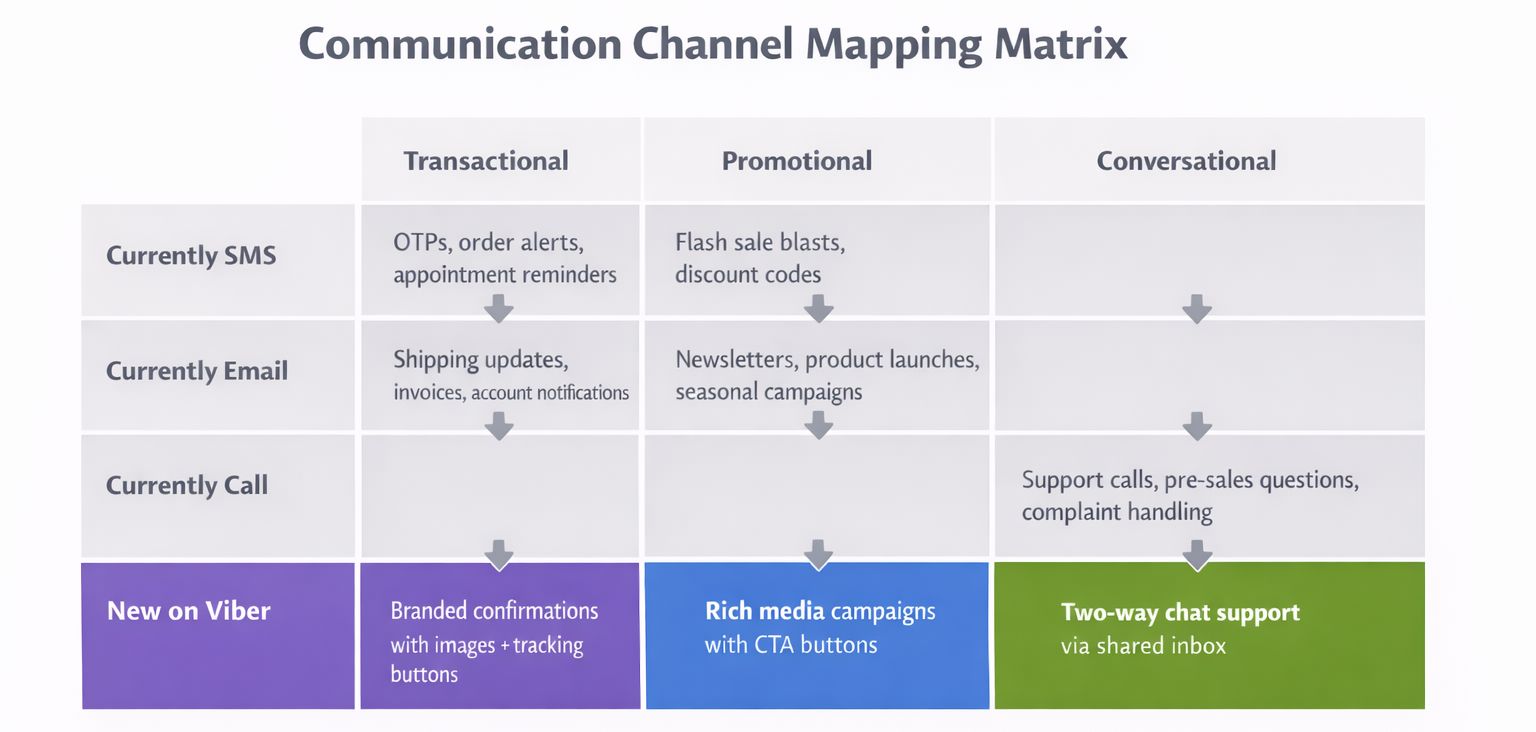
First off, identify your existing messages with the above three categories.
Which of your existing SMSes could be migrated to Viber?
Which of your email campaigns could be migrated to the rich messaging of a chat-based app?
Which of your customer interactions, currently done through voice calls, could be done through the conversation flow of a messaging app?
It may not be required to migrate all your existing interactions to the new platform.
Some businesses may use Viber for OTPs only, while others may use it for their entire promotional campaign.
The scope will depend on where your customers are: geographically as well as in terms of the messaging channels they prefer.
Also, determine whether you will be using Viber as the main messaging platform or as a secondary platform to SMS.
In the Eastern European region, the CIS countries, Southeast Asia, or the Middle Eastern countries, Viber may be the main platform with SMS as a secondary option.
In other parts of the world where Viber may not be as popular, it may be used for a particular purpose, for example, sending OTPs or for handling VIP customers, with SMS being the main platform.
Setting Up Your Viber Business Operation
With your plan in place, it is easy to set everything up since every decision is based on what you decided earlier.
Before you begin to send, you will need to have three things in place: a Viber Business account, which is verified along with your sender ID; the method to send, whether it is the Dexatel Campaign Builder for manual campaigns, the API for automated messages, or both; and finally, the inbox to receive the replies.
If you are running campaigns, especially the promotional ones, it is likely you will be using the Campaign Builder.
This is because it is easy to use, especially for marketing teams, since it does not require coding.
On the other hand, if you want to send automated messages, especially the ones triggered by events happening within your system, such as the confirmation of orders the moment the purchase is made, this is where the API comes in.
For the majority, it is likely you will be using the Campaign Builder for the campaigns and the API for the automated ones.
For more on the technical aspects, including the guide on how to send Viber messages via the API, you can check our guide.
Make sure SMS fallback is enabled from the very beginning.
This is important because not all customers may be using Viber.
In addition, those that are may be offline for a while.
This way, if you are unable to send a message via Viber, you will be able to send it via SMS.
This is important for transactional messages where success in sending is critical.
To receive messages, you need to set up a shared inbox.
This way, you and your team will be able to receive Viber messages via a desktop browser and not just one mobile phone.
Our Viber Business Inbox guide shows you how you can set this up via the Dexatel platform.
Without this inbox, only one person in your company will be able to receive all Viber messages via one mobile phone.
This will not work very well.
How to Send Transactional Messages on Viber
Transactional messages are the heart of every Viber business, as they address the customer, who is expecting to hear back from you.
For instance, someone has just made an order, someone has requested a password reset, or someone is due for an appointment tomorrow.
These are, by definition, relevant to the customer, so they get opened, read, and acted on more frequently than other, less relevant messages.
Let’s take a look at the actual process.
A customer performs some action on your system, like making an order, asking to reset their password, or booking an appointment.
This action, in turn, makes the Dexatel API send a pre-defined Viber message to the customer’s phone number.
If the customer is a Viber user, they will receive the Viber Business Inbox message with your brand’s name, logo, and verification mark.
If the customer is not a Viber user, the message will be sent automatically as an SMS.
What makes Viber’s transactional messaging better than SMS is the content.
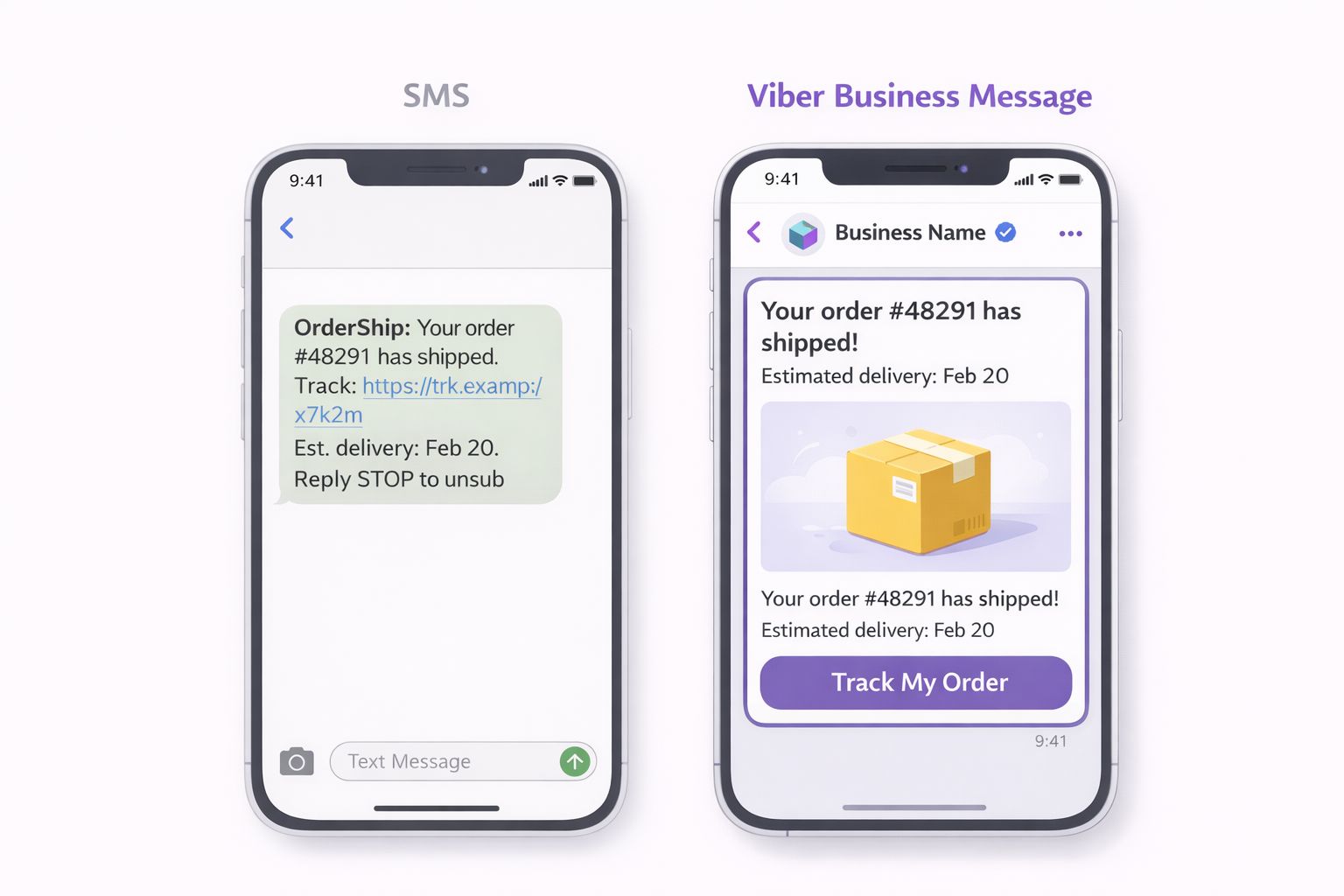
For instance, the order confirmation sent as an SMS is limited to plain text within 160 characters.
The same order confirmation sent as a Viber message can contain the product image, order number, expected delivery date, tracking link, etc.
It is not only more visually appealing but also more functional, reducing the number of “where is my order?” queries, since the customer receives everything they need in one place.
When it comes to urgent content, you need to set appropriate TTL values.
A password reset code that reaches the customer two hours after sending is useless.
Set appropriate values depending on how urgent the message is: a few minutes for OTPs, a few hours for appointment reminders, etc.
If the TTL period is over for Viber, the message will be sent via SMS anyway.
This way, you ensure that the customer receives the message via another method.
Another important point: transactional messages don’t need opt-in.
However, they need to be transactional in nature.
For example, if you send a discount coupon with an order confirmation message, you risk getting banned.
How to Run Promotional Campaigns on Viber
Promotional campaigns on Viber differ from transactional messages.
Transactional messages are sent as a result of the actions of the client, and they are sent one by one.
A promotional campaign, on the contrary, is sent by you, and to a part of your client base at a time you decide.
First, you need to decide who to send the message to.
Don’t send the message to the entire list.
Segment the list according to certain criteria, such as purchase history, location, interaction with the message, or the client lifecycle.
A promotional message like “20% off winter jackets” will have different effects on the client who viewed winter coats the previous week and the client who bought swimwear in July.
The more precise the target group, the higher the result and the lower the unsubscribe rate.
Then, you need to write the message.
Viber has a 1,000-character limit, and you can add images, videos, and interactive call-to-action buttons.
The temptation to use all the tools available is great, but don’t do it.
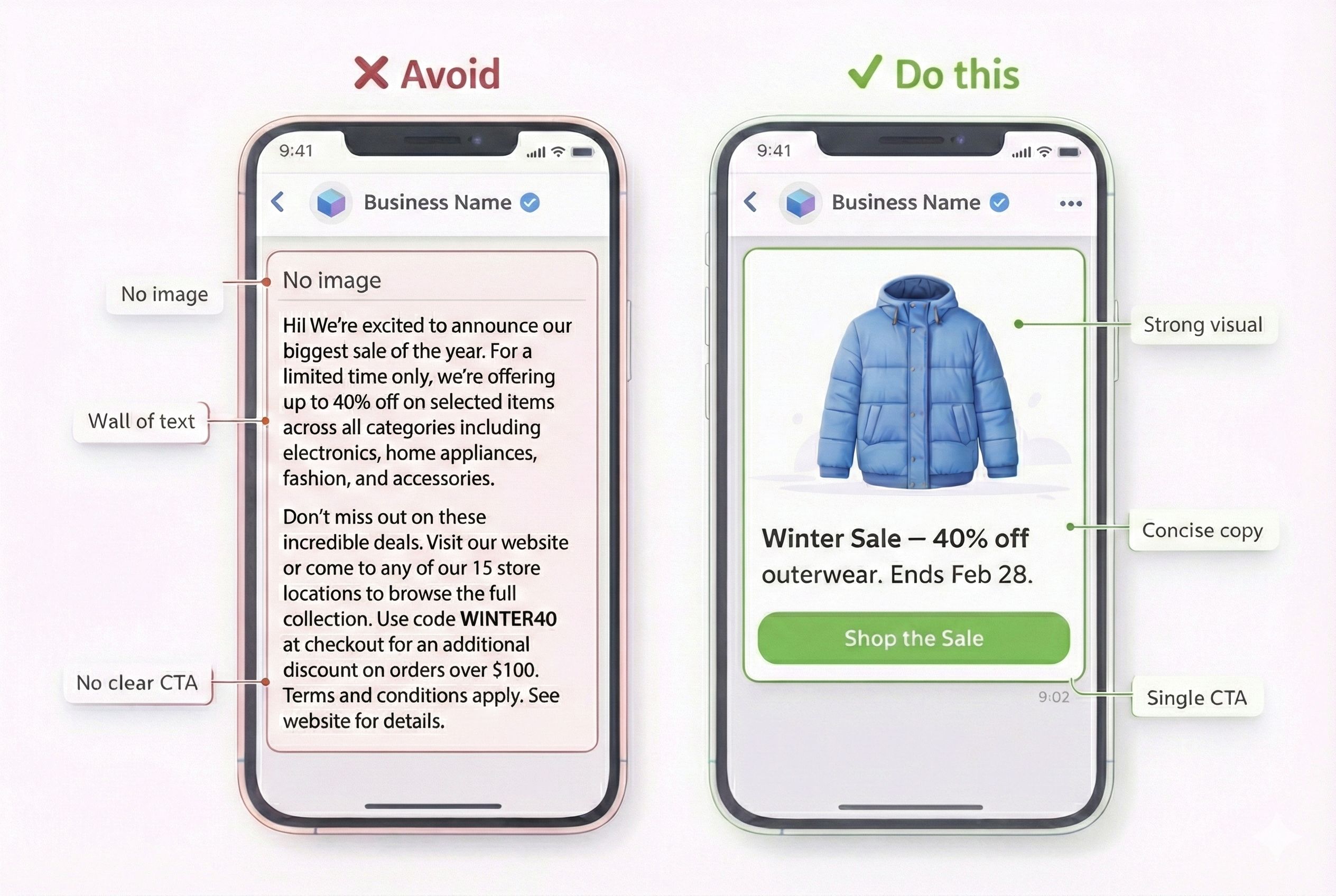
The most efficient promotional messages are short and sweet: a strong message, an image, and one call-to-action button that leads the client to the action.
The appropriate format for your objective.
- For a product launch, use an image with a button saying ‘Shop Now.’
- For a flash sale, use a short, urgent text with a countdown-style message.
- For a seasonal campaign, use a short video.
- For a loyalty reward, use a personalized text with a link.
Sometimes, text without images can work even better.
The buttons for calls to action need attention.
Use action words like ‘Shop Now,’ ‘Claim Offer,’ ‘Book Today,’ or ‘Buy Now.’
These are better than ‘Learn More,’ ‘Click Here,’ or ‘Find Out More.’
The button should lead directly to the product page or the landing page, not the home page.
The extra clicks will cost you customers.
For personalization, use dynamic variables like the customer’s name, the last product the customer bought, or the store location.
This will turn your message from a broadcast to a conversation.
If the customer sees ‘Hi Sarah, the running shoes you viewed are now 30% off,’ the chances of a reply are higher.
The message will be different from ‘Big sale on footwear.’
Timing can make or break your message.
Sending at 3 AM will only waste your message.
Sending at times when people commute will find people checking their phones.
Sending on payday will find people ready to spend.
Send at different times for your audience.
Use the insights to decide the timing.
For a detailed walkthrough of scheduling and fallbacks in Dexatel, refer to the Viber bulk messages guide.
One more thing about consent: promotional messages need to have an explicit opt-in.
Again, this is not something you can choose to do, and it is not something that is recommended to do; it is something Viber requires.
Your customers have to have opted in to receive marketing messages before you send them any promotional content.
Be sure to keep track of how and when this consent was collected.
If you are ever in doubt about the rules, it is better to be safe than sorry.
It is much more expensive to have your account restricted for consent violations than it is to have a slightly smaller audience.
How to Use Viber for Customer Support
Many businesses use Viber for outbound messages such as campaigns, notifications, and OTPs, but they become aware of the support features of Viber when the customer starts responding.
The first operational decision is staffing.
Who will handle the incoming Viber messages?
In a small business, one person can handle Viber and email support.
In larger businesses, you will need dedicated people working from a shared inbox.
In any case, set the goals for the response time.
People expect fast response times on messaging apps, not hours.
If you cannot provide people to answer Viber messages quickly during certain hours of the day, consider setting up an automated greeting that says, “Thanks for reaching out.
Our team will get back to you within 30 minutes during business hours (9 AM – 6 PM EST).”
Canned responses are critical in Viber support operations.
Plan out the top 10-15 frequently asked questions, such as “What is the status of my order?” or “What is the return policy?” and write out the standard response for each question.
This will help agents choose from the list of standard responses instead of typing from scratch every time they need to answer the question.
The 24-hour session window is the next aspect of Viber support operations.
When the customer sends the first message, the Viber support session is active for 24 hours during which up to 60 messages can be exchanged in either direction.
During the session, the messages will not be charged individually but will be included in the session fee.
So, the business will need to resolve the customer issue during the session itself.
For more details on the Viber support operations, see the Viber session messaging guide.
In practice, this means that your support workflow should focus on providing quick initial responses (to begin the session while the customer is still engaged) and ensure that issues are resolved within the same session (to avoid sending follow-up responses after the session has ended, which would incur another charge).
For handling after-hour messages, you have two options.
The easy solution is to have your bot send out an automated acknowledgment of receipt and queue the message for the next business day.
The more sophisticated solution is to have your bot handle routine issues automatically, such as answering questions about the status of orders or providing tracking information, and then have human support agents handle more complex issues when they return online.
If you're interested in this solution, you can read about Viber bots in general.
To measure the quality of your Viber bot or human support team, you should track three key statistics: the average time to initial response (how fast you acknowledge the customer’s message), resolution within the same 24-hour session, and customer satisfaction (measured by sending out one more message after the session to ask how everything went).
Common Mistakes to Avoid
Common Viber failures can be identified in any industry.
Understanding these common mistakes will help you avoid learning the hard way.
Sending Promotional Messages Without Proper Documentation of Consent
This can get your account restricted in no time.
Viber takes consent seriously, and having the other party’s phone number is not the same as having proper documentation of consent for promotional messages.
Sending Long Essays Instead of Short Messages
Having 1,000 characters is not the same as using 1,000 characters in the message.
The best Viber messages have less than 300 characters, with proper visual content and clear calls-to-action.
Ignoring the Economics of the Session Window
Every message sent outside of the active session is charged as a more expensive business-initiated message.
Treating Viber Like Email
Viber is not email, and email is not Viber.
People check their email once or twice a day, but they check Viber many times a day.
Not Setting Up SMS Fallback Correctly
For every message not delivered, the opportunity is lost.
For transactional messages such as order confirmations, security codes, and reminders, not being able to deliver the message breaks the customer experience.
Sending the Same Message to Everyone
Segmentation is not optional for Viber but is essential for Viber.
People in different age groups and different places want different messages.
Proper use of available data is essential in segmenting the right message for the right people.
Skipping the Use of Media in Viber Messages Because Text Is Easier
For promotional messages, the use of images is essential in Viber, and images have more impact than text in promotional messages.
Viber’s use of media is one of the biggest advantages of Viber over SMS.
To Conclude
Viber stands out as a high-trust, high-engagement messaging channel, especially in regions where it’s already part of everyday communication. With branded sender identities, strong visibility, and real-time delivery, it allows businesses to connect with customers in a way that feels familiar, secure, and easy to engage with.
As part of a modern omnichannel communication strategy, Viber helps bridge the gap between reach and relevance. With Dexatel, businesses can incorporate Viber business messaging smoothly alongside other channels, making it easier to manage conversations, maintain consistency, and scale communication as needs grow.