

Habilite llamadas de voz a escala. Integre la API de Voz de Dexatel y empiece a interactuar al instante.
Más información

¿Qué es un BSP de WhatsApp? La guía completa para empresas


Publicado: 9 de marzo de 2026
.jpg "WhatsApp BSP")
So, you’re interested in using WhatsApp for business, and you’re probably aware of the word BSP.
The word is often used: in Meta’s documentation, in vendor reviews, in comments on Reddit, but no one really explains what it is.
Here’s the ultimate guide that will tell you what the word BSP means, what the system looks like, what the difference between the terms BSP and ISV is, what the concept of verified business means, and so on.
¿Qué es un BSP de WhatsApp?
Un BSP de WhatsApp, o proveedor de soluciones empresariales, es un socio autorizado por Meta que ofrece a las empresas acceso programático a WhatsApp.
They do this by providing access to the WhatsApp Business Platform, formerly known as WhatsApp Business API.
You can check if a BSP is officially approved by looking at Meta’s publicly available directory of BSPs.
No basta con registrarse en la API de WhatsApp Business para empezar a enviar mensajes a gran escala.
Meta es muy estricta a la hora de conceder acceso. Los BSP son la puerta de entrada.
Se trata de empresas que han sido evaluadas y autorizadas, y que han creado la infraestructura, el conjunto de herramientas y el marco de cumplimiento necesarios para operar en la plataforma de Meta, y que luego ceden ese acceso a empresas como la tuya.
Para que te hagas una idea, piénsalo así: Meta es como un operador de telecomunicaciones.
La plataforma WhatsApp Business es como una red.
Y un BSP es como un proveedor de servicios que te permite acceder a esa red.
Cómo funciona el ecosistema BSP de WhatsApp
Comprender esta estructura te permitirá tomar una decisión más acertada.
Así es como encajan todas estas piezas:
- Meta ocupa el primer puesto. Es propietaria de WhatsApp, establece las normas, aprueba las plantillas de mensajes y controla quién puede utilizar la API.
- Los BSP son socios oficiales de Meta. Se encargan de los aspectos técnicos y de cumplimiento normativo: infraestructura, tiempo de actividad, asignación de números de teléfono, envío de plantillas, etc.
- Businesses (that's you) use a BSP to get a WhatsApp Business Account and use the capabilities of the Platform.
Cuando utilizas un BSP, no solo estás comprando una API.
Estás adquiriendo todo lo que lo rodea: incorporación, asistencia en materia de cumplimiento normativo, plantillas, infraestructura de entrega, análisis de datos y atención al cliente.
La calidad de todo lo relacionado con la API puede variar considerablemente de un BSP a otro.
BSP vs. ISV vs. Direct API: What's the Difference?
When researching how to access messaging with the WhatsApp API, there are three different terms that are commonly used: BSP, ISV, and Direct Cloud API.
The difference between these is as follows:
BSP (Business Solution Provider)
A BSP is an organization that is responsible for providing and managing WhatsApp Business Accounts for other businesses.
If you are a business and want to use WhatsApp at scale, then you are the end customer of the BSP.
ISV (Independent Software Vendor)
An ISV is an organization that provides software products such as a CRM system, helpdesk software, an e-commerce solution, and so forth.
An ISV also provides the integration of WhatsApp messaging into their software products.
The difference is that while the BSP is selling WhatsApp Business accounts as their primary product, the ISV is selling their software products and WhatsApp messaging as an additional feature.
Direct Cloud API (Meta)
As an alternative to BSPs, Meta now provides businesses with the opportunity to connect their WhatsApp accounts directly to Meta Cloud API since 2022.
However, this requires you to have the technical team handle the entire stack yourself.
The majority of businesses find that working with BSPs is significantly faster and more efficient.

What Can You Do With the WhatsApp Business API Through a BSP?
Once you're set up with a BSP, the WhatsApp Business Platform gives you access to many more powerful capabilities:
- Send transactional messages at scale, such as: Order confirmations, Shipping updates, Appointment reminders, WhatsApp OTPs
- Run marketing campaigns with rich media: Images, Videos, Documents, Interactive buttons
- Build customer service experiences with chatbot automation and human agent handoff
- Broadcast messages to your opted-in contact lists at scale
- Power your e-commerce experiences: Abandoned cart recovery, Delivery updates, Post-purchase support
- Manage your agents across one WhatsApp Business number
- Use pre-approved message templates to proactively reach your customers
Cómo empezar a utilizar un BSP de WhatsApp: paso a paso
El proceso de configuración es un poco más complejo en comparación con la mayoría de los demás canales de mensajería.
A continuación te lo desgloso:
- Crear una cuenta de Meta Business Manager, que es la base. Necesitarás una cuenta de Facebook, un nombre comercial verificado y los datos de tu empresa.
- Seleccionar y registrarse en un BSP. El BSP te ayudará a integrar tu cuenta de Meta Business Manager con su plataforma, así como a configurar tu cuenta de WhatsApp Business.
- Añadir y verificar un número de teléfono. Necesitarás un número de teléfono que no esté ya en uso en otra cuenta de WhatsApp. Recibirás un código de verificación mediante una llamada o un mensaje de texto.
- Se está completando la verificación de la empresa. Se te pedirá que envíes los datos de tu empresa a Meta a través de la cuenta de Business Manager. Esto es necesario si deseas obtener límites elevados de mensajes, así como la insignia de verificación con la marca verde.
- Envío de plantillas de mensajes. Deberás enviar las plantillas que vas a utilizar para enviar mensajes. El BSP desempeñará un papel fundamental a la hora de garantizar que estas plantillas cumplan los requisitos de la política de contenido de Meta.
- Integración de la API. Tendrás que integrar la API del BSP en tu CRM, plataforma o código. Los buenos BSP proporcionan SDK, colecciones de Postman y un entorno de pruebas para fines de desarrollo.
- Puesta en marcha. Empezarás con volúmenes reducidos, supervisarás los índices de entrega y los índices de calidad, y luego irás aumentando progresivamente. WhatsApp tiene «límites por niveles» de mensajes que aumentan en función de la calidad.
Tiempo medio desde el registro hasta el primer mensaje en directo: de 3 a 7 días laborables con un proveedor de servicios de mensajes (BSP) con experiencia.
La mayoría de los retrasos se producen en la cola de verificación de empresas de Meta, no en el BSP.
¿Qué caracteriza a un buen proveedor de servicios de WhatsApp? 5 criterios para evaluarlo
El proceso de aprobación de Meta es solo el punto de partida.
Sin embargo, el nivel de servicio que ofrece cada BSP puede variar considerablemente.
Esto es lo que hay que tener en cuenta:
Infraestructura de reparto fiable
El tiempo de actividad, la velocidad de entrega de los mensajes y la gestión de colas son aspectos fundamentales, sobre todo si se trata de códigos OTP o mensajes con plazos de entrega estrictos.
Deberías preguntar a tus posibles proveedores de servicios de mensajes (BSP) sobre su acuerdo de nivel de servicio, los tiempos de actividad y cómo gestionan grandes volúmenes de mensajes.
Fácil integración
Una buena plataforma de servicios empresariales (BSP) contará con API REST bien documentadas, SDK específicos para cada lenguaje e integraciones preconfiguradas con los principales sistemas de gestión de relaciones con los clientes (CRM).
La falta de documentación es una señal de alarma importante.
Gestión de plantillas y apoyo al cumplimiento normativo
Un buen proveedor de servicios de publicación (BSP) contará con una buena gestión de plantillas, te explicará los motivos por los que se rechazan las plantillas y te ayudará a optimizar tus envíos para que tengan la mayor duración posible.
Precios transparentes
Los costes de las conversaciones los establece Meta y los cobra WhatsApp.
Los proveedores de servicios de pago (BSP) aplican sus propios márgenes o comisiones de plataforma.
You can check out the pricing structure of Dexatel's WhatsApp service as an example of transparent pricing.
Calidad de la asistencia
Los problemas relacionados con WhatsApp, como las cuentas marcadas, los problemas de entrega y los cambios en las políticas, pueden cambiar rápidamente.
Necesitas un servicio de asistencia que sea eficaz y competente, con tiempos de respuesta reales, y no solo un sistema de tickets.
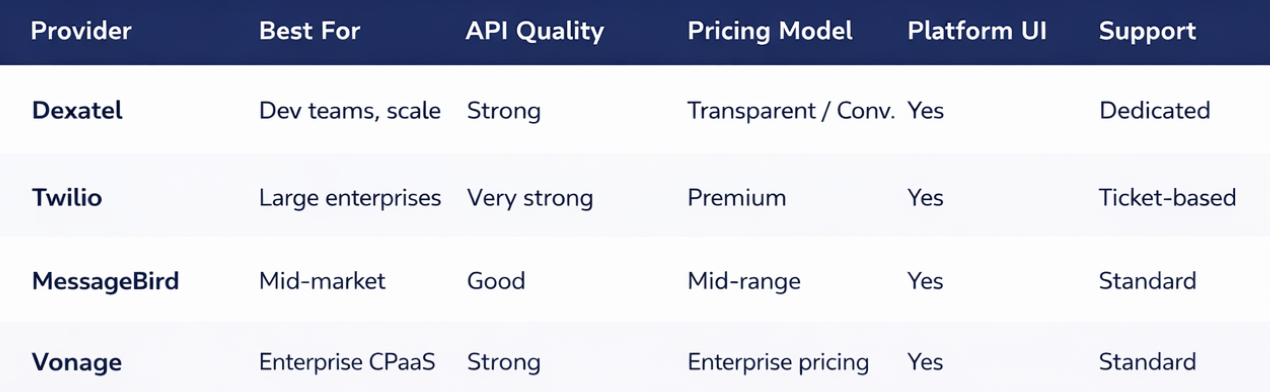
WhatsApp BSP Comparison: How the Main Providers Stack Up
There are dozens of Meta-approved BSPs.
The table below shows the most commonly evaluated service providers for the most important factors:
How to Migrate From One WhatsApp BSP to Another
It’s no secret that switching BSPs is something that most service providers will not openly admit.
Businesses change for various reasons: pricing, support, features, or restructuring their technology stack.
The good news is that you don’t have to give up your phone number.
What transfers and what doesn't
- Your phone number - this will be transferred with you through the number migration process at Meta
- Your WABA (WhatsApp Business Account) - this will be migrated or recreated depending on the circumstances
- Approved message templates - these will be retained in the Meta system and available to you
- Message history - this will not be transferred. The history of the conversations is stored in the BSP's system, not in the Meta system.
The migration process
- Sign up for your new BSP and create or connect your Meta Business Manager
- Initiate your number migration request – your new BSP will work with Meta to move your phone number
- Export what you can from your existing BSP – your content templates, your contact lists, and any analytics you need
- Test and integrate with your new BSP before switching over production traffic
- Communicate the change to your team and update any integrations that were pointing at the API of your old BSP
The process of migrating your business takes 1-3 business days.
You'll want a brief window of downtime and be prepared to proactively inform your customers if you rely on WhatsApp as a customer support channel.
Why Dexatel for WhatsApp Business API Access
To be transperent, Dexatel is not official Meta-approved BSP for now.
But we guarante the following with SLAs.
- High Throughput Infrastructure – Built for Production, Not Pilots
- Clean & Well-Documented REST API – Easy Developer Onboarding
- Full Support for Transactional, Marketing, Authentication, and Conversational Messaging
- Transparent Conversation-Based Pricing – No Hidden Fees
- Dedicated Account Support – Not a Ticket Queue
- Expert Team for Your Green Tick Verification, Template Submissions, and BSP Migrations
Selecting a WhatsApp BSP is one of the most critical decisions in the technical setup of your business.
A wrong decision will lead to unreliable delivery, confusing pricing, poor support, and painful migrations.
A right decision will mean you go live fast, scale safely, and focus your engineering team on your product, not your messaging infrastructure.
The requirements for a WhatsApp BSP are quite straightforward: have good infrastructure, have fair pricing, have good support, and have a team that knows enough about the regulations and guidelines of WhatsApp Business to ensure you stay compliant.
So, test your potential BSP against these requirements before making a decision.
Ready to get access to the WhatsApp Business API through Dexatel?
Let's get in touch.
Preguntas frecuentes
What is a BSP in Meta?
Is there a free WhatsApp Business API through a BSP?
What is WhatsApp's Business Platform?
Can I use WhatsApp API without a BSP?
How do I switch from one BSP to another?


Suscríbete a nuestroboletín
No te pierdas nuestras últimas noticias y ofertas exclusivas.

.jpg&w=828&q=75)
.jpg&w=828&q=75)
